Trading Tutorial for Beginners: Your First Trades Explained
Trading Tutorial for Beginners: Your First Trades Explained
Ready to place your first trade but not sure where to start? Walk through the complete process step by step - from broker setup to your first journal entry.
class SampleComponent extends React.Component {
  // using the experimental public class field syntax below. We can also attach
  // the contextType to the current class
  static contextType = ColorContext;
  render() {
    return <Button color={this.color} />
  }
}
Trading Tutorial for Beginners: Your First Trades Explained
You've watched the YouTube videos. Read the Reddit threads. Maybe even bought a course or two. But here you are, staring at a trading platform, and you still haven't placed a single trade.
You're not alone. Over 70% of new traders delay their first trade for weeks or months because no one showed them exactly what buttons to click and in what order. That hesitation costs more than money - it costs the learning that only comes from doing.
TradeZella has helped over 50,000 traders journal more than 20.5 billion trades, and we've noticed something: the traders who improve fastest aren't the ones who study longest before starting. They're the ones who start small, track everything, and learn from real data.
By the end of this tutorial, you'll have placed your first demo trade, monitored it, closed it, and recorded it in your journal. You'll know exactly what professional traders do after every single trade. Let's get you from spectator to participant.
In This Guide
TL;DR: Most beginners stall because they don't have a clear, step-by-step process to follow. Trading successfully isn't about finding the perfect entry - it's about executing, recording, and learning from every trade. TradeZella's automated journaling syncs with 100+ brokers to capture your trades instantly, so you can focus on improvement instead of data entry.
What You'll Need Before Your First Trade
A trading tutorial for beginners should start with preparation, not theory. Before you place any trade, you need three things in place: a broker account, a demo trading environment, and a system for recording what you learn.
Your Broker Account
- A demo/paper trading mode (non-negotiable for your first trades)
- Low minimum deposits for when you're ready to trade real money
- A platform that doesn't overwhelm you with features
Popular beginner-friendly brokers include TD Ameritrade (thinkorswim), Webull, Interactive Brokers, and for forex traders, platforms supporting MetaTrader 4 or 5.
Demo Trading Environment
You're going to make mistakes. Everyone does. The goal is to make those mistakes with fake money first. Every major broker offers demo accounts with virtual funds. You'll use real market data and real order types, but with zero financial risk.
Your Trading Journal
Here's what separates traders who improve from those who stay stuck: recording and reviewing every trade. You can use a spreadsheet, but most beginners abandon manual tracking within two weeks.
TradeZella connects directly to your broker, automatically importing your trades the moment they close. Win rate, profit factor, time-based performance - calculated instantly. No data entry required.
Let's walk through the actual process of getting your trading account ready. Every broker is slightly different, but the core steps are universal.
Choosing Your Broker
Don't overthink this. There are many different brokers you can choose from. A simple comparison can help you decide which one suits your needs.
Completing Verification
Most brokers require identity verification before you can fund your account. You'll typically need:
For demo accounts, verification is often minimal or skipped entirely. But complete it now anyway - you'll want to transition to real trading eventually without delays.
Funding Your Account (When Ready)
Start with the minimum. Seriously. For your first real trades, you don't need thousands of dollars. Many brokers accept $100-500 minimums. Some, like Webull, have no minimum at all for cash accounts.
The goal isn't to make money yet. The goal is to learn the process without the anxiety of risking meaningful capital.
Understanding Your Trading Interface
Your trading platform will look complicated at first. That's normal. You don't need to understand every button today. Let's focus on the three areas you'll actually use for your first trade.
The Chart
The chart shows price movement over time. For now, focus on:
Don't worry about indicators, drawing tools, or technical analysis yet. You'll learn those as you progress. Right now, you just need to see where price is and whether it's generally moving up or down.
The Order Entry Panel
The order entry panel is where you'll tell your broker what you want to buy or sell.
The Position Manager
Once you have an open trade, you'll see it in the position manager.
This is where you'll monitor your trade and eventually exit it.
Placing Your First Demo Trade
Here's the moment. You're going to place an actual trade. We're doing this in demo mode, so relax - there's zero risk. The goal is simply to execute the process correctly.
Step 1: Select Your Instrument
Pick something simple and liquid. For stocks, try SPY (S&P 500 ETF) or AAPL. For forex, EUR/USD is the most traded pair. For futures, ES (S&P 500 E-mini) is popular.
Type the symbol into your platform's search bar and select it. Your chart should now display that instrument.
Step 2: Determine Your Position Size
For your first trade, go small. Embarrassingly small. One share of stock. One micro lot in forex. The smallest contract size available for futures.
You're not trying to make money. You're learning the mechanics. A position that's too large creates anxiety that clouds your judgment.
- Decide the maximum you're willing to lose on this trade (for demo, pretend it's $10-20)
- Identify where you'd exit if wrong (your stop loss)
- Calculate: Position size = Max loss ÷ Distance to stop loss
Step 3: Place Your Order
For your first trade, use a market order. Click the buy button if you think price will go up, or sell if you think it will go down.
Don't overthink the direction. Seriously. You're practicing execution, not prediction. Pick a direction and commit.
Step 4: Set Your Stop Loss and Take Profit
Immediately after your order fills, set your exit levels:
Stop Loss: Where you'll exit if the trade goes against you. For your first trade, set it at a fixed dollar amount you're comfortable losing (even though it's demo money).
Take Profit: Where you'll exit with a win. A common beginner approach is to set take profit at 1.5x or 2x your stop loss distance.
Congratulations. You have an open position. You are now a trader with a live trade in the market.
Monitoring Your Open Position
Now comes the hard part: waiting. Most beginners stare at their P&L obsessively. Let's talk about what actually matters while your trade is open.
Reading Your P&L
Your unrealized P&L shows how much you'd make or lose if you closed right now. Green numbers mean you're profitable. Red means you're at a loss.
A few important mindset shifts:
When to Exit
You've already decided when to exit by setting your stop loss and take profit. For your first trade, honor those levels.
Exit at take profit: Your thesis was correct. Book the win.
Exit at stop loss: Your thesis was wrong this time. Book the small loss. Move on.
Manual exit: Only consider this if market conditions have fundamentally changed since you entered. "I'm scared" is not a valid reason.
The trade will close automatically when price hits either your stop loss or take profit. You don't need to babysit it.
After the Trade Closes: Your First Journal Entry
Your trade closed. Maybe you made a few bucks. Maybe you lost a few. Either result is fine - what matters now is what you do with that information.
Why Journaling Your First Trade Matters
Feeling in control of your trading journey is important. Nothing creates control like data. Your journal transforms random trades into patterns you can analyze.
Without a record, you're just gambling. With a record, you're building a business.
Recording in TradeZella
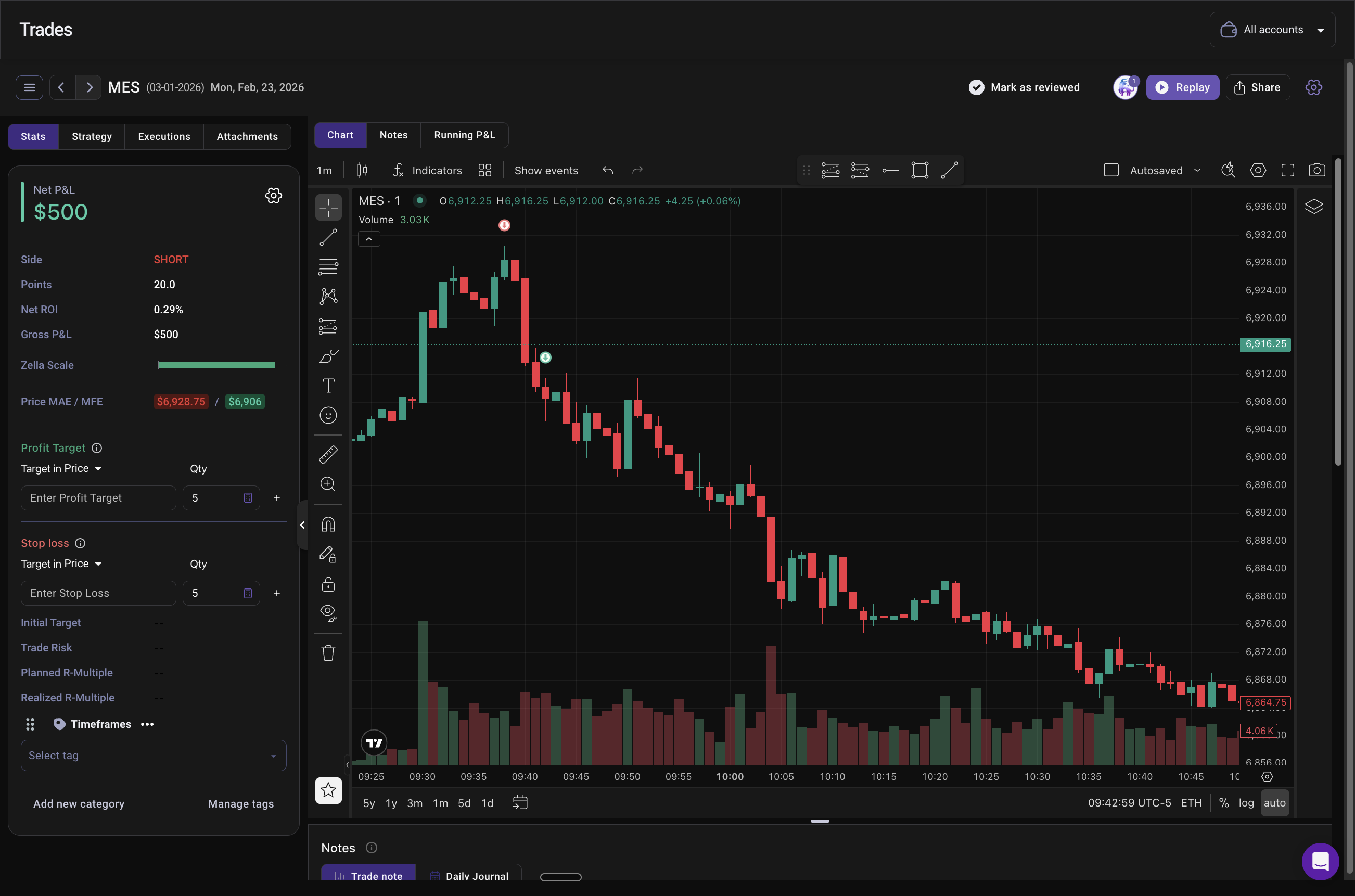
If you've connected your broker to TradeZella, your trade data is already there. Entry time, exit time, P&L, duration - captured automatically.
Now add the context only you can provide:
TradeZella's Notebook feature lets you create templates for these questions, so you're not starting from scratch every time.
Analyzing What Happened
Even with one trade, you can start building good habits:
TradeZella's 50+ reports won't show much with one trade. But after 10, 20, 50 trades, patterns emerge. Which setups work best for you. What times of day you perform well. What mistakes you keep repeating.
The traders using TradeZella have journaled over 20.5 billion trades. The platform knows what data points matter.
Your Next 10 Trades: Building the Consistency Habit
One trade doesn't make you a trader. Ten trades start to reveal who you are as a trader. Here's how to approach your next nine.
The 10-Trade Challenge
Commit to completing 10 demo trades with full journaling before changing anything about your approach. Same market, same general strategy, same position size.
Why? Because beginners constantly switch strategies after one or two losses. They never gather enough data to know if something actually works. Ten trades gives you a statistically meaningful sample to evaluate.
What to Track Across All 10 Trades
- Setup type (what pattern or signal triggered your entry)
- Time of entry
- Emotional state
- Plan adherence (did you follow your rules?)
- Outcome
TradeZella's strategy tagging lets you label each trade with your setup type. After 10 trades, you can filter reports to see: "How do my breakout trades perform versus my reversal trades?"
Weekly Review: Your Most Valuable 30 Minutes
At the end of each week, review your trades. Not to judge yourself, but to learn.
The traders who improve fastest aren't the ones with the best entries. They're the ones who review consistently and adjust based on data.
Common Mistakes New Traders Make
Trading Real Money Too Soon
The urge is real. Demo trading feels fake. You want skin in the game.
But trading real money before you've proven you can execute your process consistently in demo is like taking your driving test before learning to steer. You'll develop bad habits under pressure that are hard to unlearn.
Spend at least a month in demo. Complete your 10-trade challenge. Build confidence in your execution before adding financial stress.
Skipping the Journal
"I'll remember what happened."
No, you won't. And even if you could remember individual trades, you can't see patterns across 50 or 100 trades without data.
TradeZella's automated sync removes the friction. Your trades import automatically. Adding notes takes 30 seconds. The data compounds over time into insights you simply can't get any other way.
Changing Strategies After Every Loss
A single losing trade tells you almost nothing. It might be bad luck. Bad timing. Market conditions that don't favor your approach.
Switching strategies constantly means you never learn what works. Stick with one approach for at least 20-30 trades before evaluating whether it's profitable for you.
FAQ
What is the best trading platform for beginners?
The best platform for beginners is one with strong demo trading and straightforward order entry. TD Ameritrade's thinkorswim, Webull, and Interactive Brokers all offer solid beginner experiences with paper trading modes. For forex, MetaTrader 4 remains popular for its simplicity. TradeZella integrates with all of these, so your trades sync automatically regardless of which platform you choose.
How much money do I need to start trading?
You can start learning with zero dollars using demo accounts. When ready for real money, many brokers accept $100-500 minimums. Some have no minimum at all. Start smaller than you think you should - the goal is learning, not immediate profits. TradeZella's Basic plan at $29/month gives you full journaling capability to track your progress from day one.
Should I start with stocks, forex, or futures?
Start with whatever market interests you most, as long as you use demo mode first. Stocks are intuitive for most beginners since you're buying shares of companies you know. Forex offers 24-hour markets and low capital requirements. Futures provide use but require understanding contract specifications. TradeZella supports all three, analyzing your performance across any asset class.
How do I know when to exit a trade?
Decide your exit before you enter. Set a stop loss (where you'll exit if wrong) and take profit (where you'll book gains) immediately after opening any position. The exact levels depend on your strategy, but having them predetermined removes emotion from the equation. TradeZella's journal tracks whether you followed your exit plan, helping you identify if discipline is affecting your results.
Why do most beginner traders fail?
Most beginners fail because they trade without a process for improvement. They don't journal, don't review, and repeat the same mistakes indefinitely. Trading is a skill that improves with deliberate practice - but only if you're tracking what you're practicing. TradeZella's analytics reveal the specific patterns costing you money, giving you a clear improvement path.
How long does it take to become profitable?
Becoming consistently profitable typically takes 1-2 years of dedicated practice. There are no shortcuts. The timeline compresses significantly for traders who journal every trade and review weekly. TradeZella users have access to 50+ reports that surface insights manually tracking traders would never discover.
What's the difference between demo trading and paper trading?
They're the same thing - both refer to practicing with virtual money using real market data. Demo/paper trading lets you experience order execution, position management, and emotional responses without financial risk. Every serious broker offers this feature. Use it extensively before risking real capital.
Do I need a trading journal if I'm just starting?
Yes, especially if you're just starting. Beginners who journal improve faster because they identify mistakes early, before those mistakes become habits. TradeZella's automated sync means you don't have to manually enter trade data - your broker connection handles that. You just add your notes and reasoning.
Key Takeaways
Your first trades aren't about making money. They're about building a process you can repeat, refine, and eventually rely on.
Over 50,000 traders have journaled more than 20.5 billion trades with TradeZella. They've discovered what beginners rarely understand: the edge isn't in the perfect entry. It's in knowing exactly what works for you, based on your own data.
Your first trade is just the beginning. Make it count by recording it.