Choosing the best trading journal can be tough, so we’ve done the legwork for you. Today we’re comparing TradeZella vs. Edgewonk. All of the best (and worst) features, as well as pricing. Whatever you need to know about this Edgewonk alternative, we’ve got you.
class SampleComponent extends React.Component {
  // using the experimental public class field syntax below. We can also attach
  // the contextType to the current class
  static contextType = ColorContext;
  render() {
    return <Button color={this.color} />
  }
}
Last Updated: July 13, 2026
Edgewonk is a manual trading journal built around psychology tracking, setup analysis, and performance reports. TradeZella is an AI-powered trading platform that combines automated journaling, backtesting, trade replay, Prop Firm Sync, and 300+ analytical reports with Zella AI, a built-in AI trading partner that tags your trades, reviews your sessions, and generates pre-market plans automatically.
Both platforms help traders track and analyze their performance. But the gap between them has widened significantly since 2023. TradeZella has added AI agents, automated backtesting with plain English rules, three trade replay modes, Prop Firm Sync for funded traders, and more than 300 reports across 7 dashboard views. Edgewonk remains a focused journaling tool with psychology features like its Tiltmeter and Edge Finder, but it has not added AI, backtesting, or prop firm tracking.
This comparison breaks down every major difference, from AI and analytics to broker support and pricing, so you can see which platform fits how you actually trade.
What Are the Key Differences Between Edgewonk and TradeZella?
The biggest differences come down to five areas: AI, backtesting, trade replay, prop firm support, and broker coverage.
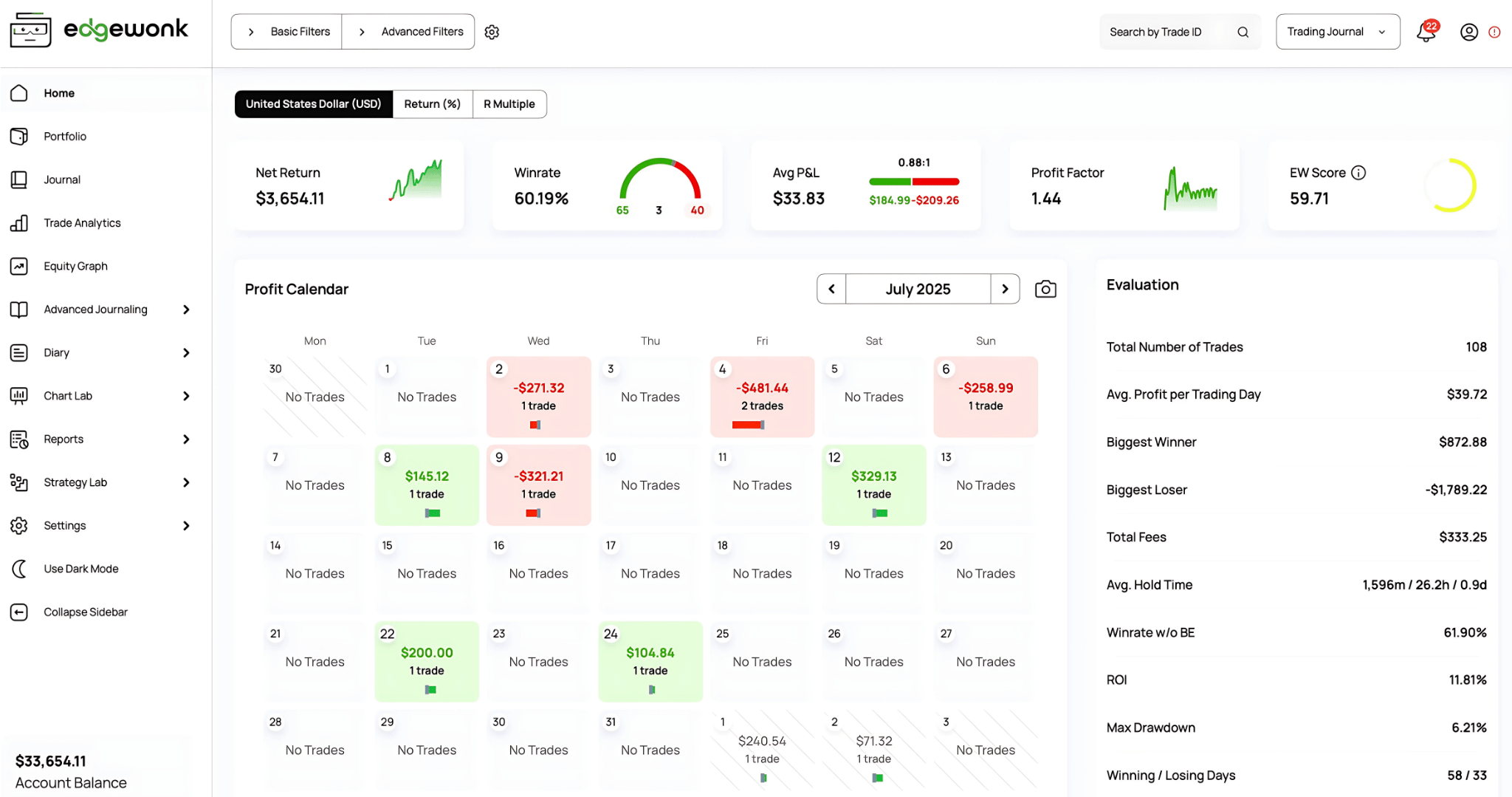
Edgewonk is a cloud-based trading journal that focuses on manual trade logging, psychology tracking, and rule-based analytics. Its strongest features are the Tiltmeter (which measures discipline violations), the Edge Finder (an automated weekly scan that surfaces your best setups and biggest mistakes), and the Trade Management Optimizer (which shows how different exit strategies would have changed your results). Edgewonk supports 200+ brokers through CSV import, offers 50+ reports, and costs $197 for a 16-month subscription.
EdgeWonk Dashboard
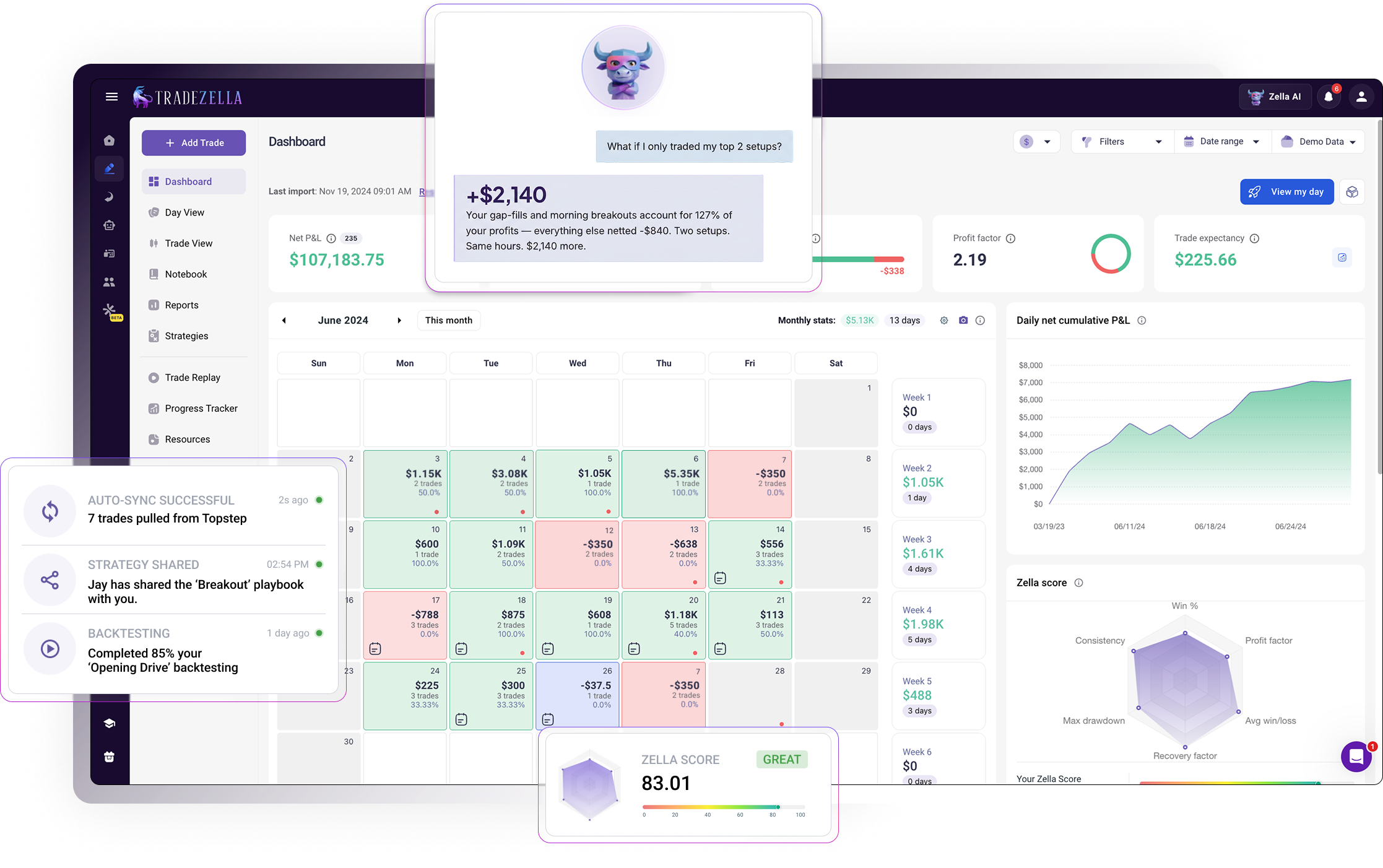
TradeZella is a full trading platform that goes beyond journaling. It includes Zella AI (an AI trading partner with autonomous agents), manual and automated backtesting, three trade replay modes, Prop Firm Sync for funded accounts, and 300+ reports across 7 dashboard views. TradeZella supports 500+ brokers through both API connections and CSV imports. Pricing starts at $35/month for the Essential plan.
TradeZella Dashoard
Here’s a quick comparison:
Edgewonk
TradeZella
AI Trading Partner
No
Zella AI (conversational + agents)
AI Agents
No autonomous agents
Auto-Tagger, Session Review, Game Plan
Broker Auto-Import
CSV import for most brokers
500+ brokers (API + CSV)
Brokers Supported
200+
500+
Reports & Analytics
50+ reports
300+ reports, 7 dashboard views
Backtesting
No backtesting
Manual replay + automated (plain English rules)
Trade Replay
No replay
3 modes (Trade, Day, Scenario)
Prop Firm Support
No prop firm features
Prop Firm Sync + Challenge widget
Strategy Tracking
Setup tracking + strategy testing
Strategies + comparison reports + Zella AI analysis
Zella AI memory, Chart Academy, Spaces, free calculators
Dark Mode
Yes
Yes
Pricing
$197/16 months (~$12/mo), single plan
$35-$99/mo (save 25% with annual billing), 3 plans
Does Edgewonk Have AI Features?
No. Edgewonk does not have any AI features. There is no AI assistant, no AI agents, and no AI-powered analysis. All journaling, tagging, and reviewing in Edgewonk is done manually by the trader.
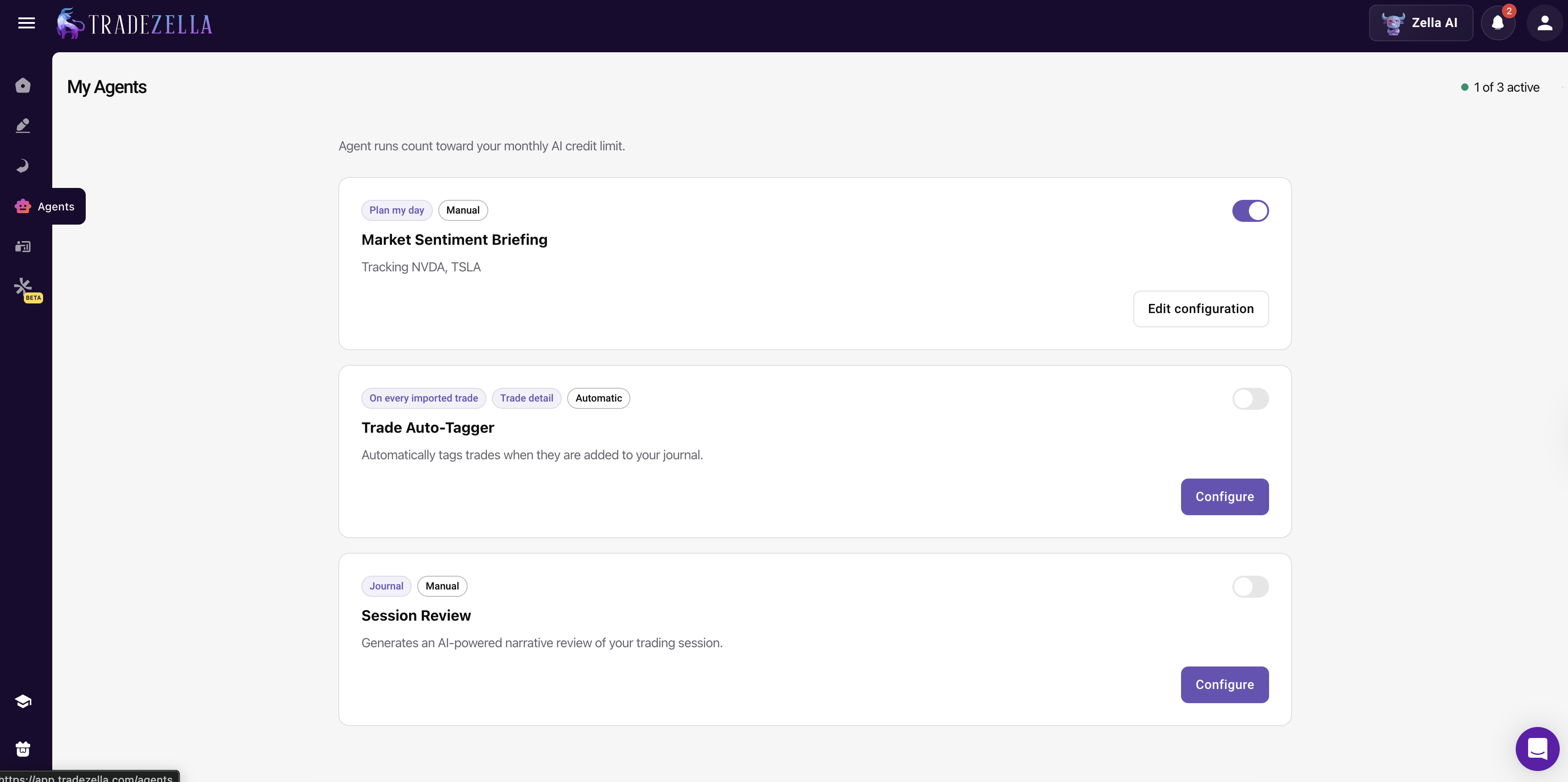
TradeZella includes Zella AI, a built-in AI trading journal system with both a conversational assistant and autonomous AI trading agents:
Auto Trade Tagger: You set up tagging criteria (for example, "tag trades that went 2R," "tag entry timeframes," "tag ICT concepts"). The agent applies tags automatically to every trade based on the rules you define.
Session Review: After your trading day ends, Session Review automatically compares your morning plan against your actual results. It checks rule adherence, what worked, what did not, and how to improve. It journals the entire day for you.
Game Plan (Market Sentiment Briefing): You configure it with how you trade (for example, "I am an ICT trader"), select your assets, and tell it what you look at (economic calendar, higher timeframes, FVGs, order blocks). When you click "Start My Day," the agent creates pre-market scenarios and a trading plan based on your style and configuration.
TradeZella Zella AI Agents
Zella AI also has memory across sessions. It remembers your name, risk limits, Strategies, and trading style. Every interaction makes the next one better.
This is the single biggest difference between the two platforms. Edgewonk requires you to do everything manually. TradeZella's agents handle tagging, reviewing, and planning automatically, which means you spend less time logging and more time improving.
Which Platform Has Better Broker Support?
TradeZella supports 500+ brokers through a combination of API connections and CSV imports. Brokers like NinjaTrader, Tradovate, Interactive Brokers, Webull, Charles Schwab, and Robinhood can sync trades automatically or through same-day import. For brokers without API support, TradeZella accepts CSV files from virtually every platform.
TradeZella Broker Support
Edgewonk supports 200+ brokers, primarily through CSV file imports. Their supported platforms include MetaTrader 4/5, NinjaTrader, Interactive Brokers, cTrader, Tradovate, Charles Schwab, TradeStation, Sierra Charts, Webull, CQG, and ByBit.
Both platforms cover the major brokers that most traders use. TradeZella's advantage is the larger number of supported platforms and more API-based auto-import options, which reduce manual work. You can see a full list of TradeZella supported broker here.
How Do the Analytics Compare?
TradeZella offers 300+ reports across 7 trading dashboard views (Dollars, Percentage, R-Multiple, Ticks, Pips, Points, Privacy). Reports include Strategy comparison, Day and Time analysis, Symbol performance, Tags breakdown, Calendar view, R-Multiple distribution, and dozens more. You can filter by date, strategy, tag, symbol, time of day, and market condition to find exactly where your edge lives.
TradeZella Reports
Edgewonk offers 50+ reports with a focus on psychology-driven analytics. Their standout reports include the Trade Management Optimizer (which simulates how different exit strategies would have affected your results), the Edge Finder (an automated weekly scan that surfaces your strongest and weakest patterns), and the Performance Simulator (which projects future results based on your current data). They also offer time of day analysis, setup performance, MAE/MFE, drawdown analysis, and profit calendar.
TradeZella has a significantly larger report library and more filtering dimensions. Edgewonk's reports are fewer but include unique tools like the Trade Management Optimizer and Performance Simulator that TradeZella does not replicate directly.
Does Edgewonk Have Backtesting?
No. Edgewonk does not offer any backtesting features. You cannot replay historical charts, run strategies against past data, or validate setups before risking real capital. If you want to test whether a breakout strategy works on ES futures or check how your VWAP setup performs during London session, you need a separate tool entirely.
This is one of the biggest gaps in Edgewonk's platform. Journaling tells you what happened. Backtesting tells you what should happen. Without backtesting, you are building your trading system on live results alone, which means every lesson costs real money.
TradeZella offers two complete backtesting methods built into the same platform where you journal and analyze your trades.
Manual Bar Replay
TradeZella Manual Bar Replay
TradeZella's manual backtesting uses TradingView-powered charts with second-level granularity across 11+ years of historical data. You control playback speed from 0.5x to 10x, place all order types (market, limit, stop), and drag your stop loss and take profit directly on the chart.
What makes this different from standalone replay tools: every trade you take during a backtest is automatically logged into your journal with full analytics. You do not need to write anything down or export a CSV. The trade appears in your dashboard the same way a live trade would, tagged to the Strategy you are testing.
You can run up to 5 symbols across 8 charts simultaneously, toggle between regular trading hours and extended sessions (RTH/ETH), and use ICT indicators like fair value gaps, liquidity sweeps, and breaker blocks directly on the replay chart.
For example, say you want to test a gap-and-go setup on AAPL. You load the chart, set your date range, define your entry and exit rules, and replay through 50 historical gaps. Each trade logs automatically. After 50 trades, you check your Strategy comparison report: if profit factor is above 1.3 and win rate supports your risk-reward ratio, you have a validated edge. If not, you saved yourself from losing real money on a setup that does not work.
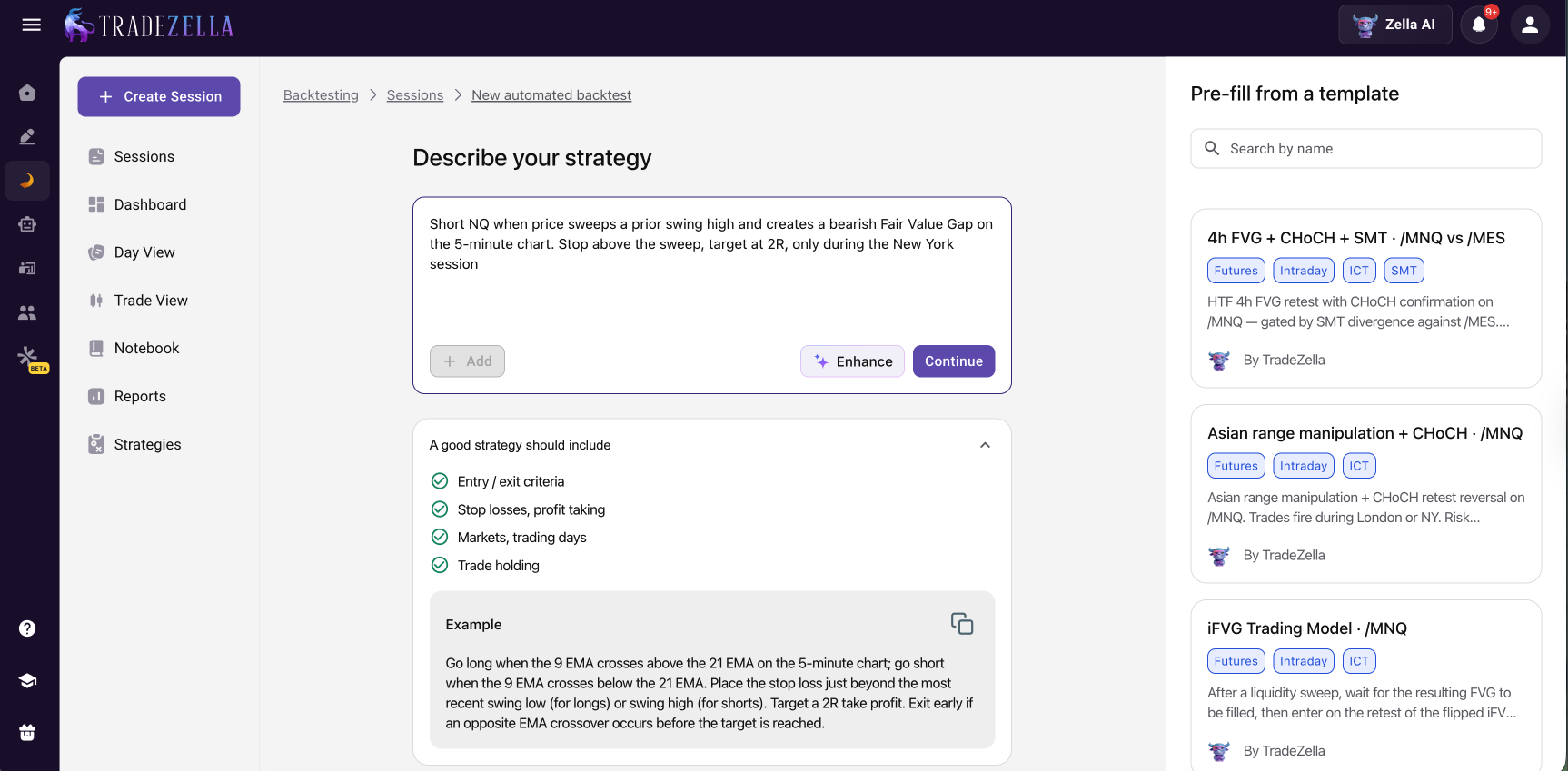
Automated Backtesting
TradeZella Automated Backtesting
TradeZella also offers automated backtesting where you write trading rules in plain English. No Pine Script, no Python, no coding of any kind. You describe your strategy the way you would explain it to another trader:
"Buy when price crosses above the 20 EMA on the 15-minute chart during regular trading hours. Set stop loss at the previous swing low. Take profit at 2R."
TradeZella runs those rules across years of market data in seconds and returns every individual trade, not just a summary equity curve. You can click into any trade, see the entry and exit on the chart, and evaluate whether the logic performed the way you intended.
Pre-built templates are available for common strategies including ICT setups, Opening Range Breakout, trend following, and mean reversion. You can use them as starting points and customize the rules to match how you actually trade.
After each automated backtest, Zella AI analyzes the results. It flags edge decay (your strategy worked in 2024 but stopped working in 2025), identifies the best and worst time windows, and compares your backtest metrics against your live trading data. If your live profit factor is 1.1 but your backtest shows 1.8, Zella AI highlights the gap so you can diagnose whether the issue is execution, psychology, or market conditions.
Why This Matters
On a $50,000 account risking $500 per trade, a strategy with a 1.4 profit factor produces roughly $10,000 over 100 trades. A strategy with a 0.9 profit factor loses $2,500 over those same 100 trades. Backtesting tells you which one you are trading before you find out with real money.
With Edgewonk, you discover your strategy does not work after 100 live trades and $2,500 in losses. With TradeZella, you discover it during a backtest that takes an afternoon, then switch to a setup that actually has an edge.
Every backtested trade in TradeZella is logged individually with full analytics. You can filter by session, by day of week, by setup type. You can compare backtest results against your live performance side by side using the Strategy comparison report. And when you find a setup that works in backtesting, you can forward-test it at reduced size using the same journal, then scale up gradually (50% to 75% to 100% of your target position size) while tracking whether live results stay within 15 to 20 percent of your backtest numbers.
Edgewonk gives you no path from "I think this works" to "I have data proving this works." TradeZella gives you both the testing environment and the tracking system in one platform.
Does Edgewonk Have Trade Replay?
No. Edgewonk does not have trade replay functionality.
TradeZella includes trade replay with three modes:
Trade Replay lets you walk through individual trades second by second with green and red entry/exit markers, speed controls, and the ability to jump to any execution.
Day Replay lets you replay an entire trading session from open to close, reviewing all your trades in sequence to spot patterns like revenge trading cascades or time-of-day problems.
Scenario Replay lets you practice setups on historical data without placing real trades.
TradeZella's replay is also integrated with journaling. You can tag mistakes during replay, check trades against your plan, and add notes and screenshots, all within the same workflow.
TradeZella Trade Replay
All replay modes integrate with TradeZella's journal, so you can tag insights, add notes, and journal directly during replay.
Which Platform Is Better for Prop Firm Traders?
Edgewonk has no prop firm specific features. You can journal prop firm trades manually, but there is no way to track evaluation progress, monitor drawdown limits, or manage multiple accounts against firm-specific rules.
Prop Firm Sync: Connect evaluation and funded accounts and pull trades automatically.
Challenge widget: Track daily and total drawdown limits, profit targets, and trailing drawdown in real time against firm rules.
Multi-account view: Manage multiple prop firm accounts in one dashboard with aggregate and per-account analytics.
TradeZella Prop Firm Sync
If you trade a prop firm trading journal across multiple evaluations or funded accounts, TradeZella is the clear choice.
How Do the Psychology Tools Compare?
This is one area where Edgewonk has genuine strength. Its trading psychology features include:
Tiltmeter: Measures how often you break your trading rules and assigns a discipline score, similar to the concept of trading tilt.
Mistake tracking: Log specific mistakes per trade and see their cumulative cost over time.
Trade checklists: Create pre-trade checklists to enforce rules before entering.
Session report cards: Review trading sessions with structured reflection.
Notebook: Write diary entries with image uploads.
TradeZella approaches psychology differently, using AI and data to catch patterns you might miss:
Custom emotion and behavior tags: Tag trades with emotions (FOMO, revenge, fear), quality grades (A/B/C), and rule adherence (Rules Followed/Rules Broken). Filter your analytics by these tags to measure the cost of emotional trading.
AI Session Review: Zella AI automatically compares your morning plan against your actual results, flags rule violations, and identifies behavioral cascades (like a loss leading to revenge trading leading to oversizing).
Notebook: Document plans, reflections, and pre-trade checklists with the Notebook feature.
Edgewonk's Tiltmeter and mistake tracking are well-designed manual tools. TradeZella's AI-powered approach catches behavioral patterns across hundreds of trades automatically, which is harder to do manually.
How Does Strategy Tracking Compare?
Both platforms let you categorize trades by setup or strategy. Edgewonk calls them "setups" and offers a Strategy Testing feature that lets you simulate how alternative entry, exit, or stop loss strategies would have performed.
TradeZella uses Strategies (formerly called Playbooks) with comparison reports that show win rate, profit factor, expectancy, and R-multiple distribution per strategy. Combined with Zella AI's analysis, you can identify which strategies to keep, which to cut, and which to refine based on your actual data.
TradeZella Strategies
Edgewonk's strategy testing is a unique "what-if" tool that TradeZella does not replicate. TradeZella's advantage is deeper analytics per strategy and AI-powered insights that surface patterns across strategies automatically.
How Do the Interfaces Compare?
Both platforms are cloud-based web applications that work on desktop, tablet, and mobile browsers. Both offer dark mode and light mode.
Edgewonk has a clean, focused interface built around its journal table, psychology tools, and report dashboards. The design prioritizes data density with customizable views.
TradeZella's interface includes a more extensive navigation system because it covers more functionality: journaling, backtesting, replay, analytics, prop firm tracking, and AI features. The trading dashboard offers 7 different views (Dollars, Percentage, R-Multiple, Ticks, Pips, Points, Privacy) for the same data.
How Does Pricing Compare?
Edgewonk pricing: $197 for a 16-month subscription (~$12/month), with a single plan that includes all features. There is no free plan or trial. Edgewonk offers a 14-day money-back guarantee.
Pro ($59/mo): Everything in Essential plus Zella AI agents (Auto-Tagger, Session Review, Game Plan), unlimited Strategies, unlimited accounts, 10 automated backtests per month.
Ultra ($99/mo): Everything in Pro plus 100 automated backtests per month, unlimited Mentor Mode, unlimited Spaces.
You can save 25% by paying annually.
On pure price, Edgewonk is cheaper. At ~$12/month, it costs less than any TradeZella plan. But the comparison is not apples to apples. Edgewonk is a journaling tool. TradeZella is a journaling tool plus an AI trading partner, plus a backtesting platform, plus a trade replay system, plus a prop firm tracker. With TradeZella, you do not need to pay separately for backtesting software, replay tools, or AI analysis.
For a detailed pricing breakdown, check our pricing page.
Who Should Choose Edgewonk?
Edgewonk is a good fit if you want a focused manual journal with strong psychology tools and you do not need AI, backtesting, replay, or prop firm tracking. Specifically:
You prefer doing all journaling and tagging manually.
You want unique tools like the Trade Management Optimizer and Performance Simulator.
You trade fewer than 5 trades per day and manual logging is manageable.
Budget is your primary concern and you need the lowest monthly cost.
Who Should Choose TradeZella?
TradeZella is the better choice for traders who want AI automation, backtesting, and a complete platform in one place. Specifically:
You want AI to handle tagging, session reviews, and pre-market planning automatically.
You need backtesting (manual replay or automated with plain English rules).
You trade prop firm evaluations and need Prop Firm Sync, drawdown tracking, and multi-account management.
You want 300+ reports and 7 dashboard views for deep performance analysis.
You trade 5+ trades per day and want automated import from 500+ brokers.
You want one platform that replaces a journal, backtesting software, replay tool, and AI assistant.
The Verdict: Edgewonk vs TradeZella in 2026
Edgewonk is a well-built manual trading journal. Its Tiltmeter, Edge Finder, and Trade Management Optimizer are genuinely useful tools for traders who prefer hands-on journaling. At ~$12/month, it is the most affordable option.
But TradeZella has evolved into something Edgewonk is not: a complete trading improvement platform. With Zella AI agents handling the tedious work (tagging, reviewing, planning), automated backtesting eliminating the need for coding or separate software, three replay modes for reviewing execution, and Prop Firm Sync for funded traders, TradeZella covers the full workflow from strategy validation to live performance tracking.
For a broader comparison across more platforms, see our best trading journal software guide.
Key Takeaways
TradeZella includes Zella AI agents (Auto-Tagger, Session Review, Game Plan) that automate journaling tasks Edgewonk requires you to do manually.
TradeZella offers both manual bar replay and automated backtesting with plain English rules. Edgewonk has no backtesting or replay features.
TradeZella supports 500+ brokers with API and CSV import. Edgewonk supports 200+ brokers, primarily through CSV.
TradeZella includes Prop Firm Sync, Challenge widget, and multi-account management. Edgewonk has no prop firm features.
TradeZella offers 300+ reports across 7 dashboard views. Edgewonk offers 50+ reports with unique tools like the Trade Management Optimizer.
Edgewonk costs ~$12/month ($197/16 months) with one plan. TradeZella costs $35-$99/month across 3 plans (save 25% annually).
Both platforms support all major markets (forex, stocks, futures, crypto, options) and offer dark mode.
Frequently Asked Questions
Is Edgewonk or TradeZella better for trading?
TradeZella is the better choice for most traders in 2026. It offers Zella AI agents that auto-tag trades, review sessions, and generate pre-market plans. TradeZella also includes backtesting, trade replay, Prop Firm Sync, and 300+ reports across 500+ brokers. Edgewonk is a solid manual journaling tool with psychology features like its Tiltmeter and Edge Finder, but it lacks AI, backtesting, replay, and prop firm support.
How much does Edgewonk cost in 2026?
Edgewonk costs $197 for a 16-month subscription, which works out to approximately $12 per month. There is only one plan with full access to all features. Edgewonk offers a 14-day money-back guarantee but no free plan or trial.
Does Edgewonk have AI features?
No. Edgewonk does not have an AI trading assistant, AI agents, or any AI-powered analysis features. It relies on manual journaling and rule-based analytics like its Edge Finder and Tiltmeter. TradeZella includes Zella AI, a built-in AI trading partner with autonomous agents that auto-tag trades, review trading sessions, and generate personalized pre-market plans.
Does TradeZella have backtesting?
Yes. TradeZella offers both manual bar replay backtesting with TradingView charts, ICT indicators, and second-level granularity, and automated backtesting where you write rules in plain English and run them across years of market data in seconds. Edgewonk does not offer any backtesting or trade replay features.
Which trading journal supports more brokers?
TradeZella supports over 500 brokers through API connections and CSV imports. Edgewonk supports over 200 brokers, primarily through CSV file imports. TradeZella offers more direct API integrations for automatic trade syncing from platforms like NinjaTrader, Tradovate, Interactive Brokers, and others.
Does Edgewonk support prop firm traders?
No. Edgewonk does not have any prop firm specific features. TradeZella includes Prop Firm Sync for connecting evaluation and funded accounts, a Challenge widget for tracking drawdown limits and profit targets, and multi-account views for managing multiple prop firm accounts in one dashboard.
Can I switch from Edgewonk to TradeZella?
Yes. You can switch from Edgewonk to TradeZella by connecting your broker accounts through TradeZella and importing your trades. TradeZella supports over 500 brokers and will automatically pull your trade history. Once imported, you can set up Strategies, configure Zella AI agents, and start using features like backtesting, trade replay, and Prop Firm Sync.



%201.png)



.png)


