NinjaTrader Backtesting vs TradeZella: Test Any Strategy in Plain English (No NinjaScript)
NinjaTrader Backtesting vs TradeZella: Test Any Strategy in Plain English (No NinjaScript)
NinjaTrader runs automated backtests, but only from a coded NinjaScript strategy or its drop-down Strategy Builder, not in plain English. TradeZella automated backtesting lets you describe any strategy in plain English, review every trade in a full chart with your indicators and ICT tools, and get AI analysis of the results.
class SampleComponent extends React.Component {
  // using the experimental public class field syntax below. We can also attach
  // the contextType to the current class
  static contextType = ColorContext;
  render() {
    return <Button color={this.color} />
  }
}
Last Updated: July 02, 2026
The core difference between NinjaTrader and TradeZella backtesting is how you build the strategy. NinjaTrader runs automated backtests from a NinjaScript strategy, which you either code in C# or assemble in its drop-down Strategy Builder. TradeZella lets you describe the strategy in plain English and runs it across years of historical data, then lets you review every individual trade in a full chart with your indicators and built-in ICT tools, and analyzes the results with Zella AI. Both platforms produce real backtest results with metrics and a trade list. The difference is the effort to define a strategy, how deeply you can review each trade, and whether AI helps you read the results.
NinjaTrader is a serious futures platform with powerful automation. TradeZella is the backtesting, journaling, and analytics layer for traders who want to validate a strategy without learning to code. This article compares them across rule definition, trade review, AI analysis, journaling, and pricing, and it is honest about what NinjaTrader does better. If you are weighing automated backtesting options, this is the comparison you need.
TL;DR
NinjaTrader automated backtesting requires a NinjaScript strategy, built either by coding in C# or through its no-code Strategy Builder (drop-down menus and conditions). Neither is plain English. TradeZella lets you write rules in plain English, review every backtested trade in a full chart with your indicators and ICT tools drawn, tag and filter trades, and get Zella AI analysis of the results. NinjaTrader is stronger for live automated execution and deep optimization. TradeZella is stronger for no-code, plain-English backtesting with a modern journaling and AI workflow. For most traders who do not code, TradeZella is the faster path from idea to validated strategy.
How Do You Build a Backtest on Each Platform?
This is the biggest difference, and the reason most non-coders pick one platform over the other.
NinjaTrader: NinjaScript or the Strategy Builder. To run an automated backtest in NinjaTrader's Strategy Analyzer, you need a NinjaScript strategy. You have two ways to create one. You can hand-code it in NinjaScript, which is C#, or you can use the Strategy Builder, a no-code wizard where you set entry and exit conditions through drop-down menus, checkboxes, and a Condition Builder, and NinjaTrader generates the NinjaScript for you. The Strategy Builder removes the need to write code, but it is still structured logic. You are selecting indicators, operators, and values from menus, not describing your strategy in words.
TradeZella: plain English. In TradeZella you type the strategy the way you would explain it to another trader. For example: "Buy ES when price breaks the opening range high in the first 30 minutes, stop below the range, target 2R, only in the morning session." The engine parses that and runs it. There are also pre-built templates for ICT concepts, Opening Range Breakout, trend following, and mean reversion. For the full mechanics, see what is automated backtesting and backtest with TradeZella.
Does NinjaTrader Have Plain English Backtesting?
No. NinjaTrader does not have plain English backtesting. Its automated backtesting runs on NinjaScript, and the two ways to produce a NinjaScript strategy are hand-coding in C# or building it in the Strategy Builder with drop-down conditions. The Strategy Builder is genuinely no-code, but no-code is not the same as plain English. You still translate your idea into the platform's menu structure: pick an indicator, pick a comparison operator, set a value, add a condition, repeat. TradeZella is the platform where the input is a plain sentence, which is why traders who think in words rather than conditions reach for it.
What Is the Difference Between No-Code and Plain English Backtesting?
No-code backtesting means you do not write a programming language. Plain English backtesting means you describe the strategy in ordinary sentences and software turns it into the test. Plain English is a type of no-code, and it is the most accessible type. NinjaTrader's Strategy Builder is no-code but not plain English: you build logic through menus and conditions. TradeZella's plain English input is no-code and natural language: you write "enter long when the 9 EMA crosses above the 21 EMA and RSI is below 30" and the engine handles the rest. On a $50,000 account where every week of setup delay is a week you are not validating your edge, the difference is speed. Describing a strategy in a sentence takes minutes. Learning a menu system or a language takes longer. For journal-based no-code validation, see backtesting without code.
How Do You Review Individual Trades on Each Platform?
Both platforms show you the trades a backtest took. NinjaTrader's Strategy Analyzer has a Trades display listing every trade with entry and exit price, times, profit, commission, and even MAE, MFE, and bars held, and you can right-click a trade and select Chart to jump to it. The limitation is what that chart is. NinjaTrader's own documentation states the trade chart is "a non-configurable 1-minute interval" that "does not have all the standard features of a regular chart," and it only works if you have historical data for that date range. So you can see roughly where a trade happened, but not on your own timeframe and setup with your indicators.
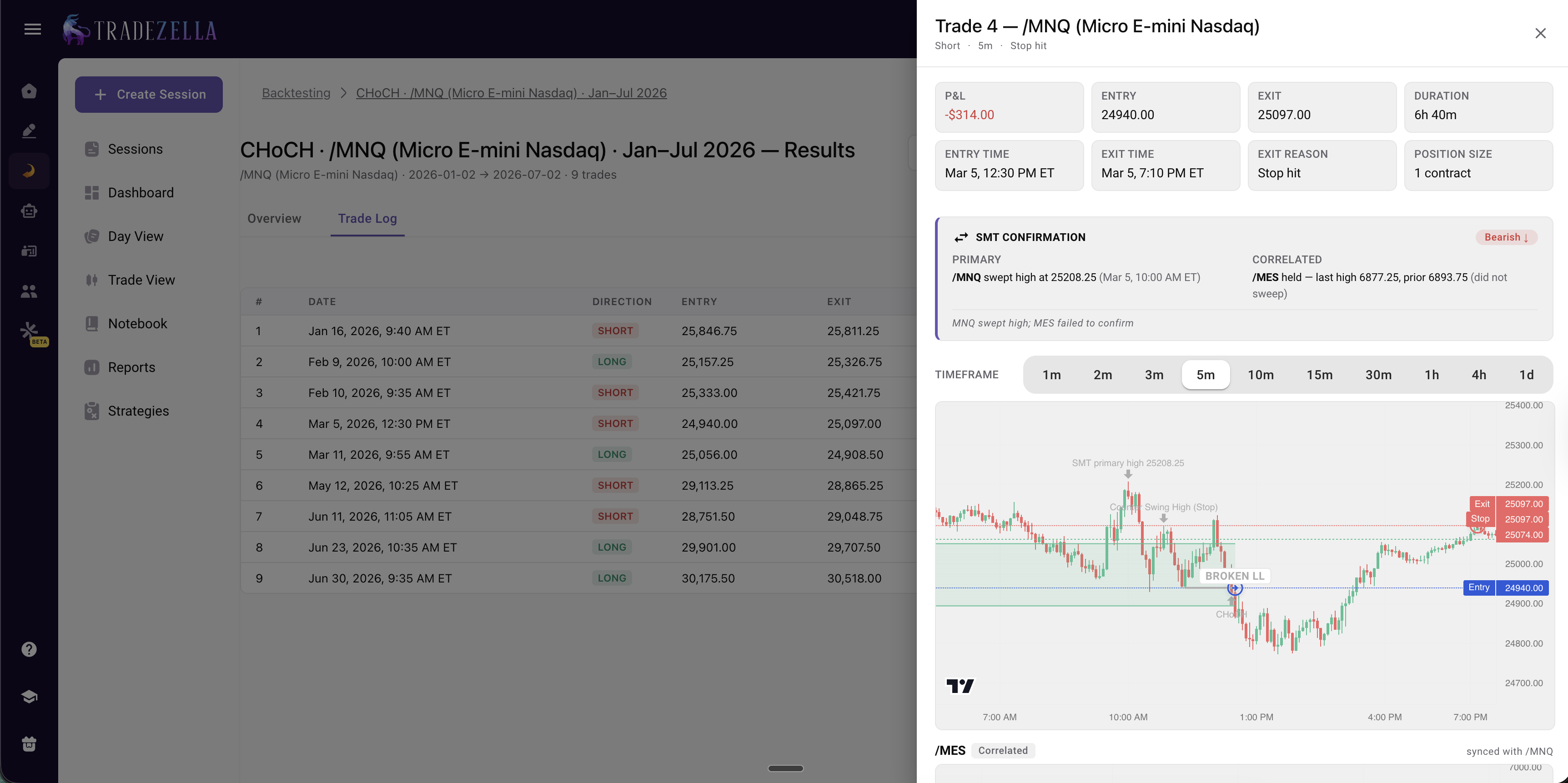
In TradeZella, every backtested trade is a full journal entry you can open and review like a live trade, on a full chart where the AI automatically draws the setup it traded. If the entry was based on a Fair Value Gap, you see that FVG drawn on the chart. If it was a breaker block, you see the breaker and its retest drawn. So you see exactly why the engine took each trade, not just where it entered and exited.
You can tag each trade by setup, quality, or mistake, score it in R-multiples, and filter the whole set by time of day, day of week, or any custom tag. If the engine took 100 trades, you review them in the same environment you use for your live trades. This is the difference that decides whether trade-by-trade review actually happens, because summary statistics hide problems that only a real chart review reveals. For how to turn that into improvement, see the trade review process.
TradeZella Automated Backtesting Per Trade Analysis
Does Either Platform Analyze Your Backtest With AI?
NinjaTrader does not have AI analysis of backtest results. It gives you the metrics, the trade grid, and period breakdowns, and reading them is on you.
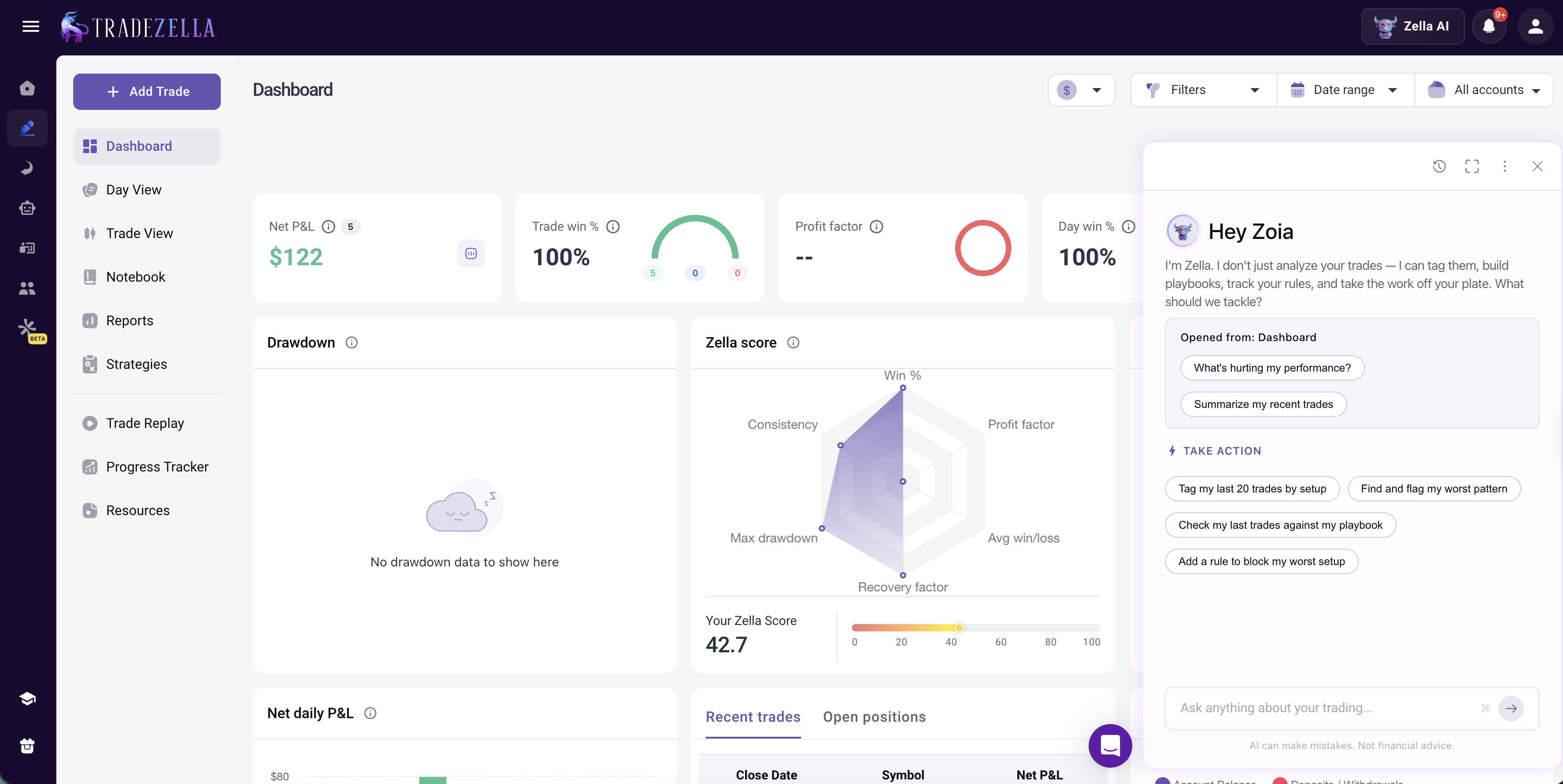
TradeZella adds Zella AI, its built-in AI trading partner. After an automated backtest, Zella AI reviews the full set of trades and surfaces patterns a summary hides, for example that a strategy runs a strong profit factor in the morning and a weak one after lunch, so you can add a filter and re-run. Zella AI also powers agents that work on your completed trade data, an Auto Trade Tagger that applies your tagging rules, a Session Review that compares your plan to your results, and a Market Sentiment Briefing that builds a pre-market plan from how you trade. These agents work on completed data, not during live trading. This is what AI backtesting in plain English looks like in practice: you describe the strategy in words, and AI both runs it and reads the results. See AI backtesting and AI trade analysis.
Journaling and Backtest-to-Live
NinjaTrader has a basic Journal tab where you can add comments to trades, and its Trades display includes MAE and MFE. TradeZella is built around journaling: 50+ analytics reports, custom Strategies, a tag system, Notebook, Calendar view, and R-Multiple View, and every backtested trade lands in the same dashboard as your live trades. Because TradeZella imports trades from 500+ brokers, you can compare your backtest directly against your live results. If a strategy backtests at a 1.5 profit factor and trades live at 0.9, the gap is execution, not the strategy, and that is how you find your trading edge. TradeZella imports the trades and Zella AI is the intelligence layer that analyzes them.
TradeZella Dashboard with Zella AI
What Does NinjaTrader Do Better?
To be fair, NinjaTrader has real strengths TradeZella does not try to match. NinjaTrader is a full futures brokerage and execution platform, so it can run a strategy live and automatically, placing real orders without you at the screen. TradeZella is not a broker and does not auto-execute trades. NinjaTrader also has deep optimization tools, including parameter optimization, walk-forward optimization, and Monte Carlo simulation, plus basket testing across multiple instruments, which appeal to systematic and quantitative futures traders. If your goal is to build a fully automated futures system that executes on its own, NinjaTrader is built for that. TradeZella's goal is different: validate a strategy without coding, review every trade, and improve your own execution with AI and journaling.
NinjaTrader (Strategy Analyzer)
TradeZella
How you build a strategy
NinjaScript (C#) or Strategy Builder (drop-down conditions)
Plain English
Plain English rules
No
Yes
Coding required
No (wizard) or yes (C#)
None
See individual trades
Yes (Trades grid, MAE/MFE)
Yes
Review a trade on a chart
Bare, non-configurable 1-min chart
Full chart, AI draws the setup it traded (FVG, breaker + retest)
Tag & filter trades (setup, quality, time)
Basic journal comments
Full tag analytics, 50+ reports
AI analysis of results
No
Yes (Zella AI)
Backtest-to-live in one dashboard
Broker-tied
Yes, imports 500+ brokers
Optimization & walk-forward
Yes (plus Monte Carlo)
Monte Carlo via free tools
Live automated execution
Yes (it is a broker)
No (not a broker)
Markets
Futures / forex focused
Forex, futures, stocks, crypto
Best for
Automated futures systems, optimization
No-code plain-English backtesting + review
Which Should You Choose?
Choose NinjaTrader if you trade futures, want to run a strategy live and automatically, and are comfortable building it in NinjaScript or the Strategy Builder, or if you need deep optimization and walk-forward tools.
Choose TradeZella if you want to backtest in plain English with no code, review every trade in a full chart with your indicators and ICT tools, tag and filter results, get AI analysis from Zella AI, and compare backtest performance to your live trades across 500+ brokers. For a wider view, see best backtesting software, and for the other head-to-head, TradingView backtesting vs TradeZella.
NinjaTrader automated backtesting requires a NinjaScript strategy, built by coding in C# or with the no-code Strategy Builder. Neither is plain English.
TradeZella lets you backtest in plain English, no code and no menu-building. This is the biggest difference for traders who do not code.
Both show individual trades, but TradeZella reviews each one in a full chart where the AI draws the setup it traded (the FVG, or the breaker block and its retest), while NinjaTrader charts a trade only on a bare, non-configurable 1-minute chart.
NinjaTrader has no AI analysis. TradeZella has Zella AI to read your backtest results and surface patterns a summary hides.
TradeZella imports 500+ brokers, so backtest and live trades sit in one dashboard for direct comparison. NinjaTrader has a basic journal.
NinjaTrader is better for live automated futures execution and deep optimization. TradeZella is better for no-code, plain-English backtesting with modern journaling and AI.
Frequently Asked Questions
Does NinjaTrader have plain English backtesting?
No. NinjaTrader's automated backtesting runs on a NinjaScript strategy, which you either code in C# or build with the no-code Strategy Builder using drop-down menus and conditions. The Strategy Builder removes coding, but it is not plain English, you still assemble logic from menus. TradeZella is the platform where you describe the strategy in plain English and the engine runs it.
Do you need to code to backtest on NinjaTrader?
Not necessarily. You can build a strategy without writing code using NinjaTrader's Strategy Builder, a visual wizard with drop-down conditions that generates NinjaScript for you. If you want full control, you can hand-code the strategy in NinjaScript (C#). Either way, you are working in NinjaTrader's structured logic rather than describing the strategy in plain English, which is how TradeZella works.
Can you see individual trades in NinjaTrader backtesting?
Yes. NinjaTrader's Strategy Analyzer has a Trades display that lists every trade with entry and exit price, entry and exit time, profit, commission, and MAE, MFE, and bars held, and you can right-click a trade and choose Chart to jump to it. The chart it opens is a non-configurable 1-minute interval that does not include all the features of a regular chart, so you cannot review the trade on your own timeframe and setup. TradeZella reviews each trade on a full chart where the AI automatically draws the setup it traded, such as the Fair Value Gap or the breaker block and its retest.
What is plain English backtesting?
Plain English backtesting is testing a strategy by describing it in ordinary sentences instead of writing code or building menu-based conditions. You type your entry, exit, stop, and filters the way you would explain them to another trader, and the software translates them into an executable test. It is the most accessible form of no-code backtesting. TradeZella offers plain English backtesting across forex, futures, stocks, and crypto with 11+ years of historical data.
Is TradeZella better than NinjaTrader for backtesting?
It depends on your goal. TradeZella is better if you want to backtest without code in plain English, review every trade in a full chart with ICT tools, tag and filter results, get AI analysis, and compare backtest to live trades in one dashboard. NinjaTrader is better if you trade futures, want to run a strategy live and automatically, or need deep optimization and walk-forward testing. Many traders who do not code find TradeZella the faster path from idea to validated strategy.
Can TradeZella execute trades automatically like NinjaTrader?
No. TradeZella is not a broker and does not place or automate live trades. It is a backtesting, journaling, and analytics platform. NinjaTrader is a futures brokerage that can run strategies live and automatically. TradeZella imports your executed trades from 500+ brokers so you can journal and analyze them, and Zella AI reviews that data, but it does not execute trades on your behalf.
Is NinjaTrader or TradeZella better for beginners?
For learning to backtest without a technical barrier, TradeZella is friendlier because you write strategies in plain English and review trades in a familiar chart. NinjaTrader has a steeper learning curve because you build strategies in NinjaScript or the Strategy Builder and the platform is oriented around futures execution. Beginners who want to validate ideas and build good review habits usually start faster on TradeZella.