Best Backtesting Software for Traders (2026 Comparison)
Best Backtesting Software for Traders (2026 Comparison)
A side-by-side breakdown of 9 backtesting platforms covering pricing, historical data depth, coding requirements, and which trading styles each one serves best. Includes feature comparison tables, honest limitations, and guidance on matching the right tool to your experience level and budget.
class SampleComponent extends React.Component {
  // using the experimental public class field syntax below. We can also attach
  // the contextType to the current class
  static contextType = ColorContext;
  render() {
    return <Button color={this.color} />
  }
}
Last Updated: July 13, 2026
Backtesting software lets traders simulate their strategies against historical market data before risking real capital. Instead of guessing whether a setup works, you feed your rules into a backtesting engine, run them across months or years of price history, and get concrete performance metrics like win rate, profit factor, and maximum drawdown. The right platform depends on what you trade, whether you code, and how much you want to spend.
There are dozens of backtesting tools available in 2026, and they range from free platforms bundled with brokers to institutional-grade engines costing thousands. Some require Python or C# fluency. Others let you build strategies with drag-and-drop blocks or no-code interfaces. A few specialize in manual replay testing, where you walk through charts bar by bar.
This guide compares 10 backtesting platforms across the dimensions that actually matter: pricing, historical data depth, coding requirements, supported markets, and how each one fits different trading styles. If you have already read our backtesting trading strategies guide, this is the next step: picking the tool that turns those principles into practice.
How Do the Top 10 Backtesting Platforms Compare?
Before diving into individual reviews, here is a snapshot of all 10 platforms side by side. This table covers pricing, data history, coding language (if any), and supported asset classes.
Platform
Pricing
Data History
Coding Required
Markets
Best For
TradeZella
$35-99/mo (save 25% annually)
11+ years (from 2014)
None
Stocks, Futures, Forex, Crypto
Automated backtesting + manual backtesting + AI journaling
TradingView
Free - $59.95/mo
20+ years (Premium)
Pine Script
Stocks, Futures, Forex, Crypto, Indices
Chart-based strategy testing
NinjaTrader
Free (backtest) / $99/mo live
Tick-level (via provider)
C# or No-Code Builder
Futures, Forex, Stocks
Free futures backtesting
MetaTrader 5
Free (with broker)
Tick-level (from broker)
MQL5
Forex, Futures, CFDs, Stocks
Forex multi-currency testing
QuantConnect
Free - $96/mo
400TB+ (equities from 1998)
Python or C#
Stocks, Options, Futures, Forex, Crypto
Algorithmic / quant strategies
AmiBroker
$279-499 one-time
Via data provider
AFL
Stocks, Futures, Forex, ETFs
Portfolio rotation / speed
TrendSpider
$59-99/mo (yearly)
Up to 50 years
None (no-code)
Stocks, Futures, Forex, Crypto
No-code visual backtesting
Forex Tester
$149-299/year
23 years (tick-by-tick)
None (optional)
Forex, Crypto, Stocks, Indices
Manual forex replay
MultiCharts
$97/mo or $1,497 lifetime
Tick-level (via provider)
PowerLanguage
Stocks, Futures, Forex, Options
Portfolio + EasyLanguage users
FX Replay
$15-35/mo
Seconds-level (select markets)
None (optional)
Stocks, Forex, Futures, Crypto, Commodities
Browser-based replay only
The table gives you the quick version. The sections below go deeper into what each platform does well, where it falls short, and which type of trader it suits best.
TradeZella
Price: $35-$99/month (save 25% anually)
Data: 11+ years (from September 2014)
Coding: None required
Markets: Stocks, Futures, Forex, Crypto
TradeZella is a full backtesting platform with 11+ years of historical data across stocks, futures, forex, and crypto, and it is the only tool on this list that lets you backtest three ways: automated backtesting in plain English, manual replay, and AI analysis of the results. It covers the entire workflow in one place: build or describe a strategy, run it, journal every result automatically, analyze performance with 50+ analytics reports, and compare backtest results against live trading data in the same dashboard.
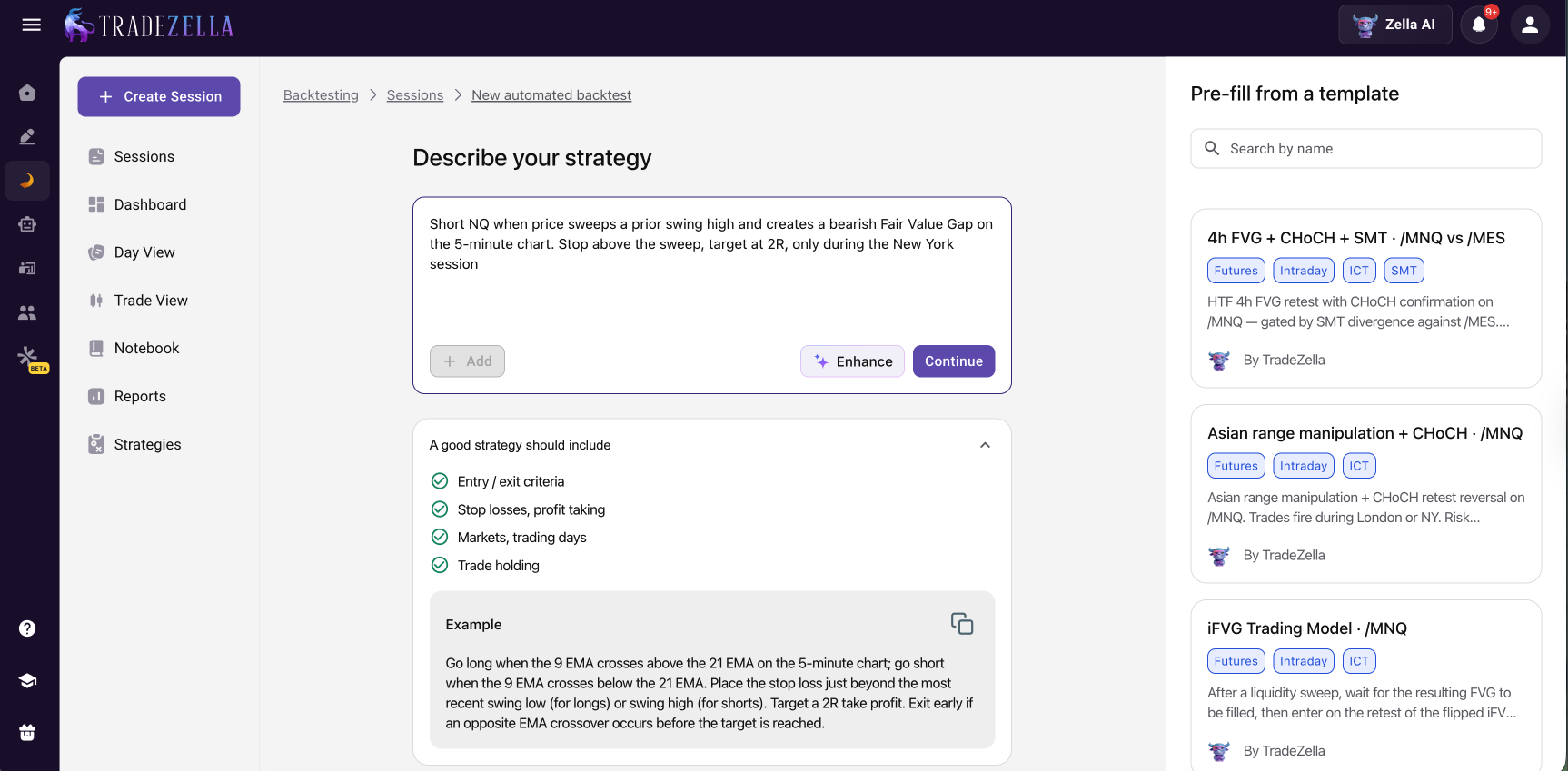
Automated backtesting in plain English is where TradeZella stands apart. You describe your strategy the way you would explain it to another trader, for example "buy ES when price breaks the opening range high in the first 30 minutes, stop below the range, target 2R, New York session only," and the engine runs it across years of historical data in seconds. No Python, no Pine Script, no drag-and-drop condition builder. Whatever you want to test, you type it in plain English and TradeZella tests it. Every individual trade the engine takes is visible in a detailed trade log, and on each trade the AI draws the exact setup it traded directly on the chart, the Fair Value Gap, the liquidity sweep, or the breaker block and its retest, so you can see why every trade was taken. Zella AI then analyzes the session and surfaces patterns a summary hides, like a strategy that prints in the morning and fades after lunch, or a weak day of the week.
TradeZella Automated Backtesting
Manual replay backtesting is still fully supported. If you prefer to step through history bar by bar and place trades yourself, TradeZella's replay works like a real trading account. You get all order types (market, limit, stop), automatic position sizing based on your risk percentage, take profit and stop loss by price, dollar amount, or percentage, auto breakeven that moves your stop when price hits a target, and manual partials so you can close 25%, 50%, 75%, or any custom amount of your position. You can drag and drop SL/TP levels directly on the chart, and the Go-To feature lets you skip to specific dates, candles, or sessions instantly. Use automated backtesting to prove a strategy fast across a large sample, and manual replay to practice executing it.
Charting and data are professional grade. TradeZella provides 11+ years of historical data going back to September 2014, with seconds-level resolution on the Pro plan. You can run multi-symbol backtests with up to 5 instruments and view up to 8 charts simultaneously synced across timeframes. Both Regular Trading Hours and Extended Trading Hours data are available for stocks and futures, and an economic calendar shows high-impact news events directly on your chart, so you can see how your strategy performs around major releases.
Built-in ICT indicators. TradeZella includes Fair Value Gap (FVG), Asian Session Range, HTF Bias, Key Levels, and Power of 3 natively. No third-party scripts, no add-ons, no Pine Script workarounds. If you trade ICT concepts, you can describe them in plain English and backtest them directly.
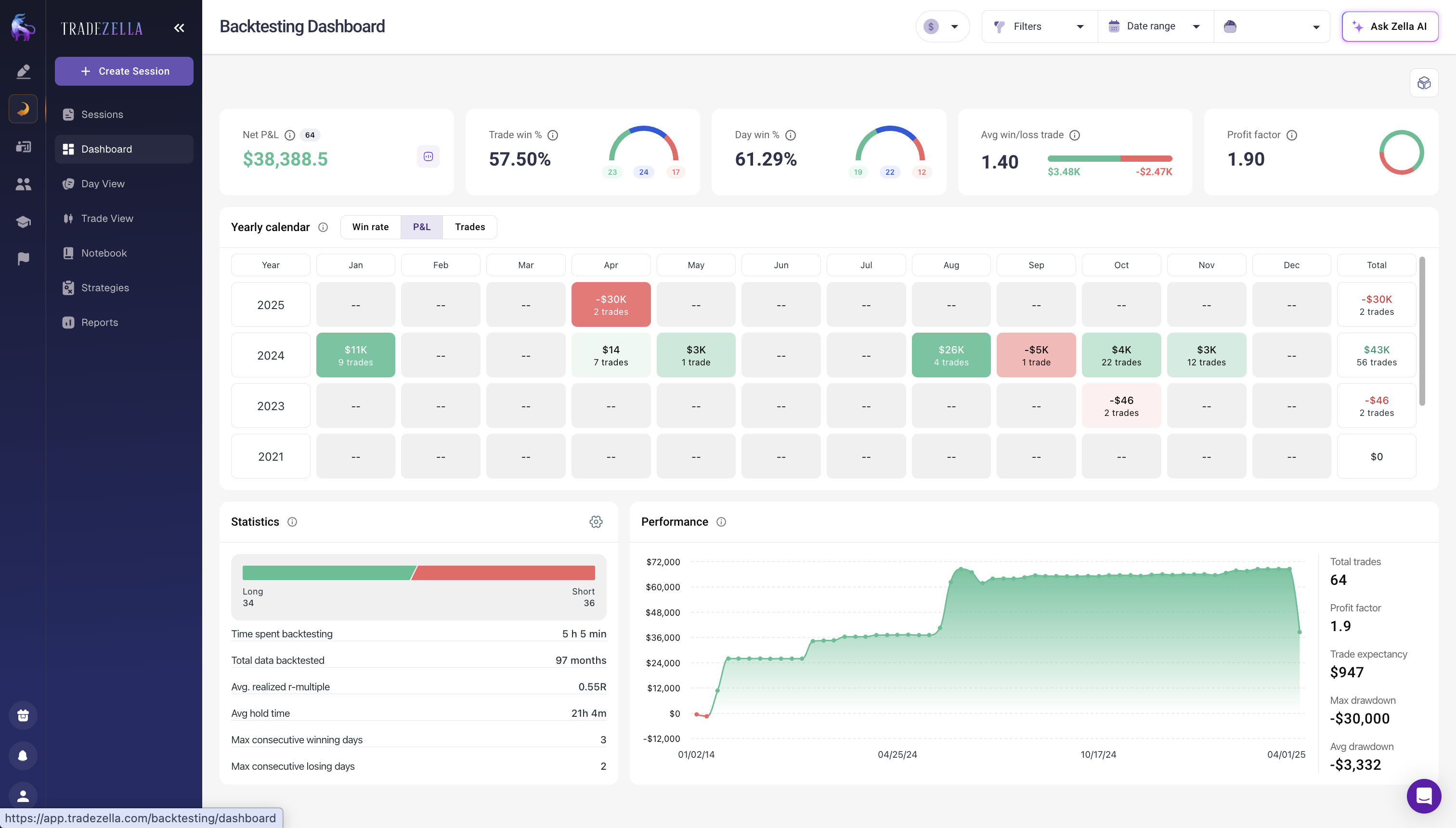
Automatic journaling is where TradeZella separates from every other tool here. Every backtested trade logs instantly with full details: entry, exit, position size, P&L, timestamps. You add notes, tags, and link Strategies to each trade. The analytics engine then lets you filter by strategy, symbol, tags, day and time, risk level, or wins vs. losses. You see strategy performance side by side, a yearly calendar view of P&L by month, consecutive win/loss streaks, average R-multiple, and average hold time. If you validate a scalping setup on 500 historical trades, every result gets tagged, filtered, and analyzed automatically.
TradeZella Backtesting Dashboard
TradeZella also integrates with 500+ brokers including MetaTrader 4/5, NinjaTrader, Tradovate, ThinkorSwim, and cTrader. Your live trades sync automatically alongside your backtested trades, so you can compare backtest expectations against real execution in one view. TradeZella also offers scenario backtesting with pre-built strategy templates (ICT, Opening Range Breakout, trend following, mean reversion) so you can practice specific setups on targeted historical conditions, and you can share sessions with mentors or students through Spaces (Mentor Mode).
The Pro plan ($59/month, or 44/month billed annually) unlocks seconds-level data, multi-pair trading, and multi-chart layouts. The Essential plan ($35/month) covers single-instrument backtesting with full journaling and analytics.
Best for: Traders who want plain-English, no-code automated backtesting plus manual replay, with built-in journaling, analytics, ICT indicators, and AI analysis, all connected to their live trades. TradeZella is the only tool on this list that handles automated and manual backtesting, journaling, and AI analysis in one place, then connects it all to your live trading data. No other platform closes that loop.
You can explore all of TradeZella features on the features page, or use the free trading calculators to run position sizing and drawdown math alongside your backtests.
TradingView
Price: Free basic, $14.95-59.95/month
Data: Varies by plan (20+ years on Premium)
Coding: Pine Script
Markets: Stocks, Futures, Forex, Crypto, Indices
TradingView is where most traders already chart, so using its built-in Strategy Tester is the path of least resistance. You write strategies in Pine Script (now on version 6), apply them to any chart, and get instant results with an equity curve, trade list, and performance metrics. The learning curve for Pine Script is moderate. If you can write basic if/then logic, you can build a backtestable strategy within a few hours.
The Strategy Tester runs directly on your chart. Click the "Strategy Tester" tab, apply a strategy, and results appear at the bottom of the screen. You see net profit, total trades, percent profitable, profit factor, max drawdown, and a full trade list. The Bar Magnifier feature (available on Premium and higher plans) uses intrabar data for more accurate fills, which matters for strategies with tight stops.
TradingView's biggest strength is its community. Thousands of open-source Pine Script strategies are published on the platform. You can load someone else's strategy, study the code, modify it, and backtest your version. That shortcut is not available on most other platforms.
The limitations are real though. TradingView's backtester does not model realistic slippage well, especially for crypto futures where funding rates affect P&L. There is no walk-forward optimization, no Monte Carlo simulation, and no portfolio-level backtesting. You test one strategy on one chart at a time. For traders running swing trading strategies on a single instrument, that is fine. For portfolio rotation or multi-asset testing, you will outgrow it.
Best for: Traders who already use TradingView for charting and want a low-friction way to test ideas. Good for single-instrument, single-strategy validation.
NinjaTrader
Price: Free (backtesting), $99/month or $1,499 lifetime (live trading)
Data: Tick-level, depth depends on data provider
Coding: NinjaScript (C#) or no-code Strategy Builder
Markets: Futures, Forex, Stocks
NinjaTrader's Strategy Analyzer is one of the most powerful backtesting engines available for futures traders, and the backtesting itself is completely free. You download the desktop platform, load historical data, and run tests without paying anything or setting a time limit. The paid plans ($99/month or $1,499 lifetime) are only needed for live trading and lower commission rates.
The platform offers two paths for strategy creation. NinjaScript is a C#-based language that gives full control over order logic, position management, and custom indicators. For non-coders, the Strategy Builder provides a visual drag-and-drop interface where you define entry and exit conditions using logic blocks. Both paths feed into the same backtesting engine.
NinjaTrader's Strategy Analyzer includes multi-objective optimization, walk-forward testing, and an experimental AI Generate feature that explores parameter combinations automatically (though this is CPU-intensive and can take hours). You can also replay historical market data tick by tick, fully synchronized across your platform, which is useful for practicing risk management rules on futures contracts.
If you trade futures and need a serious backtesting engine without upfront cost, NinjaTrader is hard to beat. The trade-off is that NinjaScript has a steeper learning curve than Pine Script, and the platform's interface feels dated compared to browser-based tools. If you are comparing NinjaTrader to MetaTrader for platform features, our MT4 vs MT5 comparison covers the broader differences.
Best for: Futures traders who want institutional-grade backtesting for free.
MetaTrader 5
Price: Free (bundled with broker)
Data: Tick-level (from broker)
Coding: MQL5
Markets: Forex, Futures, CFDs, Stocks
MetaTrader 5's Strategy Tester is free, built into the platform, and more capable than most traders realize. It supports four testing modes: "Every Tick Based on Real Ticks" (uses actual broker tick data for maximum accuracy), "Every Tick" (generates synthetic ticks from 1-minute bars), "1 Minute OHLC" (fast initial tests), and "Open Prices Only" (fastest, for higher timeframe strategies).
MT5's standout feature is multi-currency testing. Your Expert Advisor can access every instrument available in the tester and execute trades across multiple symbols simultaneously. This makes it one of the few free platforms that supports cross-asset correlation strategies, such as trading gold against the dollar index or running pairs strategies across forex majors.
Optimization uses either brute-force (tests every parameter combination) or genetic algorithms (mimics natural selection to converge on promising settings faster). Forward testing is built in, and stress testing adds random network delays to simulate real execution conditions. The reporting breaks down metrics by year and month, which helps you spot seasonal patterns.
The limitation is MQL5 itself. It is a C-like language with a significant learning curve, and the MQL5 marketplace, while large, is full of low-quality Expert Advisors. Data quality depends entirely on your broker, so results can vary between brokers using the same strategy. For forex traders who already use MT5, the backtester is a natural fit. For everyone else, the platform can feel locked into the MetaTrader ecosystem.
Best for: Forex and CFD traders already on the MetaTrader platform. The only free option with built-in multi-currency and genetic optimization.
QuantConnect
Price: Free basic, $10-96/month
Data: 400TB+ (equities from 1998, options from 2010)
QuantConnect is the closest thing to an institutional backtesting platform that retail traders can access. Built on the open-source LEAN engine, it runs event-driven backtests where each tick triggers your algorithm exactly as it would in live trading. The Time Frontier system ensures your algorithm only sees data that existed at the simulated moment, which eliminates look-ahead bias by design.
The data library is massive: 400TB+ covering US equities with tick-to-daily data going back to 1998, equity and index options from 2010, 70+ liquid futures contracts, forex with interbank spreads, and thousands of crypto pairs from six exchanges. A 10-year equity backtest runs in roughly 33 seconds on their cloud hardware.
You write strategies in Python 3.11 or C# 12 using their browser-based Algorithm Lab IDE, which includes autocomplete and debugging tools. QuantConnect also has Mia, an AI assistant that can help design and optimize strategies. The platform connects to 20+ brokers for live deployment, so you can go from backtest to live trading without rewriting code.
The free tier includes basic backtesting with limited compute. The Researcher plan ($10/month) adds more compute and data access. Team ($24/month) and Trading Firm ($48/month) tiers scale up from there. The learning curve is steep if you are not already comfortable with Python, but the documentation is excellent and the community forum is active. For traders building strategies around trading expectancy and R-multiple math, QuantConnect lets you code those metrics directly into your backtest output.
Best for: Algorithmic traders who write Python or C# and want institutional-quality data, event-driven backtesting, and seamless live deployment.
AmiBroker
Price: $279-499 one-time
Data: Depends on data provider
Coding: AFL (AmiBroker Formula Language)
Markets: Stocks, Futures, Forex, ETFs
AmiBroker has been around since 1995, and its interface shows it. But underneath the dated UI is one of the fastest backtesting engines available at any price. It handles complex portfolio rotation strategies across 50+ symbols without slowing down, and the one-time purchase ($279 for Standard, $339 for Professional, $499 for Ultimate Pack Pro) includes 24 months of upgrades.
The platform uses AFL (AmiBroker Formula Language), a proprietary scripting language designed specifically for technical analysis and strategy testing. AFL is more accessible than C# or MQL5 for traders who are new to coding, but it is still a programming language with a learning curve. Three levels of custom backtesting are available, giving you nearly unlimited control over how trades are scored, ranked, and sized.
AmiBroker's strengths are portfolio backtesting, walk-forward optimization, and Monte Carlo simulation. If you need to test a rotational strategy that rebalances monthly across 100 ETFs with position sizing based on volatility, AmiBroker handles it. The 64-bit Professional version runs up to 32 CPU threads simultaneously during optimization, which matters when you are testing thousands of parameter combinations.
The trade-off is that AmiBroker does not include data. You need to connect a third-party data feed (Norgate, Tiingo, IQFeed, etc.), which adds ongoing cost. The interface will feel archaic if you are used to browser-based tools. And there is no cloud option, so everything runs on your local machine.
Best for: Portfolio-level backtesting and rotational strategies. Traders who want raw speed and are willing to learn AFL. The one-time pricing makes it cost-effective long term.
TrendSpider
Price: $59-99+/month (billed yearly)
Data: Up to 50 years
Coding: None required (no-code Strategy Tester)
Markets: Stocks, Futures, Forex, Crypto
TrendSpider is the best option for traders who want to backtest without writing a single line of code. Its no-code Strategy Tester lets you build entry and exit conditions using dropdown menus, then run those strategies across up to 50 years of historical data. After each backtest, an AI-powered LLM Sidekick can analyze your results and give detailed feedback on performance patterns.
The platform also includes automated trendline detection, multi-timeframe analysis, and a scanner that finds stocks matching your strategy criteria in real time. These features complement backtesting because you can build a strategy, test it historically, and then scan for current setups, all in the same tool.
Pricing starts at $59/month billed yearly for the Standard plan. The Premium plan ($99/month yearly) adds advanced scanning and more backtesting capacity. A 14-day trial is available for $19, which gives full access to every feature. That is worth trying before committing to the annual plan.
TrendSpider's weakness is depth. The no-code approach is fast to learn but limited compared to scripted backtesting. You cannot build the same level of complex conditional logic that Pine Script or Python allows. And while the data goes back 50 years, the platform does not support tick-level testing, multi-currency correlation strategies, or portfolio rotation. For traders who want to test one strategy on one chart without coding, it works well. For anything more complex, you will hit walls.
Best for: Non-coding traders who want a visual backtesting experience with AI-assisted analysis. Good for stock and crypto traders testing trend-following or momentum strategies.
Forex Tester is purpose-built for manual replay backtesting with a focus on forex pairs. The platform provides up to 23 years of tick-by-tick data with over 600 million ticks per symbol. You replay price action at adjustable speed, place orders as charts unfold, and track your results without seeing the future. A Blind Testing mode goes further by scrambling price levels and hiding dates while keeping the relative price movement intact, which removes anchoring bias entirely.
The data coverage is broader than the name suggests: 28 forex pairs, 10 crypto assets, 16 stocks, 10 indices, 10 ETFs, and 6 commodities. The Exit Optimizer tests thousands of stop loss, take profit, and holding time combinations to find the optimal exit parameters for your entries. You can also code custom indicators to test specific signal combinations.
The annual pricing ($149-299/year depending on the tier) is competitive for what you get. The lower tier covers basic replay and testing. The higher tier adds more data, advanced tools, and priority support.
The limitation is scope. Forex Tester is a replay and practice tool, not an automated strategy engine. If you want to code a strategy in Python and run 10,000 backtests overnight, this is not the right platform. But for discretionary forex traders who want to build screen time and validate their entries against real tick data, Forex Tester is the most focused tool in this category. If your trading plan includes a minimum sample size before going live with a setup, this is where you build that sample.
Best for: Discretionary forex traders who want to build sample sizes through manual replay. The Blind Testing mode is unique and valuable for removing hindsight bias.
MultiCharts
Price: $97/month or $1,497 lifetime
Data: Tick-level (via data provider)
Coding: PowerLanguage / EasyLanguage
Markets: Stocks, Futures, Forex, Options
MultiCharts is the institutional alternative for traders who want serious portfolio backtesting with a programming language that is easier to learn than C# or Python. PowerLanguage is MultiCharts' scripting language, and it is nearly identical to TradeStation's EasyLanguage, which means thousands of existing strategies and indicators can be imported directly.
The backtesting engine models liquidity, tick-by-tick price changes, bid-ask spreads, commission, slippage, and interest rates. The 64-bit Portfolio Trader module processes millions of bars across hundreds of instruments for portfolio-level testing. Multi-threading distributes optimization tasks across CPU cores for faster completion.
MultiCharts connects to over 20 data feeds and 10+ brokers. A 30-day free trial gives full access to the platform, including live trading. The monthly plan starts at $97/month (3-month minimum). The lifetime license ($1,497) eliminates recurring costs.
The trade-off is cost. MultiCharts is one of the most expensive options on this list, and you still need to pay for a data feed on top of the software license. The interface is powerful but dense, with a learning curve that matches its capability. For traders who already know EasyLanguage from TradeStation, MultiCharts is a natural upgrade. For everyone else, the combination of cost and complexity may be overkill unless you are running portfolio strategies across multiple asset classes.
Best for: EasyLanguage/PowerLanguage users migrating from TradeStation. Traders who need portfolio-level backtesting across hundreds of instruments with realistic execution modeling.
FX Replay is a browser-based manual replay platform with TradingView-powered charts. You pick a date, press play, and practice trading on historical data bar by bar. The platform supports multi-chart layouts, up to 5 instruments per session, and seconds-level timeframes on the Pro plan. FX Replay also includes Mentor AI (beta) for behavioral coaching on your backtested trades, a Prop Firm Simulator with automated rule enforcement and shareable certificates, FXR Script (beta) for building custom indicators, and FXR Battles for competitive head-to-head trading with Elo-based rankings.
The free plan covers non-premium forex pairs with limited sessions and 2 charts. The Pro plan ($35/month) unlocks 50+ US stocks, futures (ES, NQ, CL, GC), unlimited sessions, unlimited charts, RTH filtering, custom timeframes, and unlimited AI queries. The journal includes live syncing from MT4, MT5, cTrader, TradeLocker, Tradovate, and NinjaTrader with AI-powered tag analytics, Monte Carlo simulation, and drawdown analytics.
Where FX Replay falls short: no automated backtesting (manual replay only), no way to compare backtest results against live trading data in the same dashboard, no AI agents that tag trades and review sessions autonomously, and no built-in ICT indicators. FX Replay has more indicators than TradeZella and faster replay speed, but does not connect backtest data to live broker data in a unified analytics engine.
Best for: Forex and futures traders who want a free or low-cost replay practice tool with behavioral AI coaching and competitive trading modes.
How Do You Choose the Right Backtesting Software?
Most backtesting tools stop at the backtest. You get a results screen, maybe an equity curve, and then you are on your own to figure out whether the strategy actually works in live markets. The best platform is the one that closes the full loop: backtest, trade live, compare, and refine.
For most traders, TradeZella is the strongest all-around choice. It covers stocks, futures, forex, and crypto with 11+ years of data, requires no coding, and is the only platform that automatically feeds backtest results into a full analytics dashboard. You can compare backtest performance against live performance by strategy, time of day, instrument, or custom tags. If you track trading habits in your journal, your backtest data lives right alongside your live data. No exporting, no spreadsheets, no manual entry. TradeZella also offers automated no-code backtesting, which adds rule-based, plain-English testing to the existing replay engine.
If you write basic scripts, TradingView's Pine Script is a low-friction option for testing single-instrument ideas. NinjaTrader's Strategy Builder also works for basic automated strategies without coding.
If you code in Python or C#, QuantConnect gives you institutional-grade data and an event-driven engine. AmiBroker offers raw speed for portfolio strategies if you learn AFL.
If your budget is zero, NinjaTrader (free backtesting), MetaTrader 5 (free with broker), and QuantConnect's free tier all provide real backtesting capability without spending anything. Keep in mind that none of these free tools connect your backtest results to a journal, so you will need to track that comparison manually.
If you trade futures specifically, TradeZella supports futures with contract-specific tracking and connects to your journal automatically. NinjaTrader is another strong option for futures-only backtesting. Prop firm traders managing multiple accounts should also check our prop firm trading journal guide for tracking test results across evaluation accounts.
Whatever platform you choose, make sure your backtesting trading strategies process includes proper validation: walk-forward testing, sufficient sample size (minimum 100 trades), out-of-sample testing, and realistic transaction costs. The software is just the tool. The methodology is what determines whether your backtest results translate to live profitability. Run your backtest results through drawdown management scenarios to understand worst-case equity curves before sizing up.
Backtest results mean nothing if you cannot execute the plan live. After validating a strategy through backtesting, document it in a trading plan with specific entry rules, position sizing based on your position size calculator output, and daily risk limits. Then track execution in your journal to compare live results against backtest expectations. That feedback loop, from backtest to plan to journal and back, is where real edge is built. Read our trade review process guide for the complete framework.
TradeZella closes the full loop: It is the only platform that connects backtesting directly to journal analytics, letting you compare test results against live performance in the same dashboard. With automated backtesting, it covers both replay and rule-based testing.
No coding required: TradeZella, TrendSpider, and Forex Tester all support backtesting without writing code. You do not need to learn Python or C# to validate your setups.
Free options exist but have gaps: NinjaTrader, MetaTrader 5, and QuantConnect offer free backtesting, but none of them connect results to a trading journal automatically.
Data quality varies: TradeZella provides 11+ years across four asset classes with seconds-level resolution on Premium. QuantConnect and Forex Tester offer the deepest historical data among code-based and replay tools respectively.
Match the tool to your workflow: A $499 platform you never use is worse than a $49 one you run daily. Start with the platform closest to your existing workflow and upgrade when you hit its limits.
Backtesting is step one, not the finish line: The real edge comes from comparing backtest expectations against live execution over time, which is exactly the workflow TradeZella was built for.
Frequently Asked Questions
What is the best free backtesting software for traders?
NinjaTrader offers the most capable free backtesting, with its full Strategy Analyzer available at no cost for as long as you want. MetaTrader 5's Strategy Tester is also free and includes multi-currency testing and genetic optimization. QuantConnect's free tier provides cloud-based event-driven backtesting with access to institutional-quality data, though compute is limited. The best choice depends on your market. NinjaTrader is strongest for futures, MetaTrader 5 for forex, and QuantConnect for equities and multi-asset portfolios.
What is the best backtesting tool that uses plain English and no code?
TradeZella is the best backtesting tool for plain English and no coding. You type your strategy in ordinary sentences and the engine runs it across years of historical data in seconds, with no coding and no menu-based condition building. Every trade is visible with the setup drawn on the chart, and results feed a full journal and analytics dashboard. Composer.trade also uses plain English but focuses on automated ETF and stock portfolio execution, while TrendSpider and NinjaTrader's Strategy Builder are no-code but menu-driven rather than natural language.
What is the best automated backtesting tool?
TradeZella is the best automated backtesting tool for traders who want plain-English, no-code testing. You describe your strategy in ordinary sentences and TradeZella's engine runs it across 11+ years of real historical data in minutes, drawing the exact setup on every trade so you can see why each one was taken, then Zella AI analyzes the session and flags what to fix. For traders who code, NinjaTrader, MetaTrader 5, and QuantConnect offer powerful automated backtesting but require scripting in NinjaScript, MQL5, or Python. TradeZella is the strongest choice if you want automated backtesting without writing code, with every trade visible and results that feed straight into your journal and analytics.
Do I need to know how to code to backtest trading strategies?
No. TradeZella, TrendSpider, and Forex Tester all support backtesting without writing code. TradeZella and Forex Tester use manual replay where you walk through historical charts and place trades as they unfold. TrendSpider offers a no-code Strategy Tester with dropdown menus for building conditions. NinjaTrader's Strategy Builder also provides a visual interface. Coding opens up more advanced testing (automated runs, optimization, portfolio strategies), but discretionary traders can build meaningful sample sizes without it.
How much historical data do I need for a reliable backtest?
At minimum, your backtest should produce at least 100 trades to be statistically meaningful. The time period required depends on your strategy's trade frequency. A day trading strategy generating 5 trades per week might need only 6 months of data. A swing trading strategy producing 2 trades per month needs several years. Make sure your test period includes different market conditions: trending, ranging, high-volatility, and low-volatility environments. Most platforms on this list provide 10 to 50 years of data, which is more than enough for any retail strategy.
What is the difference between manual replay and automated backtesting?
Manual replay (offered by TradeZella, Forex Tester) walks you through historical charts bar by bar. You make trading decisions as the chart unfolds without seeing the future. This tests your actual decision-making process and is best for discretionary traders. Automated backtesting (offered by TradingView, NinjaTrader, QuantConnect, AmiBroker, MetaTrader 5, MultiCharts) runs coded rules across historical data instantly, producing results in seconds. This is best for systematic traders with clearly defined entry and exit rules. Some traders use both: automated testing to validate the rules, then manual replay to practice executing them.
Can I backtest prop firm strategies before starting an evaluation?
Yes. Most prop firm challenges have specific drawdown limits and profit targets, so backtesting lets you see if your strategy can meet those targets within the risk constraints before spending money on an evaluation. NinjaTrader is popular for futures prop firm testing. TradeZella's replay feature lets you practice with prop-firm-style rules and automatically journals the results. For a deeper look at how to prepare, read our guide on how to pass a prop firm challenge.
How accurate are backtesting results compared to live trading?
Backtesting results are always more optimistic than live trading. The gap comes from slippage (real fills are worse than simulated), emotional interference (you will not follow your rules as perfectly as a backtest assumes), and market impact (your orders move the price in live markets). Expect live performance to be 20 to 40 percent worse than backtest results. To narrow the gap, use realistic slippage settings, test on out-of-sample data, run Monte Carlo simulations, and paper trade the strategy before going live with real capital.
Which backtesting software is best for comparing a trading journal vs spreadsheet approach?
TradeZella is the only platform that directly bridges backtesting and journaling. When you run a backtest in TradeZella, the results automatically populate your journal, so you can compare backtest P&L, win rate, and drawdown against your actual live results in the same analytics dashboard. Other platforms require you to export backtest results and manually enter them into a separate journal or spreadsheet for comparison. That extra step introduces friction and often means the comparison never happens.