FX Replay vs TradeZella: Which Backtesting Platform Is Right for You?
FX Replay vs TradeZella: Which Backtesting Platform Is Right for You?
FX Replay and TradeZella are both TradingView-powered backtesting platforms for forex, futures, stocks, and crypto. TradeZella connects backtesting to live performance tracking with auto-journaling, deep tag analytics, Zella AI, and backtest-to-live comparison in one platform. FX Replay is a dedicated replay practice tool with a free tier, Mentor AI coaching, Prop Firm Simulator, custom indicators through FXR Script, and competitive trading through FXR Battles.
class SampleComponent extends React.Component {
  // using the experimental public class field syntax below. We can also attach
  // the contextType to the current class
  static contextType = ColorContext;
  render() {
    return <Button color={this.color} />
  }
}
Last Updated: July 09, 2026
FX Replay and TradeZella are both backtesting platforms that let you replay historical market data and practice trading strategies without risking real money. Both use TradingView-powered charts. Both support forex, futures, stocks, and crypto. Both let you place trades as the chart unfolds bar by bar and track your results. But they solve different problems for different types of traders. The biggest difference: FX Replay is a manual replay tool, while TradeZella does manual replay and automated, no-code backtesting, where you describe your strategy in plain English and test it across years of data in minutes. They solve different problems for different types of traders.
TradeZella is a backtesting platform that also functions as an AI trading journal. You can backtest two ways, manually bar by bar or automated and no-code, and either way every trade logs automatically with full details, with the same analytics reports you use for live trades applied to your backtested trades. Import your live trades from 500+ brokers, and your backtest results and live results sit in the same dashboard on the same Strategy. Zella AI tags your trades, reviews your sessions, generates pre-market plans, and answers questions about your actual data with memory across sessions.
FX Replay is a dedicated replay and practice platform with a strong free tier. It focuses on simulated backtesting with Mentor AI for behavioral coaching, a Prop Firm Simulator for practicing evaluations, FXR Script for building custom indicators, and FXR Battles for competitive head-to-head trading. FX Replay has a larger indicator library than TradeZella and supports up to 16 chart layouts with faster replay speeds.
Both platforms are legitimate and well-built. This comparison breaks down exactly where each one excels so you can pick the right one for how you actually trade.
Our Commitment to Transparency
We built TradeZella to be the tool we wanted to use, and 100,000+ traders use it today. But we recognize different traders have different needs. Here is our honest assessment of the landscape.
TL;DR
TradeZella is best for traders who want both automated and manual backtesting in one tool, with journaling and AI built in. Run automated, no-code backtests (describe your strategy in plain English and test it across years of data in minutes, with the setup drawn on every trade), or step through charts manually, then let every trade auto-journal and Zella AI tag and review it, all connected to your live performance on the same Strategy. Essential plan starts at $35/month. FX Replay is best for traders who want a free or low-cost replay practice tool with behavioral AI coaching, a Prop Firm Simulator, custom indicators through FXR Script, and competitive trading through FXR Battles. Free plan available, Pro at $35/month.
Why Does It Matter That Everything Is in One Platform?
Most traders who backtest seriously end up paying for three separate tools: a backtesting platform to practice strategies, a journal to log and review live trades, and an analytics tool to find patterns in their data. Some add a fourth for trade replay. The data lives in different places, the subscriptions stack up, and the comparison between backtest and live performance never happens because it requires manually exporting and matching data across tools.
This is where TradeZella is fundamentally different from FX Replay and every other backtesting platform. TradeZella is not just a backtesting tool. It is manual backtesting, automated backtesting, journaling, analytics, trade replay, Prop Firm Sync, and Zella AI in one platform. You backtest a strategy, your trades journal automatically, your analytics update in real time, and when you start trading live, your broker trades import into the same dashboard. One login. One subscription. One place where all your trading data lives.
FX Replay is a backtesting and practice platform. It does that well, and it now includes a journal with live broker syncing. But if you want deep analytics across backtested and live trades, AI that tags and reviews your sessions, trade replay of your live executions, and prop firm tracking for real funded accounts, you need additional tools on top of FX Replay.
Here is what the cost looks like:
With separate tools, a trader might pay $35/month for FX Replay Pro (backtesting), $29.95/month for a journal like Tradervue Silver or TraderSync Pro (live trade logging and analytics), and spend hours manually comparing data across the two. That is roughly $65/month with fragmented data that never connects.
With TradeZella Pro at $59/month, you get manual backtesting, automatic backtesting, journaling, analytics, trade replay, Prop Firm Sync, Zella AI and much more. One subscription. One dashboard. And the data actually connects, so the backtest-to-live comparison that makes traders better actually happens instead of living on a to-do list. For a broader look at journaling platforms, see our best trading journal software guide.
This is not about TradeZella doing more things. It is about the data being connected. A backtested Strategy and a live Strategy showing up in the same report, filtered by the same tags, compared in the same view. That connection is what turns backtesting from practice into actual improvement.
So, you're ready to take your backtesting game to the next level. You already know what backtesting is and how it can benefit your trading. But you're left with one question: "What should I use to backtest?" With so many options out there, it can be tough to know where to start.
Today, we're going to pit two popular backtesting softwares against each other: FX Replay and TradeZella. We'll break down their key features, price, functionalities, and overall value, so you can decide which one is the best fit for your needs.
We're not here to tell you which platform is the best. That’s ultimately your call. Our aim is to provide an unbiased comparison so you can make an informed decision based on your own trading style and trading goals.
TradeZella vs. FX Replay: Summary of Key Features & Pricing
First let’s zoom out and look at what each of the platforms offer.
Features
TradeZella
FX Replay
Pricing
$35/month
$35/month
Backtesting
Yes
Yes
Automated Backtesting
Yes
No
Scenario Replay
Coming Soon
No
Connect Your Trading Account
Yes (500+ brokers)
No
AI Features
Zella AI: Agents + Conversational AI + Memory
Mentor AI (Beta)
Trading Journal/Notebook
Live Trades + Backtested Trades
Limited to Backtested Trades
Trade Replay
Yes (3 Modes)
No
Analytics
Live Trades + Backtested Trades (50+ Reports)
Limited to Backtested Trades
Strategies
Live Trades + Backtesting Sessions
Limited to Backtesting Sessions
Prop Firm Support
Prop Firm Sync (Real Accounts)
Prop Firm Simulator (Practice Only)
Education
Yes
No
FX Replay, launched in 2022, is primarily a backtesting platform. While it has recently integrated a journaling component for backtested trades, its focus remains on providing a tool for testing trading strategies.
FX Replay
TradeZella, on the other hand, offers backtesting as one of its core features but goes beyond that to provide a more comprehensive trading solution, as seen on the sidebar menu, where you have 4 main tabs: Tracking, Backtesting, Mentor Mode, and Education. Essentially, it allows you to automatically track and journal your trades, both backtested and live, collaborate with your mentor, access educational resources, and more.
TradeZella
We know pricing is a huge factor for traders, especially if you’re already paying for multiple subscriptions.
FX Replay’s Pro Plan, at $35 per month, remains a suitable option for those primarily focused on rigorous strategy backtesting with detailed seconds data. However, if you're seeking an all-in-one solution that extends beyond backtesting, TradeZella offers compelling value.
With backtesting available on TradeZella at $35 per month, albeit without seconds data, traders still gain access to every other backtesting functionality alongside advanced analytics and live trade tracking — at the best value among other options.
For those needing the precision of seconds data alongside comprehensive features, the TradeZella Pro Plan is available. Despite a higher price point compared to FX Replay, TradeZella's broader functionality, encompassing both backtesting and live trade analysis, provides a more complete toolset for your entire trading journey.
So if you're looking at value for your money, TradeZella might be the better option.
TradeZella vs. FX Replay: Backtesting Capabilities
We know you’re interested in the backtesting side of each platform, so let’s dive in!
Automated Backtesting (No-Code): The Biggest Difference
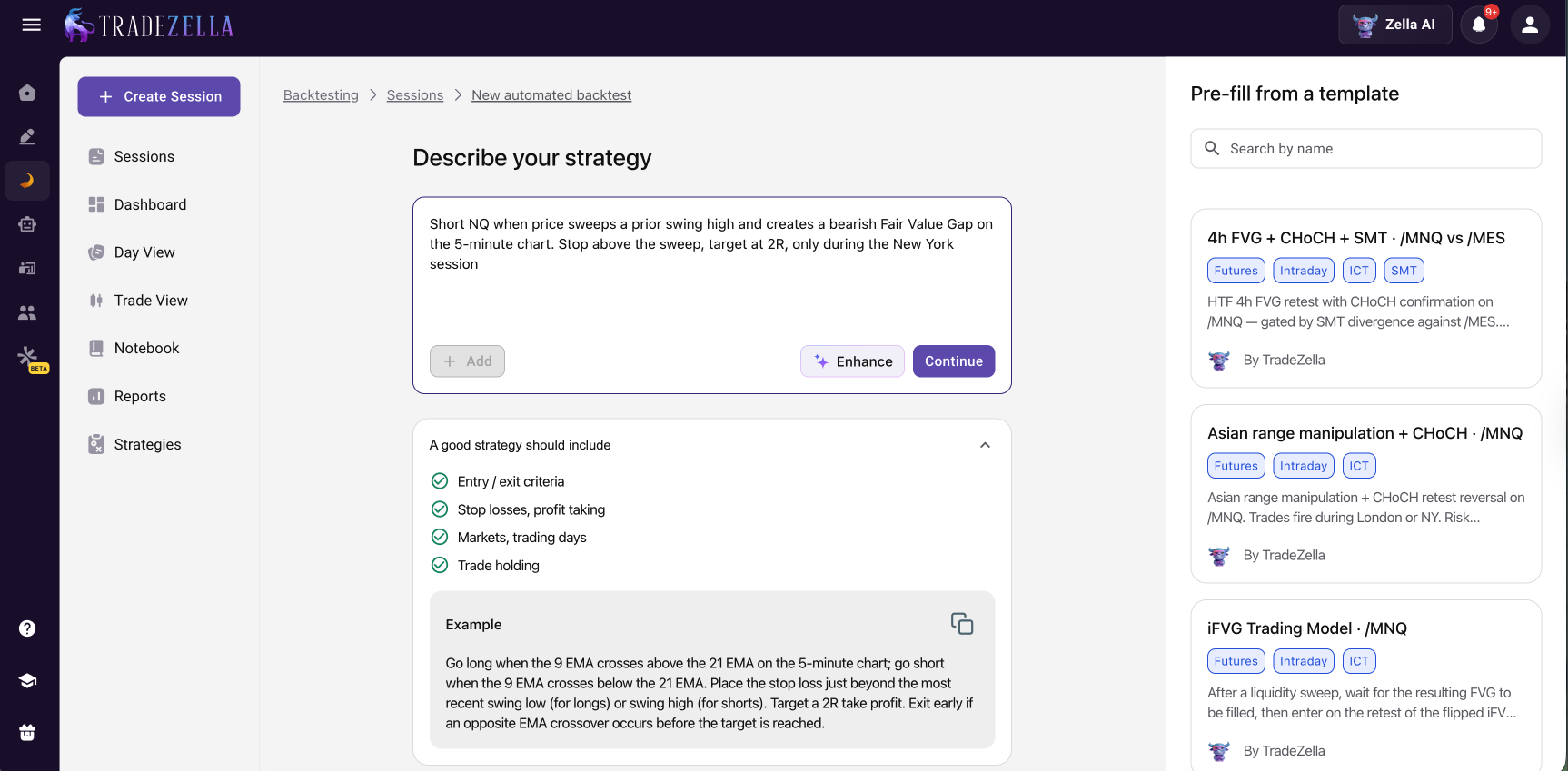
This is where the two platforms split most clearly. FX Replay is a manual replay tool. You step through historical charts bar by bar and place every trade by hand, and that is the only way to backtest on it. TradeZella does manual replay too, but it also runs automated, no-code backtesting. You describe your strategy in plain English, for example "buy ES when price sweeps the previous day low and forms a bullish Fair Value Gap, stop below the sweep, target two times risk," and the engine runs it across years of historical data in minutes and returns every individual trade the strategy would have taken. No Python, no scripting.
TradeZella Automated Backtesting
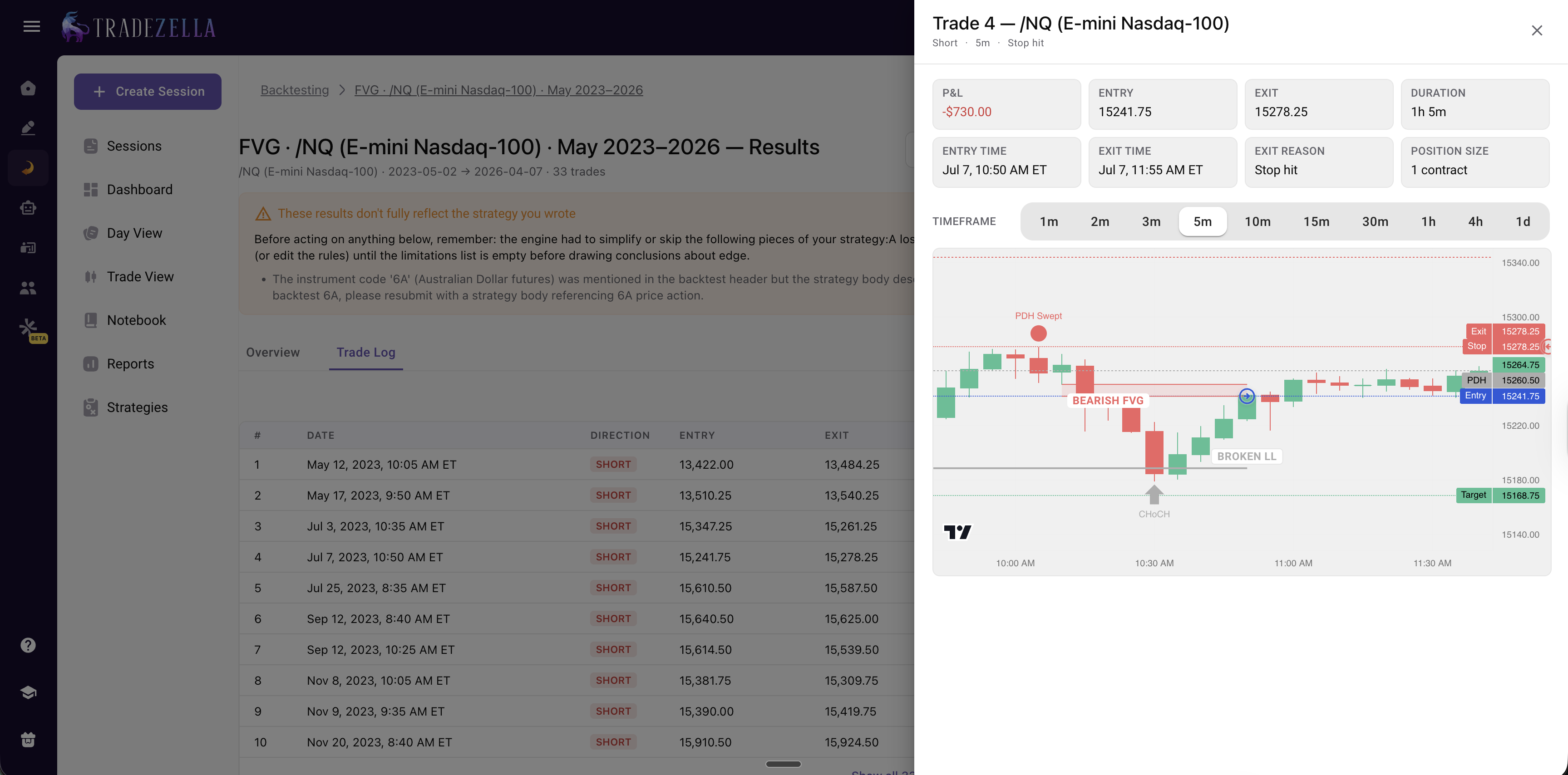
What sets it apart from other automated backtesters is that TradeZella draws the exact setup on every trade it takes. Open any backtested trade and you see the Fair Value Gap that formed, the liquidity sweep that triggered the entry, or the breaker block and its retest marked right on the chart, so you can confirm each trade actually traded your setup instead of trusting a black-box equity curve. Zella AI then analyzes the full set of results and points to what to fix. FX Replay has no equivalent to this. Every backtest on it is done manually, one trade at a time.
TradeZella Automated Backtesting per Trade Analysis
So if you want to validate a rules-based strategy across years of data quickly, TradeZella is the only one of the two that can do it. If you specifically want manual screen time to practice execution, both platforms handle that well. Learn more in our what is automated backtesting guide.
Assets
Both platforms offer backtesting for a variety of assets, including Forex, Futures, Crypto, and Indices. However, TradeZella provides an additional advantage by allowing you to backtest stocks, whereas FX Replay does not.
So if you’re a stock trader looking to backtest your trades, TradeZella is the only choice.
TradingView Charts
Both platforms integrate with TradingView charts, providing you with a powerful and customizable tool for visualizing market data.
Tool Templates
Both platforms offer tool templates to streamline your backtesting workflow and save time.
Multichart and Multipair
Both platforms support multichart and multipair analysis, allowing you to simultaneously monitor multiple charts and instruments.
FX Replay's Multichart
TradeZella Multichart Backtesting
Currently, both FX Replay and TradeZella allow you to backtest on up to 8 charts simultaneously, and add up to 5 symbols in one session. This provides sufficient multichart capabilities for most traders to effectively monitor and analyze various markets and instruments.
Replay and Jump to Candle
Both platforms allow you to replay market action and jump to specific candles, providing great control over your backtesting sessions.
For FX Replay, right-click on the chart and select "Replay to this date."
FX Replay - Replay
For TradeZella, click "Jump to Specific Candle" and then the desired candle on the chart.
TradeZella - Go To Candle Backtesting
Both methods offer efficient ways to navigate your backtesting data. However, TradeZella's visual candle selection provides a more intuitive and direct approach.. While FX Replay's right-click method is also quick, it requires an extra step and may not be as immediately apparent to new users.
Go-to Feature
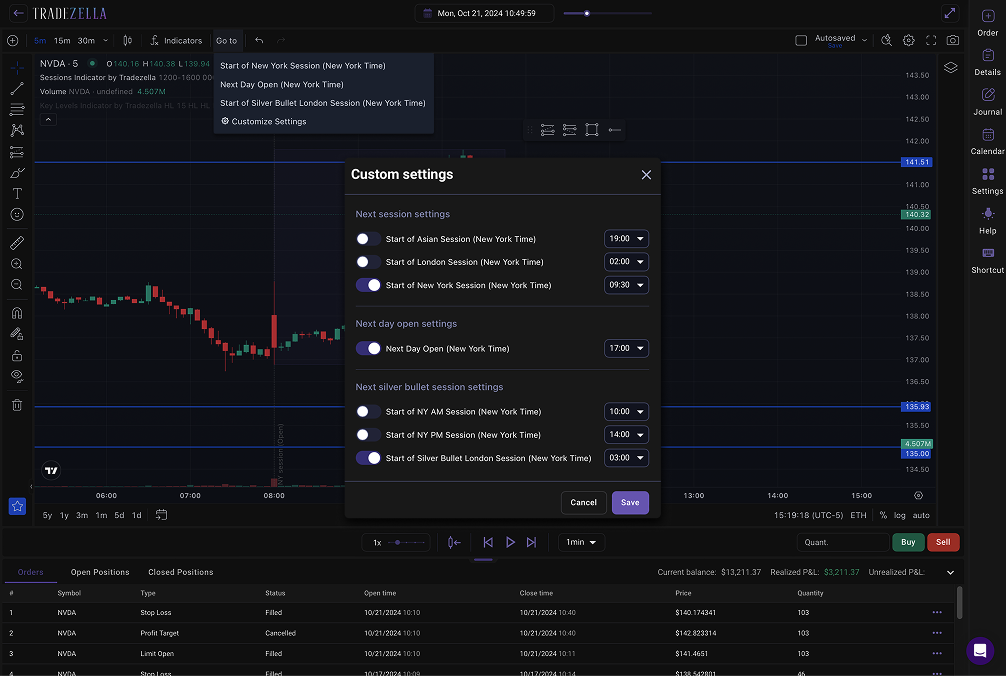
Both platforms streamline your workflow by letting you jump to a specific time or session, without having to manually skip forward. You can customize the start of each trading session as you'd like and skip to the desired period with a click of a button.
FX Replay Go-To Session Backtesting
TradeZella Go-To Session Backtesting
Custom Indicators
Both platforms offer custom-made indicators for their users. Because FX Replay has been in the market for longer, they provide more custom indicators as of writing, but TradeZella has started launching their very own custom indicators and will continue to add more.
Automatic Position Sizing
Both TradeZella and FX Replay offer automatic position sizing features, which can be a valuable tool for managing risk and optimizing your trading strategies. This feature allows you to automatically calculate the appropriate position size based on your risk tolerance and trading parameters.
TradeZella Automatic Position Sizing - Backtesting
FXReplay Place Order
Drag SL & TP
Something that's unique to TradeZella is the ability to dynamically adjust your Take Profit (TP) and Stop Loss (SL) levels during backtesting.
Simply drag and drop your TP/SL orders on the chart to adjust them in real-time as the trade unfolds.
This allows you to react to changing market conditions and fine-tune your risk management strategy on the fly, simulating the active decision-making process of live trading.
TradeZella Backtesting - Drag order lines
As you adjust your TP/SL, TradeZella displays your estimated profit or loss, providing immediate feedback on the potential impact of your adjustments. You can also quickly exit a trade by clicking the "X" button beside your order.
This dynamic TP/SL adjustment feature offers a more interactive and realistic backtesting experience, allowing you to test your ability to adapt to market volatility and optimize your exit strategies. FX Replay does not currently offer this dynamic TP/SL adjustment feature.
Quick Buy and Sell Buttons
Both platforms also provide convenient quick buy and sell buttons, making it easy to place orders during your backtests. This can save you time and streamline your workflow.
Speed Controls
You can adjust the speed of your backtesting session on both platforms. With FX Replay, you can go up to 16x the speed. With TradeZella, you can speed up to 10x. If you prefer to accelerate your backtests significantly, FX Replay might be a better option in terms of speed control.
Seconds Data/Tick
Tick data, capturing price changes at their most granular level, is crucial for precise backtesting and accurate market representation. Both TradeZella Premium and FX Replay offer seconds data, enabling traders to analyze strategies with high precision.
In this regard, you can confidently choose either platform to meet your needs.
Take Partials
Both FX Replay and TradeZella offer valuable features for incorporating partial profit taking into your backtesting strategy. Both platforms let you adjust your position and take partial profits on an existing order. Choose to close a portion of your position by percentage or a specific amount, calculated from either your remaining position or the original order size.
FX Replay Backtesting - Take Partials
TradeZella Backtesting - Take Partials
However, FX Replay provides an additional layer of control with its Multiple Take Profit (TP) Levels feature. When setting up an order, you can define multiple TP levels in advance using preset prices, ticks, or percentages.
FX Replay Multiple Take Profit
Ultimately, both platforms offer the necessary tools to effectively implement partial profit-taking strategies during backtesting. The choice may depend on whether you prefer to predefine your TP levels or adjust them dynamically as the trade progresses.
RTH/ETH
When backtesting, the ability to analyze performance during specific trading sessions is essential. TradeZella offers the flexibility to view and switch between both Regular Trading Hours (RTH) and Electronic Trading Hours (ETH).
TradeZella Backtesting - RTH / ETH
In contrast, FX Replay currently only provides data for Electronic Trading Hours (ETH), potentially limiting the scope of backtesting analysis.
RTH charts are ideal for analyzing intraday price action and identifying key levels, so for traders who need the flexibility to analyze and optimize strategies across both RTH and ETH, TradeZella provides a significant advantage.
TradeZella vs. FX Replay: Journaling
As mentioned previously, both backtesting platforms offer journaling along with backtesting, but the two differ in depth and flexibility.
TradeZella provides a seamless and powerful journaling experience directly within the backtesting interface. A dedicated column beside the chart allows for real-time note-taking and tagging without disrupting your backtesting workflow. No need to switch between pages.
TradeZella Backtesting Journal
Key features include:
Session and Trade Notes: Maintain both broad session reflections, as well as trade-specific analysis.
Playbook Integration: Attach playbooks to track strategy rules and ensure that you’re following your rules during backtesting.
Customizable Tagging & Reporting: Use highly customizable tags (e.g., entry model, timeframe, mistakes) to categorize trades. Each tag generates corresponding performance reports for in-depth strategy refinement. One thing to note is that you can tag your trades while you’re in the backtesting session.
Rich Media: Easily add images and screenshots for visual context.
Automatic Note Population: When reviewing an individual trade later, all associated notes, tags, and attachments are automatically populated, providing a complete and readily accessible record of your analysis and decision-making process.
In essence, TradeZella's journaling is designed to be a dynamic and comprehensive tool that supports continuous learning and improvement by providing a complete and easily accessible record of your trading journey.
FX Replay
FX Replay Backtesting Journal
Separate Window Journaling: FX Replay's journaling feature opens in a new window, requiring traders to switch contexts and potentially disrupting their workflow.
Individual Trade Focus: Journaling is primarily focused on individual trades, with currently no way of writing a journal entry for the whole session.
Basic Tagging: While tagging is available, it's limited to a single category, reducing flexibility.
Standard Features: Users can add screenshots, utilize checklists, rate confidence levels, and add general notes.
Less streamlined: The need to open a new window, and the limited tagging, makes the user experience less streamlined than TradeZella.
In summary: TradeZella offers a more integrated, comprehensive, and user-friendly journaling experience, with advanced tagging and reporting features. FX Replay provides basic journaling functionality but with a less seamless workflow. In this aspect, TradeZella clearly shines better.
TradeZella vs. FX Replay: Analytics
Both TradeZella and FX Replay offer comprehensive analytics dashboards to help you evaluate your backtesting performance. However, they take slightly different approaches:
FX Replay offers a custom analytics dashboard designed specifically for backtesting sessions. This dashboard provides you with detailed insights into your backtest performance. Their dashboard includes:
FX Replay Backtesting Analytics
Basic backtesting stats
Time invested backtesting
Historical time replayed
Time invested by day (min)
Number of trades taken
Overall win rate
Number of trades by symbol
Advanced analytics
Profit & loss chart
Winners vs Losers
Buy vs Sell
Performance by Session
Performance by time
Performance by day
Performance by month
Performance calendar
Monte Carlo simulation
FX Replay Backtesting Analytics
TradeZella also provides basic backtesting stats like:
Total data backtested within a certain time
Total time spent backtesting
Sessions win rate: Winning sessions over the total number of finished sessions
Trade win rate
Total time invested backtesting
TradeZella Backtesting Analytics
Additionally, TradeZella takes a unique approach by presenting your performance analytics as if they were actual trades taken on live markets by giving you the exact same analytics as they provide on your live accounts. This allows you to visualize your results in a more realistic and intuitive way.
Clicking on the Dashboard icon on the sidebar takes your backtesting dashboard. You can either select which specific session you’d like to review or choose to review multiple sessions at once.
Now let’s dive deeper into the data that’s available for you.
Dashboard
TradeZella Backtesting Analytics Dashboard
Clear overall glance at your backtesting session performance in different views (Dollar, Percentage, R-Multiple, Ticks, Pips, Points)
Account Balance & P&L
Daily Net Cumulative P&L & Net Daily P&L
Trade Win Rate & Day Win Rate
Avg Win/Loss Trade
Trade Expectancy
Streaks: Current Day Streak, Current Trade Streak, Current Streak
Max Drawdown & Average Drawdown
Advanced Calendar
Zella Score - Scores your overall performance
Trade Log & Tracking
Gives you a detailed and customizable list of all the trades you’ve taken in that session. Clicking on an individual trade allows you to review that trade even deeper, as if it were an actual trade taken on the live market.
TradeZella Backtesting Tracking
Your chart with your entries and exits, your stats, your tags, and your notes are automatically populated in this page.
Reports
This is where your data comes together and where you can review your strategy’s strengths and weaknesses on a much deeper level. Access 50+ reports to discover key insights in your strategies, like:
Peak trading times
Optimal holding periods
Average risk and reward
Best or worst trading days
Most profitable months
Performance by price, volume, instrument
TradeZella Backtesting Reports
Compare Symbols, Tags, Sides, etc.
TradeZella's robust analytical tools empower traders to go beyond basic performance metrics.
TradeZella vs. FX Replay Backtesting Compare Reports
As shown in the image, you can create distinct groups to compare various aspects of your trading. This allows you to directly compare performance across different symbols, trade directions (long or short), and timeframes. By leveraging customizable tags, you can even analyze the effectiveness of different trading approaches.
TradeZella provides a comprehensive statistical breakdown for each group, including key metrics like win rate, average win/loss, and total P&L. This data-driven approach, combined with clear visualizations, enables traders to identify strengths and weaknesses, ultimately leading to more informed trading decisions and strategy refinement.
Although FX Replay also has comparison reports, TradeZella offers a more flexible functionality, allowing you to dive deeper into your data.
In terms of reporting, it’s clear that both TradeZella and FX Replay offer comprehensive analytics dashboards to help you analyze your backtesting performance.
However, TradeZella's unique approach of presenting analytics as if they were live trades and its additional features, such as the intensive trade log and in-depth reporting, make it a strong contender for traders seeking a more intuitive and in-depth analysis of their backtesting results.
Mentor Mode
TradeZella introduces a unique feature unmatched by other backtesting platforms: Mentor Mode. This innovative tool fosters deeper collaboration between mentors and traders specifically within the context of backtesting, taking personalized guidance to the next level.
TradeZella Backtesting - Mentor Mode
How it works:
For Traders: Invite your mentor to directly access your backtesting sessions, including your historical trades, analytical breakdowns, and detailed journals. This provides your mentor with a comprehensive view of your backtesting methodology, enabling them to offer targeted feedback and accelerate your learning.
For Mentors: Mentor Mode becomes a valuable asset for those offering backtesting guidance. Easily review your students' backtesting performance, identify areas for improvement in their strategies, and provide specific advice based on their individual backtesting results. This fosters a more efficient and effective learning environment for mastering backtesting techniques.
TradeZella's Mentor Mode bridges the gap between backtesting theory and practical application, creating a powerful synergy between mentors and traders seeking to master historical data analysis.
TradeZella vs. FX Replay: Summary
TradeZella vs. FX Replay Backtesting
Both TradeZella and FX Replay offer robust solutions for your backtesting needs, each with its own strengths and weaknesses.
FX Replay excels in providing a focused and streamlined backtesting. With its intuitive interface and powerful features like multi-chart analysis, custom indicators, and high-speed replay, FX Replay allows you to efficiently test and refine your trading strategies. This platform is for traders who only want an in-depth backtesting platform.
TradeZella offers a more comprehensive and integrated approach to trading analysis, encompassing backtesting, live trade tracking, advanced analytics, and mentorship. It provides a compelling entry point for traders seeking a feature-rich platform at a much lower cost. TradeZella's strengths lie in its versatility, offering tools to support traders throughout their entire trading journey.
So, which platform is right for you? The best choice depends on your specific needs and preferences. Consider factors such as your budget, the level of customization and functionalities you require, and whether you want a platform that can support you throughout your trading journey, from backtesting to live trading.
If TradeZella sounds like the ideal fit for you, you can start your journey by visiting their website here.
Remember, the key to successful trading is continuous learning and improvement. Whichever platform you choose, make sure to leverage its features to gain a deeper understanding of the markets and refine your trading strategies.
Frequently Asked Questions
What is the main difference between TradeZella and FX Replay?
FX Replay is a dedicated backtesting platform built specifically for replaying historical market data and testing strategies. TradeZella is a complete trading platform that includes backtesting alongside live trade tracking, 50+ analytics reports, journaling, Zella AI insights, and Mentor Mode. If you only need backtesting, both work. If you want backtesting connected to your live trading data and analytics in one place, TradeZella covers the full workflow.
Can I backtest stocks on FX Replay?
No. FX Replay supports Forex, Futures, Crypto, and Indices, but does not support stock backtesting. TradeZella supports all of those plus stocks. If you trade stocks and want to backtest your setups, TradeZella is the only option between the two.
Does FX Replay have journaling features?
FX Replay has basic journaling that opens in a separate window. You can add notes, screenshots, checklists, and a single tag category per trade. However, it only journals individual trades, not full sessions. TradeZella's journaling is built directly into the backtesting interface with session notes, trade notes, multi-category custom tags, Strategy integration, and automatic note population when you review trades later.
Which platform has better analytics for backtesting?
Both platforms offer solid analytics dashboards. FX Replay provides backtesting-specific stats including a Monte Carlo simulation, performance by session, and time invested metrics. TradeZella takes a different approach by presenting backtesting analytics in the same format as live trade analytics, giving you 50+ reports, comparison tools for symbols and tags, an advanced calendar, and the Zella Score. TradeZella also lets you review multiple sessions at once, which FX Replay does not.
Can my mentor review my backtesting sessions?
Only on TradeZella. Mentor Mode lets you invite a mentor to access your backtesting sessions, including trade history, analytics, and journal entries. This is unique to TradeZella and is not available on FX Replay or most other backtesting platforms.
Do both platforms support seconds data for backtesting?
Yes, but at different price points. FX Replay includes seconds data on its Pro plan at $35 per month. TradeZella includes seconds data on its Pro plan at $59 per month. TradeZella's Basic plan at $35 per month includes all backtesting features except seconds data. If seconds-level precision is critical and you only need backtesting, FX Replay is the lower cost option for that specific feature.