Five trading journal platforms, tested on what actually matters: how you log trades, what insights the software surfaces, and whether the journaling workflow helps you improve. This is not a feature checklist copied from pricing pages. Each platform was evaluated on broker import coverage, journaling depth, analytics quality, AI capabilities, and real cost.
class SampleComponent extends React.Component {
  // using the experimental public class field syntax below. We can also attach
  // the contextType to the current class
  static contextType = ColorContext;
  render() {
    return <Button color={this.color} />
  }
}
Last Updated: July 13, 2026
Trading journal software is a dedicated platform that lets you log, annotate, and analyze your trades in one place. Unlike a spreadsheet, journal software automates trade imports from your broker, calculates performance metrics like win rate, profit factor, and expectancy automatically, and gives you filtering tools to break down your results by setup, time of day, and custom tags. The best journal software turns raw trade data into actionable patterns that help you improve.
If you have already moved past the trading journal vs spreadsheet decision and know you want dedicated software, this guide compares the 5 platforms worth considering in 2026. We evaluated each on five dimensions: broker import coverage, journaling depth, analytics quality, AI features, and real cost.
For a comparison focused more on tracking and analytics features, see our best trading trackers guide. This article focuses specifically on the journaling workflow: how you log trades, add notes and screenshots, tag psychological patterns, and build a review habit that compounds over time.
Our Commitment to Transparency
We built TradeZella to be the tool we wanted to use, and 100,000+ traders use it today. But we recognize different traders have different needs. Here is our honest assessment of the landscape.
TL;DR
TradeZella is best for traders who want AI-powered journaling with 500+ broker imports, Strategies, backtesting, trade replay, and Prop Firm Sync, starting at $35/month. Tradervue is the only platform with a meaningful free tier (100 stock trades/month) for testing the habit. TraderSync offers AI coaching through Cypher on Premium and Elite plans starting at $29.95/month. Edgewonk is the cheapest premium option at $197/year with deep psychology tracking and automated imports. Journalytix is purpose-built for futures traders who want real-time session feedback at $47/month."
What Should You Look for in Trading Journal Software?
Before comparing platforms, here are the five dimensions that separate useful journal software from a glorified spreadsheet.
1. Broker auto-import. Manual entry kills consistency. If logging a trade takes more than 30 seconds, you will eventually stop doing it. The best software pulls trades directly from your broker, including entry, exit, size, fees, and timestamps. The more brokers supported, the less friction you face.
2. Journaling depth. Logging numbers is tracking. Journaling is adding context: why you took the trade, what the market conditions were, how you felt, what you would do differently. Look for note fields, screenshot attachments, custom tags, and pre-trade checklists. This is what turns data into trading discipline .
3. Analytics and filtering. Your journal should calculate R-multiples, profit factor, and expectancy automatically. More importantly, it should let you filter by setup, time of day, and custom tags so you can analyze your trading performance at a granular level and eventually find your trading edge.
4. Psychological tracking. The best journal software helps you track trading habits and emotional patterns. Custom tags for revenge trading, tilt and rule-following let you measure the cost of emotional decisions in dollars, not feelings.
5. Review workflow. A journal that collects data but makes it hard to review is half a tool. Look for calendar views, daily summaries, and the ability to build a structured trade review process directly inside the platform.
Edge Finder AI, setup filtering, psychology correlation
Live P&L dashboard, risk monitoring
Extras
Zella AI, Backtesting, Replay, Prop Firm Sync, Zella University
None
Cypher AI insights (Premium+), trade replay
Tiltmeter, Edge Finder AI
Real-time alerts, leaderboard
Pricing
$35-$99/mo Save 25% annually
Free / $30-$50/mo $27-$40/mo annual
$30-$80/mo $16-$40/mo annual
$197/year ~$16/mo
$47/mo $33/mo annual
The 5 Best Trading Journal Platforms in 2026
#1: TradeZella: Best AI Trading Journal for Traders
Best for: Traders who want AI-powered insights, the deepest journaling workflow, professional-grade analytics, backtesting, and trade replay in one platform.
TradeZella connects to over 500 brokers and platforms, which is the widest import coverage of any journal on this list. Trades sync automatically with full details: entry, exit, position size, fees, and timestamps. Once imported, you can add notes, screenshots, and custom tags to every trade without leaving the platform.
Where TradeZella separates from the field is the combination of journaling and analysis. You create Strategies (named setups with defined entry and exit rules) and assign every trade to one. The Strategy comparison report then shows you exactly which setups are making money and which are not. Add the Day & Time report, the Tags report, the Symbol report, and the R-Multiple View, and you have the filtering power to find your trading edge without exporting data anywhere.
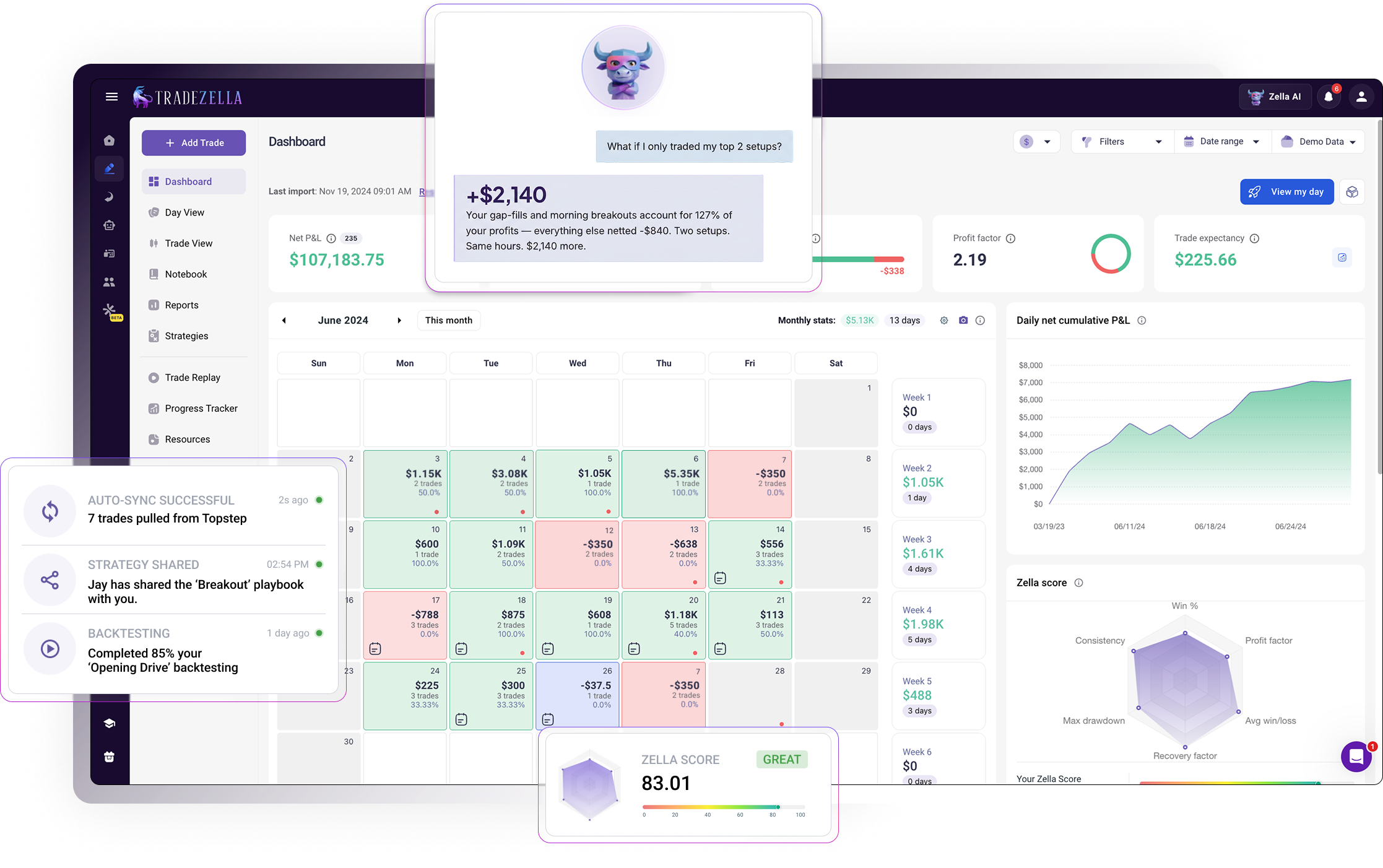
The Notebook feature lets you document your trading plan, record pre-session checklists, and log reflections after each day. The Calendar view gives you a visual daily P&L overview, which makes weekly reviews fast and visual.
TradeZella also includes Zella AI, an AI trading partner that goes beyond basic chat-based analysis. Zella AI includes autonomous agents that take action on your data without prompting. The Auto-Tagger agent applies tags to every trade based on rules you define, such as tagging trades by entry timeframe, R-multiple thresholds, or whether specific concepts like SMT or supply and demand were present. The Session Review agent automatically reviews your trading day after you finish, comparing your morning plan against your actual results, checking rule adherence, and journaling the entire session. The Market Sentiment Briefing agent creates pre-market scenarios and a trading plan based on how you trade, your selected assets, and the factors you told it to analyze. Zella AI also remembers your preferences, risk limits, and trading style across sessions, so every interaction builds on the last. This puts TradeZella alongside TraderSync as one of only two platforms on this list with built-in AI analysis, but with the advantage of autonomous agents that tag, review, and plan for you rather than just answering questions.
Trade Replay lets you walk through historical charts bar by bar to practice execution. Backtesting with 11+ years of data lets you test strategies before risking capital. Prop Firm Sync lets you connect your prop firm accounts by uploading trades or syncing through your broker, then tracks evaluation progress with account-specific analytics, which is critical if you run multiple funded accounts.
Pricing: Essential plan at $35/month ($26/month billed annually). Pro plan at $59/month ($44/month annually) and Ultra plan at $99/month ($74/month annually).
Limitations: No free tier. The Essential plan limits you to one trading account and 10 Strategies, which means active traders will likely need Pro from the start.
#2: Tradervue: Best Free Option for Stock Traders
Best for: Traders who want a reliable, established journal with a free tier and straightforward trade logging.
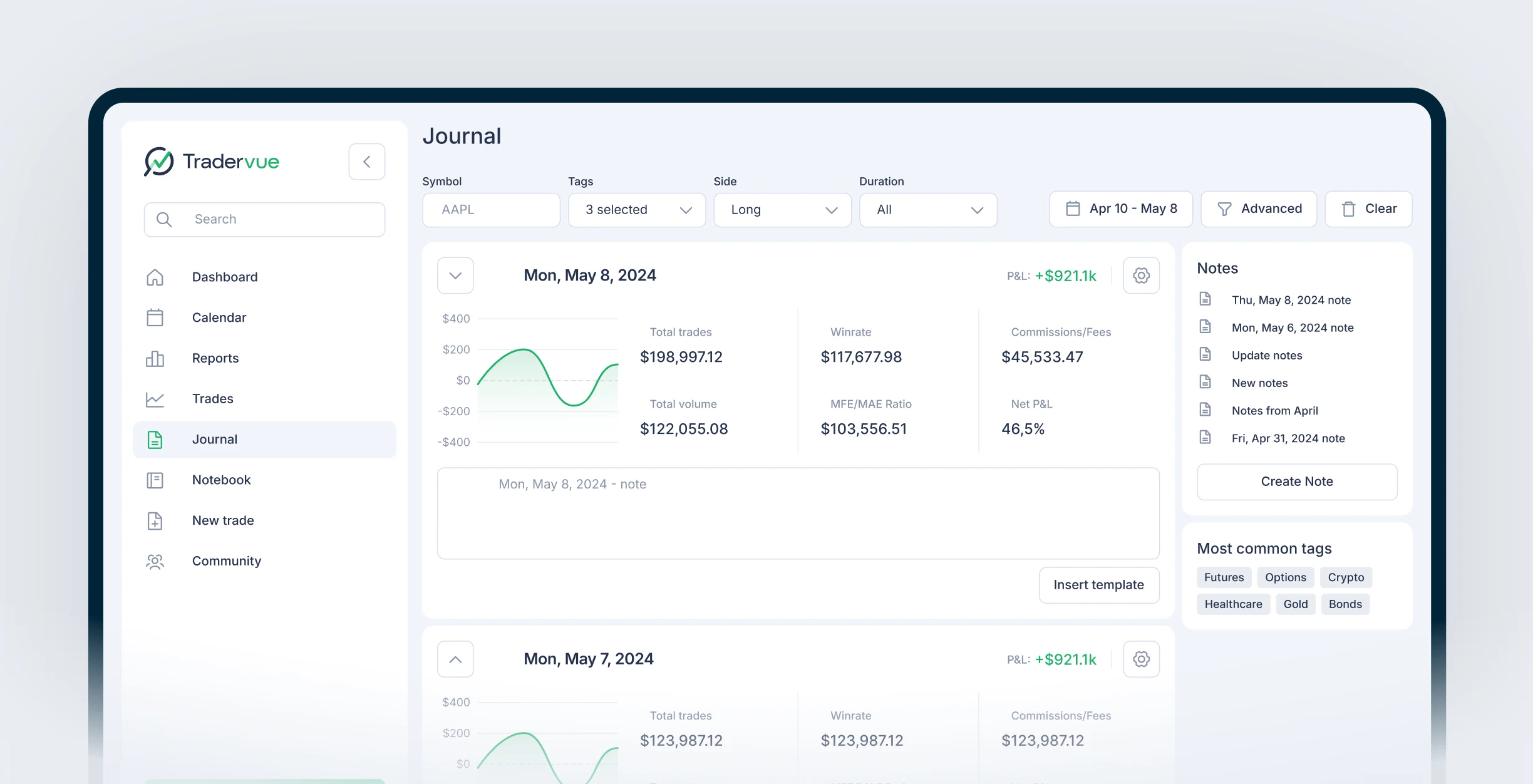
Tradervue has been around longer than most platforms on this list, and its core strength is simplicity. It imports trades from 80+ brokers, generates charts with entry and exit points marked on TradingView-style visuals, and produces over 100 reports on your trading history. The platform supports stocks, options, futures, and forex across Silver and Gold tiers.
The journaling workflow is functional but more basic. You can add notes and tags to trades, and the platform generates daily summaries. The mentorship feature on Silver and Gold plans lets you share your journal with a coach, which is useful for traders who work with a mentor.
Where Tradervue falls short compared to newer platforms is in advanced filtering and strategy-level analysis. You get aggregate reports and basic tag filtering, but there is no dedicated Strategy comparison view, no trade replay, and no backtesting. The analytics are solid for understanding what happened but less powerful for discovering why.
Pricing: Free plan (100 stock/ETF trades per month). Silver at $29.95/month ($26.95/month annually). Gold at $49.95/month ($39.96/month annually). The free plan is the most generous on this list for casual stock traders, but it does not support options, futures, or forex.
Limitations: Free plan is stocks and ETFs only with a 100-trade monthly cap. No trade replay. No backtesting. No AI features. Analytics are broad but lack the deep per-strategy filtering that newer platforms offer.
#3: TraderSync: Best for Structured Trade Coaching
Best for: Traders who prioritize AI-generated insights and automated trade classification.
TraderSync's differentiator is its AI engine, called Cypher AI (available on Premium and Elite plans). After you log at least 100 trades, Cypher AI analyzes your patterns and generates insights about which setups, times, and conditions produce your best results. The Elite plan adds automatic AI-generated insights without requiring you to dig through reports manually.
The journaling features include trade notes, screenshots, and a tagging system for categorizing trades by strategy or emotional state. TraderSync also offers a Trading Plan tool on the Elite tier that lets you define rules and track adherence.
Broker imports cover the major platforms, with support for stocks, options, futures, and crypto. The analytics dashboard includes standard metrics (win rate, profit factor, average win/loss) with filtering by date, strategy, and tags.
Pricing: Pro at $29.95/month ($16.47/month annually). Premium at $49.95/month ($24.97/month annually). Elite at $79.95/month ($39.97/month annually). Annual billing saves roughly 45%. 7-day free trial on all plans, no credit card required.
Limitations: The Pro plan limits you to one active account and excludes AI features entirely. AI insights require at least 100 logged trades to activate. The Elite plan at $79.95/month is the most expensive option on this list. No trade replay. No backtesting.
#4: Edgewonk: Best for Psychology Tracking at the Lowest Annual Cost
Best for: Traders who want a psychology-focused journal at the lowest annual cost.
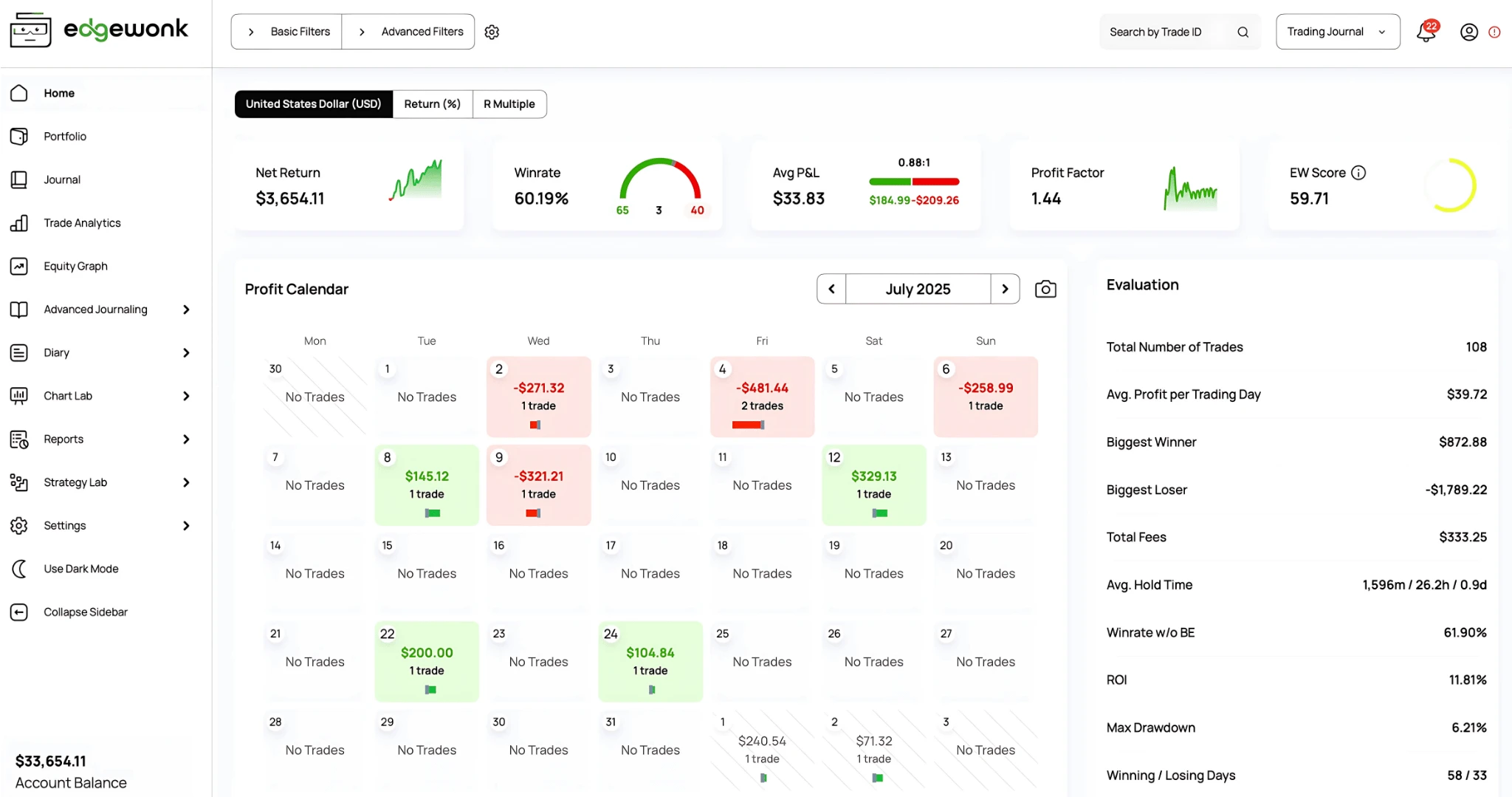
Edgewonk's standout feature is its Tiltmeter, a built-in emotional tracking system that measures how your psychological state affects your trades. You log your emotional state alongside each trade, and Edgewonk correlates emotions with performance outcomes. For traders working on trading tilt and emotional control, this is the most direct measurement tool on the market.
The platform also includes an Edge Finder AI that analyzes your journal data to identify statistical edges in your trading. The analytics cover standard metrics with the ability to filter by setup, time, and tags.
Trade logging requires more manual input than the auto-import platforms. Edgewonk supports importing from some brokers, but the coverage is narrower than TradeZella, Tradervue, or TraderSync. For traders who take many trades per day, the import limitations add friction.
Pricing: $197/year (approximately $16/month). This is the lowest cost of any premium journal on this list. Annual or biennial subscription only, no monthly option. 14-day money-back guarantee.
Limitations: Narrower broker import coverage. No trade replay. No backtesting. No free plan or trial (refund policy instead). The psychology-first approach is excellent for traders focused on behavioral improvement but less useful for traders who primarily need analytics depth.
#5: Journalytix: Best for Real-Time Futures Session Feedback
Best for: Futures traders who want real-time performance feedback during the trading session.
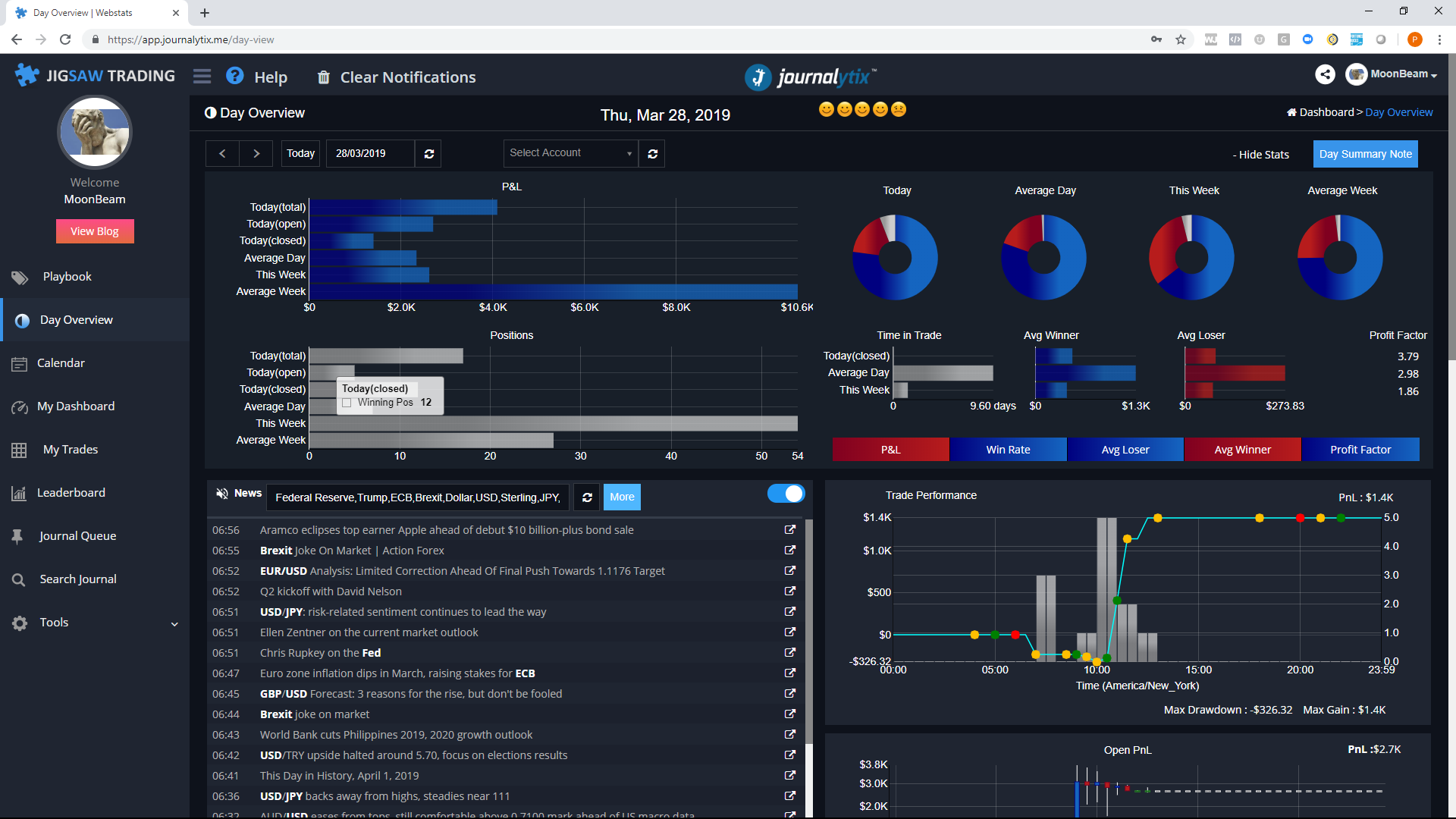
Journalytix, built by the team behind Jigsaw Trading, is fundamentally different from the other platforms on this list. It functions more like a live performance dashboard than a post-session journal. The platform monitors your trades in real time, provides risk alerts, and classifies trades as they happen.
This live approach is its biggest strength for active futures traders. You get real-time P&L tracking, position risk monitoring, and automated trade classification without waiting until after the session to review. For traders who need immediate feedback on position sizing and risk, this is unique.
The downside is scope. Journalytix is primarily built for futures traders. While it technically supports stocks, forex, CFDs, and crypto, its roots are in the futures and prop firm ecosystem. If you trade futures on platforms like NinjaTrader or Tradovate, it integrates well. If you trade stocks across multiple brokers, the import options are more limited.
Pricing: $47/month ($399/year, approximately $33/month). 2-week free trial included.
Limitations: Primarily futures-focused. Limited broker coverage outside of futures platforms. No trade replay. No backtesting. The real-time dashboard is powerful during sessions but offers less post-session analytical depth compared to TradeZella or TraderSync.
Which Trading Journal Software Is Right for You?
You trade multiple markets and want everything in one platform: TradeZella. The 500+ broker coverage, Strategies, analytics, backtesting, and replay make it the most complete option. If you also trade crypto or run prop firm accounts, the multi-market support and Prop Firm Sync are hard to match.
You are starting out and want a free option: Tradervue's free tier works for stock traders taking fewer than 100 trades per month. If you are still in the template phase, start with our free trading journal template and upgrade when you outgrow it.
You want AI to surface insights automatically: TradeZella's Zella AI analyzes your trade data and delivers personalized insights on your setups, timing, and risk patterns, all within the same platform where your Strategies, tags, and journal notes already live. TraderSync's Cypher AI (Premium or Elite) also offers automated analysis, but requires a separate platform and the full AI experience starts at $79.95/month on the Elite plan.
You are focused on psychology and emotional control: Edgewonk's Tiltmeter is the most direct tool for correlating emotions with performance. At $197/year, it is also the cheapest premium option.
You trade futures and want real-time session feedback: Journalytix monitors your trades live during the session. However, TradeZella also supports futures traders with contract-specific tracking, session timing analytics, and Prop Firm Sync for funded futures accounts. For most futures traders, TradeZella covers the full workflow (journaling, analytics, backtesting) while Journalytix adds a real-time overlay during active trading.
Prop Firm Traders: If you manage multiple funded accounts, your journal needs to handle multi-account tracking without mixing data. TradeZella's Prop Firm Sync lets you connect your prop firm accounts by uploading trades or syncing through your broker connection, then tracks evaluation progress in a dedicated dashboard with account-specific analytics. TraderSync supports multiple accounts on Premium and Elite, but without prop-firm-specific tracking features. Tradervue, Edgewonk, and Journalytix require manual separation of accounts.
TradeZella is the most complete platform: Zella AI for personalized insights, 500+ broker imports, Strategies, 50+ reports, backtesting, trade replay, and Prop Firm Sync. Best for traders who want AI-powered journaling and analytics in one place.
Tradervue offers the only meaningful free tier (100 stock trades/month) and has been a reliable journal for years, though it lacks advanced filtering, replay, and backtesting.
TraderSync's Cypher AI generates automated insights after 100+ trades, but the full AI experience requires the Elite plan at $79.95/month.
Edgewonk is the cheapest premium journal at $197/year, with a unique psychology-first approach and Tiltmeter for emotional tracking.
Journalytix is built for futures traders who want real-time performance feedback during the session, not just post-session analysis.
No single platform is best for everyone. Match the tool to your market, trading frequency, and the specific weakness you are trying to fix.
TradeZella combines trade journaling, 50+ analytics reports, backtesting, and trade replay in one platform with 500+ broker integrations. The dashboard offers 7+ different views including R-Multiple, Ticks, and Pips, with widgets for Zella Score, Net P&L, Profit Factor, Max Drawdown, and a Calendar overview. It is the only journal on this list with Prop Firm Sync, which lets you connect prop firm accounts and track evaluation progress with dedicated analytics. TradeZella also includes Zella University, a built-in education hub with video lessons on trading psychology, risk management, order flow, and structured setups, plus live webinars and feature walkthroughs.
Do I actually need trading journal software, or can I use a spreadsheet?
A spreadsheet works when you are taking fewer than 3 trades per day and want basic metric tracking. Once you start filtering by setup, time of day, and market conditions, spreadsheets become unwieldy. Dedicated software automates imports, calculates metrics, and gives you one-click filtering that would require complex pivot tables in a spreadsheet. Our trading journal vs spreadsheet guide breaks down exactly where spreadsheets hit their ceiling.
Which trading journal has the free plan?
Tradervue is the only platform on this list with a meaningful free tier: 100 stock and ETF trades per month with basic reporting. It does not support options, futures, or forex on the free plan. If you want a free starting point before committing to software, our free trading journal template provides a structured spreadsheet you can use immediately.
Can I use these journals for prop firm trading?
TradeZella is the strongest option for prop firm traders because of Prop Firm Sync, which lets you connect your prop firm accounts by uploading trades or syncing through your broker, then tracks evaluation progress in a dedicated dashboard. TraderSync supports multiple accounts on Premium and Elite plans but without prop-firm-specific tracking. Tradervue, Edgewonk, and Journalytix would require manual account separation. For details on multi-account prop firm journaling, see our prop firm trading journal guide.
How many trades do I need before journal analytics become useful?
At least 30 trades for basic metric analysis. For filtering by setup or time of day, you need 15 or more trades per segment. TraderSync's AI features require at least 100 trades to activate. In practical terms, 2 to 3 months of consistent journaling gives most day traders enough data for meaningful analysis.
Is TradeZella worth the price without a free plan?
If you trade more than 3 times per day across any market, the time saved on auto-import alone justifies the Basic plan at $24/month (annual). The analytics, Strategies, backtesting, and replay features add value that no other single platform matches. For casual traders taking a few stock trades per week, Tradervue's free tier or Edgewonk's $197/year plan may be more cost-appropriate.
Can I switch between journal platforms without losing my data?
Most platforms support CSV export, which means you can move your trade history. However, notes, screenshots, and custom tags typically do not transfer. If you are switching from a spreadsheet, the transition is usually clean because CSV import is standard. If you are switching between platforms, plan on re-tagging your most recent 2 to 3 months of trades to maintain analytical continuity. The historical data will import, but the context you added manually will not.



.png)