TrendSpider vs TradeZella: Which Backtesting Platform Is Right for You?
TrendSpider vs TradeZella: Which Backtesting Platform Is Right for You?
TrendSpider and TradeZella are both no-code backtesting tools with AI, so the choice comes down to what you want around the backtest. TrendSpider is a charting, scanning, and alert platform with a strategy tester. TradeZella is a backtesting and journaling platform that connects your backtests to your live trades.
class SampleComponent extends React.Component {
  // using the experimental public class field syntax below. We can also attach
  // the contextType to the current class
  static contextType = ColorContext;
  render() {
    return <Button color={this.color} />
  }
}
Last Updated: July 13, 2026
TrendSpider and TradeZella are both no-code backtesting platforms with AI, so the real backtesting differences come down to how you build a test and what you see. TradeZella lets you backtest in plain English, shows every individual trade with the AI drawing the exact setup it traded, and has built-in ICT indicators so you can backtest smart-money setups directly. It is also an AI journaling platform: Zella AI automatically tags your trades and reviews your sessions, and it imports your live trades from 500+ brokers so your backtests and real results sit in one dashboard. TrendSpider is a charting, scanning, and alert platform with a no-code strategy tester built around technical indicators and patterns. If backtesting your own setups in plain English, reviewing every trade, and journaling your live trading is the priority, TradeZella fits. If you want market scanning and alerts alongside a technical backtester, TrendSpider is strong. This is an honest comparison of how each one backtests.
Because both tools are no-code and both now use AI, a lot of "which is better" advice online is out of date. This guide sticks to what each platform actually does today. For the wider field, see best backtesting software.
TL;DR
TrendSpider is a charting, scanning, and alert platform with a no-code strategy tester, built to find and watch setups in real time. TradeZella is a plain-English backtesting and AI journaling platform: you backtest your own setups in plain English, see every trade with the exact setup drawn on the chart, and Zella AI automatically tags your trades, reviews your sessions, and flags what to fix. It also imports your live trades from 500+ brokers, so your backtests and real results sit in one dashboard, plus built-in ICT indicators and Prop Firm Sync. Both tools are no-code and both use AI. Choose TrendSpider if scanning the market and testing indicator-based strategies on the chart is the priority. Choose TradeZella if you want to backtest, journal, and improve your own trading, at a lower price.
What Is TradeZella?
TradeZella is a backtesting, journaling, and analytics platform for traders. You describe a strategy in plain English and it runs across 11+ years of stock, futures, forex, and crypto data, down to seconds. Every trade is visible, and the AI draws the exact setup it traded on each chart, the Fair Value Gap, the liquidity sweep, or the breaker block and its retest. Zella AI analyzes the results and points to what to fix. The part that sets TradeZella apart is the journaling loop: it imports your live trades from 500+ brokers, so your backtests and your real trades sit in the same dashboard and you can compare them directly.
What Is TrendSpider?
TrendSpider is a technical-analysis platform for stocks, options, futures, ETFs, crypto, and forex. Its core strengths are automated chart analysis (trendline detection, multi-timeframe analysis), market scanning, and dynamic price alerts. It also includes a no-code Strategy Tester: you build entry and exit conditions with a point-and-click builder, and you can use an AI button to describe or refine a strategy in natural language, then an "AI Explain" button to interpret your backtest results. The tester shows your positions on the price chart along with a trade-by-trade log and metrics like Sharpe ratio, Sortino, win rate, and maximum drawdown. TrendSpider also offers trading bots and alert automation.
In short, TrendSpider is a charting-and-scanning platform with a capable backtester attached. It is built for technical traders who live on the chart and want to scan, alert, and test indicator-based strategies in one place.
How Does the Backtesting Differ?
Both are no-code and both have AI, so this is an honest comparison of how each one backtests, not a claim that one has AI and the other does not.
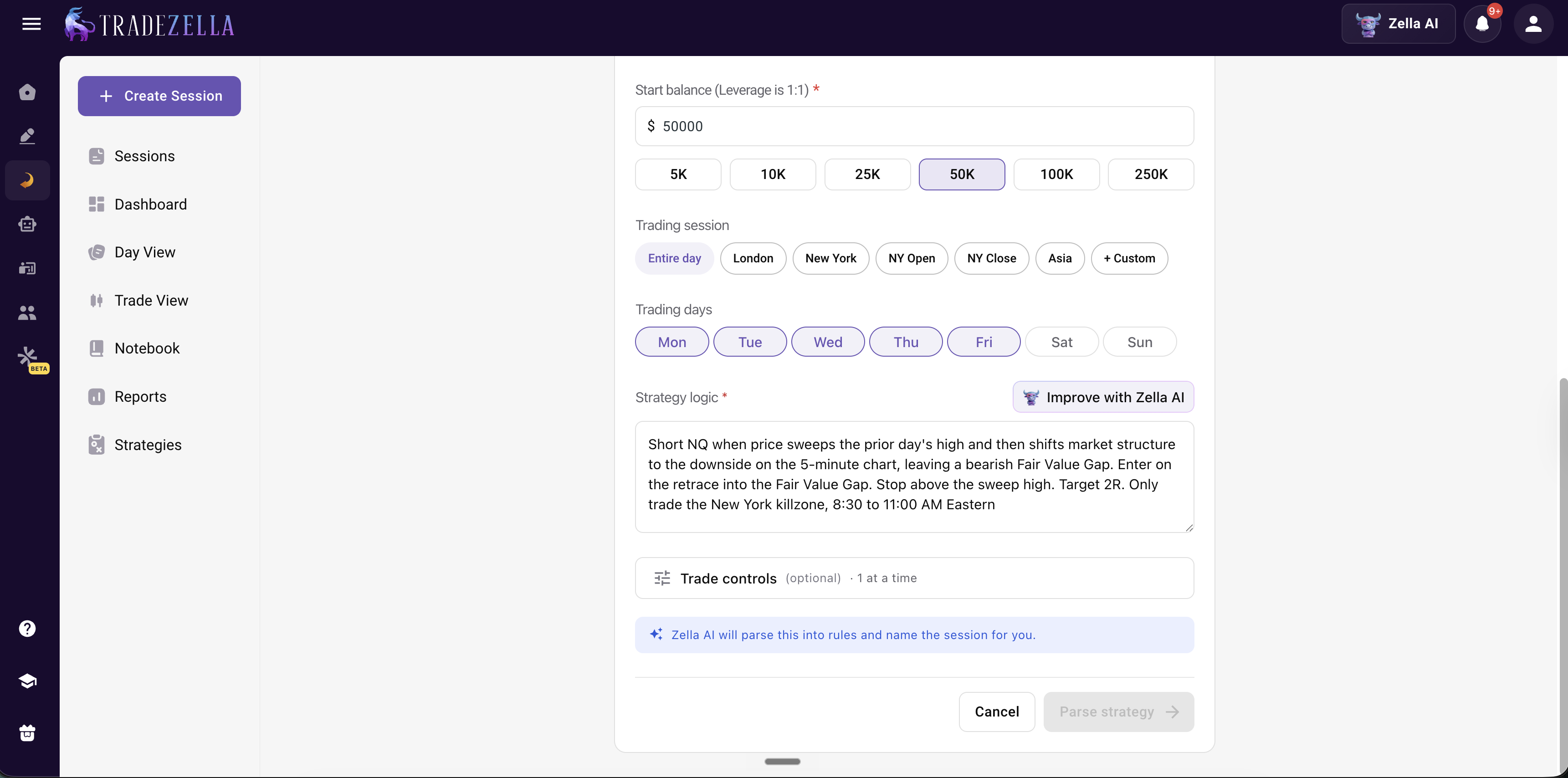
Plain English first vs condition builder first. This is the biggest backtesting difference. TradeZella's primary input is plain English, you type the strategy the way you would explain it. TrendSpider's Strategy Tester is built around a point-and-click condition builder, with an AI button to help describe or refine. Both reach a no-code backtest, but TradeZella leads with natural language, which is faster for traders who think in setups rather than indicator conditions.
TradeZella Plain English Backtesting
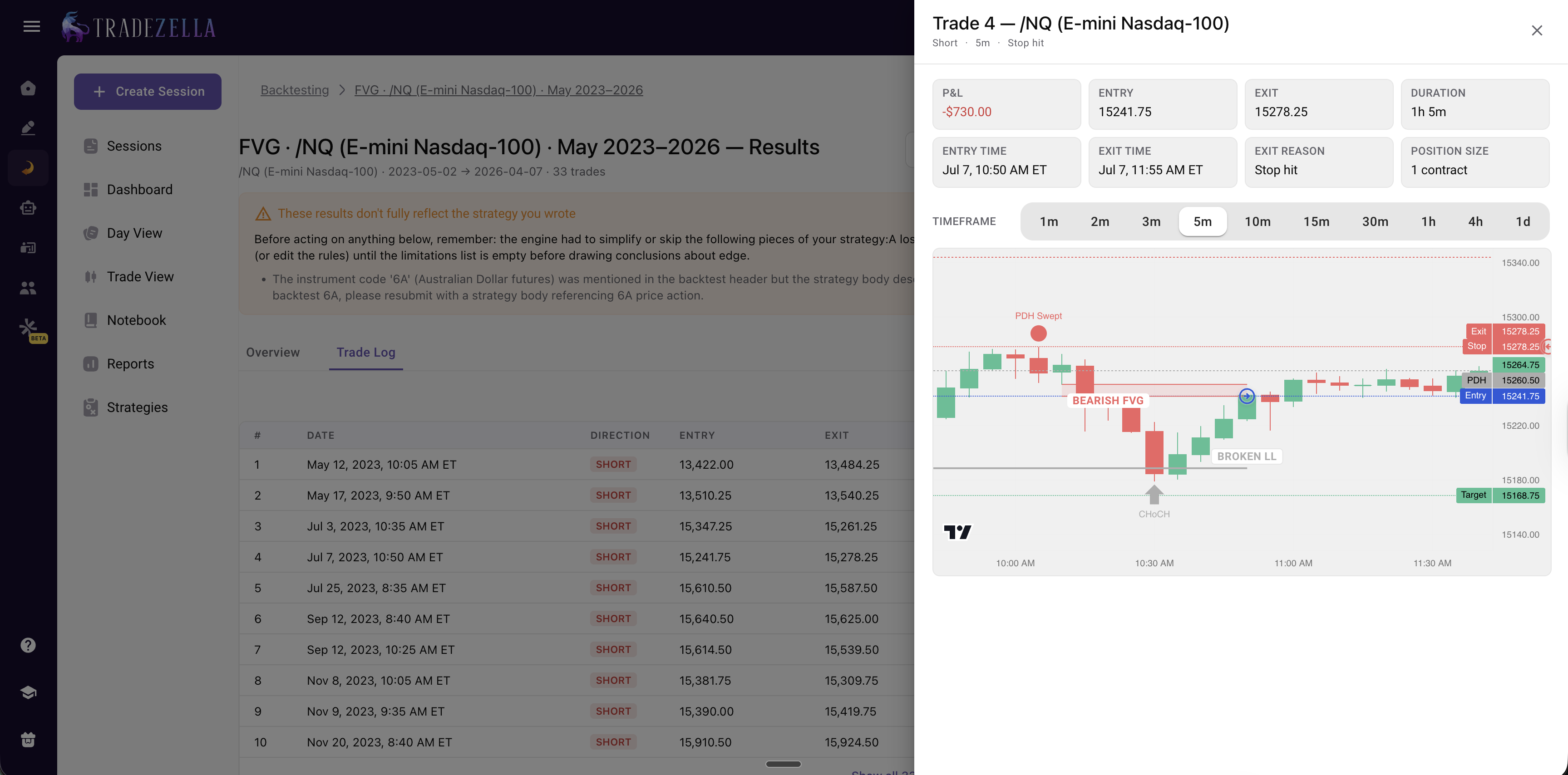
The setup drawn on every backtested trade. Both platforms show individual trades, but TradeZella's AI draws the exact setup it traded on each one, the Fair Value Gap, the liquidity sweep, or the breaker block and its retest, so you can confirm why each trade was taken. TrendSpider shows your positions on the chart, but it is organized around technical indicators and patterns, not smart-money setups.
TradeZella Auto Backtesting Trade Analysis
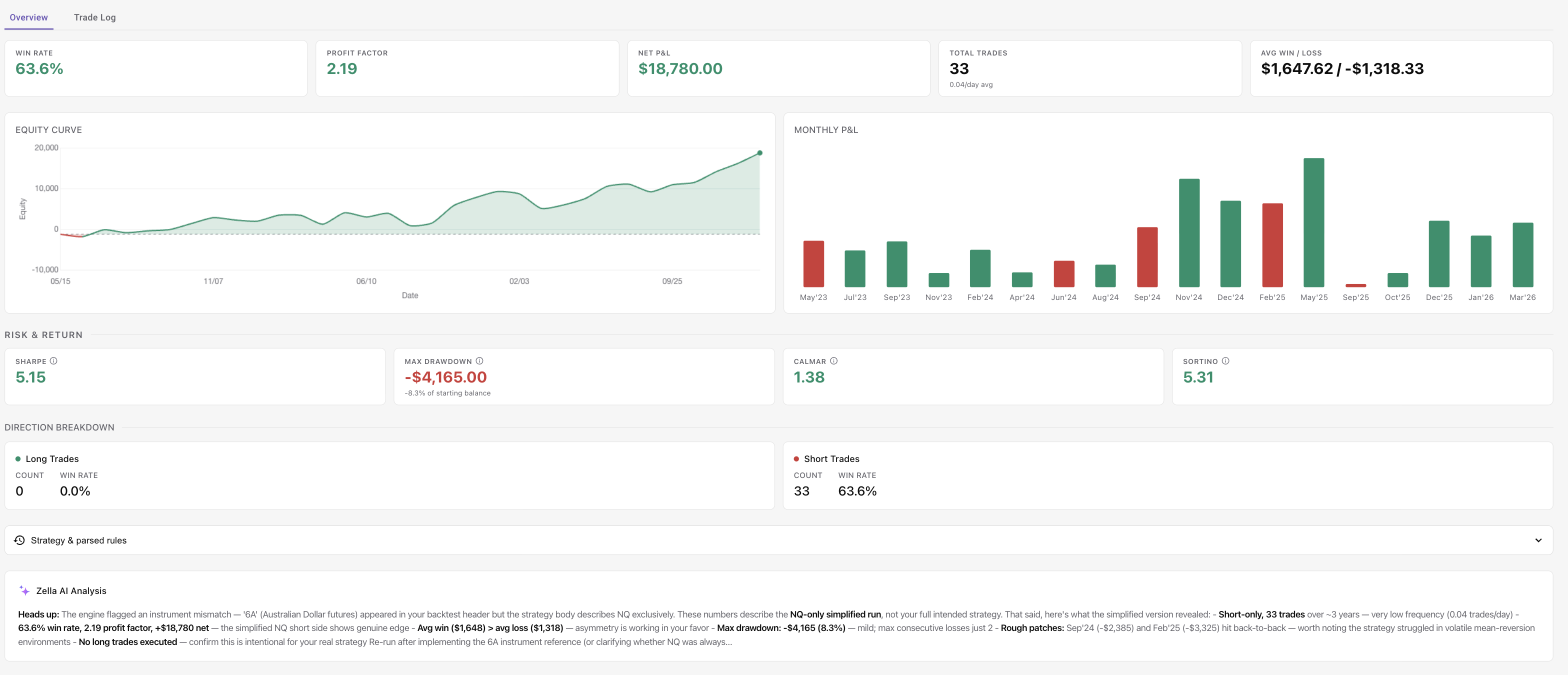
AI analysis of results. This is closer to parity. TrendSpider has an AI Explain button that interprets your backtest, and TradeZella has Zella AI that flags what to fix, a weak session or a losing day, and works across your wider trading, not just one backtest.
TradeZella Auto Backtesting Stats and AI Analysis
Different focus around the backtest. TrendSpider adds market scanning, alerts, and deeper charting to find setups in real time, which TradeZella does not do. TradeZella instead closes the loop after the backtest: it imports your live trades from 500+ brokers and Zella AI journals and reviews them, so you can see whether the edge you backtested actually holds when you trade it live. TrendSpider helps you find setups, TradeZella helps you validate and improve them.
Price.TradeZella backtesting starts at $35/month; TrendSpider starts at $89/month ($59 billed annually). If backtesting is the main thing you need, TradeZella covers it for less. (TradeZella also journals your live trades so you can compare them to your backtests, but on core backtesting the differences above are what matter most.)
TrendSpider
TradeZella
Backtesting input
Condition builder + AI assist
Plain English first
No-code backtesting
Yes
Yes
AI on backtests
AI strategy builder + AI Explain
Zella AI flags what to fix
Every backtested trade with setup drawn
Positions shown on chart
Yes + AI draws the setup per trade (FVG, breaker)
Backtest granularity
Down to 1-minute (higher tiers)
Down to seconds
Markets you can backtest
Stocks, options, futures, ETFs, crypto, forex
Stocks, futures, forex, crypto
Compare backtest to live trades
No
Yes, imports 500+ brokers
AI journaling (auto-tag & session review)
No
Yes, Zella AI
Pricing
From ~$89/mo (~$59 annual), up to low-mid hundreds
$35-$99/mo (save 25% with annual billing)
Best for
Technical traders who scan, chart, and backtest
Backtesting your own setups in plain English (incl. ICT)
Which One Should You Use?
Choose TrendSpider if you are a technical trader who wants advanced charting, automated trendline detection, market scanning, and alerts in the same tool as your backtesting, and you trade indicator- and pattern-based strategies.
Choose TradeZella if your priority is validating and improving your own trading: plain-English backtesting, every trade reviewed with the setup drawn, and a journal that compares your backtests to your live results across 500+ brokers. If you trade prop firm accounts or ICT setups, TradeZella is built for that, and it costs ($35 to $99/month vs $89+ for TrendSpider). For the other head-to-heads, see NinjaTrader vs TradeZella and TradingView vs TradeZella.
Can You Use Both?
Yes, and they complement each other cleanly. Use TrendSpider for charting, scanning, and finding setups in real time. Use TradeZella to backtest those setups in plain English, review each trade, and journal your live results to see whether the edge holds. TrendSpider helps you find and watch; TradeZella helps you validate and improve.
Key Takeaways
Both are no-code backtesting tools with AI, so the backtesting choice is about how you build a test and what you see, not features you assume one lacks.
TradeZella's backtesting edge: plain-English-first input, every trade shown with the AI drawing the exact setup it traded, and built-in ICT indicators so you can backtest smart-money setups directly.
TrendSpider's Strategy Tester is built around a condition builder (with AI assist) and technical indicators. It shows individual trades and has AI Explain.
TrendSpider's edge is scanning, alerts, and charting to find setups in real time. TradeZella does not scan live markets.
For backtesting alone, TradeZella is ($35 to $99/month vs $89+ for TrendSpider). Many traders use TrendSpider to find setups and TradeZella to backtest them in plain English.
Frequently Asked Questions
What is the difference between TrendSpider and TradeZella?
TrendSpider is a charting, scanning, and alert platform with a no-code strategy tester, built for technical traders. TradeZella is a backtesting and journaling platform that connects your backtests to your live trades. Both are no-code and both use AI. TradeZella's main advantages are the journaling loop that compares backtest to live across 500+ brokers, plain-English-first input, and built-in ICT indicators. TrendSpider's main advantages are market scanning, alerts, and advanced charting.
Does TrendSpider have AI and no-code backtesting?
Yes. TrendSpider's Strategy Tester is no-code, using a point-and-click condition builder. It also has an AI button to describe or refine a strategy in natural language and an AI Explain button that interprets your backtest results. So TrendSpider is genuinely no-code and AI-assisted. TradeZella differs by leading with plain-English input, drawing the setup on each trade, and connecting backtests to your live trading journal.
Is TradeZella a good TrendSpider alternative?
If your priority is backtesting and improving your own trading, yes. TradeZella backtests in plain English, shows every trade with the setup drawn, and journals your live trades so you can compare them to your backtests. If your priority is real-time market scanning, alerts, and advanced charting, TrendSpider does those things and TradeZella does not. Many traders use both, TrendSpider to find and watch setups, TradeZella to validate and journal them.
Does TrendSpider show individual backtest trades?
Yes. TrendSpider's Strategy Tester shows your positions on the price chart along with a trade-by-trade log and metrics like Sharpe ratio, Sortino, win rate, and maximum drawdown. TradeZella also shows every individual trade, and its AI additionally draws the exact setup it traded on each chart and lets you tag and journal each trade alongside your live trades.
Which is cheaper, TrendSpider or TradeZella?
TradeZella is cheaper. TradeZella starts at $35 per month for Essential, $59 per month for Pro, and $99 per month for Ultra. You can save 25% by paying annually. TrendSpider starts at about $89 per month for Standard ($59 billed annually) and scales up through higher tiers that run into the low-to-mid hundreds per month. If backtesting and journaling are your main needs, TradeZella covers them at a lower price. If you also need TrendSpider's scanning and alerting, the higher cost buys those capabilities.