The 5 best trading journals for day traders in 2026, compared on the features that matter for intraday trading: automatic broker import speed, time-of-day analytics, trade replay, per-setup performance tracking, and daily loss limit monitoring. Includes pricing, honest limitations, and which journal fits different day trading styles.
class SampleComponent extends React.Component {
  // using the experimental public class field syntax below. We can also attach
  // the contextType to the current class
  static contextType = ColorContext;
  render() {
    return <Button color={this.color} />
  }
}
Last Updated: July 13th, 2026
The best trading journal for day traders is a platform that automatically imports trades from your broker in real time, provides time-of-day and per-setup analytics for intraday patterns, includes trade replay for reviewing fast-moving sessions, and tracks daily loss limits to prevent account blow-ups. TradeZella is the best trading journal for day traders in 2026 because it combines all of these features with 500+ broker integrations, 50+ analytics reports, built-in backtesting,Prop Firm Sync for funded accounts, Mentor Mode, Trade Replay and Zella AI, AI agents system that automatically tags your trades, analyzes your performance, and delivers personalized session reviews without you lifting a finger.
Day trading creates more data in a single session than most swing traders create in a month. A scalper taking 15 trades before lunch generates 15 entries, 15 exits, 15 stop levels, and 15 sets of tags, notes, and screenshots. If your journal can't keep up with that volume automatically, you won't journal consistently. And a journal you don't use consistently is worthless.
This is why day traders need a different journal than swing traders or position traders. The requirements are speed (trades need to import immediately, not at end of day), volume handling (10-30 trades per session without manual entry), intraday analytics (time-of-day performance, per-hour breakdowns, session comparisons), and behavioral tracking (catching revenge trading and overtrading patterns that develop within a single session).
We compared 5 trading journals on these day-trading-specific requirements. Here's what we found.
Our Commitment to Transparency
We built TradeZella to be the tool we wanted to use, and 100,000+ traders use it today. But we recognize different traders have different needs. Here is our honest assessment of the landscape.
TL;DR
TradeZella is best for day traders who need auto-import from 500+ brokers, trade replay, time-of-day analytics, and Zella AI that tags, reviews, and plans automatically, starting at $35/month (save 25% with annual pricing). Tradervue has a free tier (30 trades/month) for beginners testing the journaling habit. TraderSync offers AI coaching through Cypher starting at $29.95/month. Edgewonk is best for psychology-focused traders with deep behavioral tagging and automated imports at $197/year. Journalytix is purpose-built for NinjaTrader futures traders at $47/month.
What Should Day Traders Look for in a Trading Journal?
Before comparing platforms, it helps to understand what separates a good day trading journal from a good general trading journal. Day traders have five specific requirements that don't apply to swing traders or investors:
1. Automatic broker import that handles high volume. Day traders take 5 to 30 trades per session. Manual entry breaks down at this volume. You need a journal that connects to your broker and pulls trades automatically, including partial fills, scaling in and out, and bracket orders. If you're still copying trades from a spreadsheet, read our comparison of trading journal vs spreadsheet to see what you're missing.
2. Time-of-day analytics. Most day traders make 80% of their profits in 20% of their trading hours. The Day & Time report shows exactly which hours are profitable and which are costing money. A day trader who discovers their afternoon trades have negative expectancy can stop trading at noon and immediately improve their monthly P&L by $1,000 to $3,000 on a $50,000 account.
3. Per-setup performance tracking. Day traders typically run 2 to 4 setups (breakouts, pullbacks, reversals, scalps). You need to know the win rate and profit factor of each one separately. A journal with Strategies (or playbooks) lets you tag every trade by setup and compare them side by side.
4. Trade replay. Day trading happens fast. A 30-second scalp is hard to review from a P&L number alone. Trade replay walks you through past trades bar by bar so you can see exactly where entry timing was off, where you moved the stop, or where you cut the winner early. This is the single most valuable review tool for day traders.
5. Daily loss limit tracking. Day traders are the most vulnerable to blowing daily limits because the speed of trading makes it easy to take 3 revenge trades in 10 minutes. Your journal needs to show running daily P&L after every trade, ideally with a visual indicator of how close you are to the limit. For the full framework on risk management tools including daily loss limits, see our dedicated guide.
1. TradeZella: Best Overall AI Trading Journal for Day Traders
TradeZella is the best AI trading journal for day traders because it is the only platform that combines automatic trade import from over 500 brokers, time-of-day analytics, per-strategy performance tracking, trade replay, backtesting, and daily P&L calendar in one integrated system. TradeZella also includes Zella AI, a suite of AI agents that go beyond a simple chatbox. These agents automatically tag your trades based on your criteria, analyze your performance patterns, deliver a personalized market sentiment briefing before each session, and generate a custom session review after you finish trading. Day traders using TradeZella can import trades, review intraday patterns, replay individual trades, and run a complete weekly review without switching between multiple tools.
Why day traders choose TradeZella
500+ broker auto-import. Connects to NinjaTrader, Tradovate, Interactive Brokers, TD Ameritrade, Webull, and hundreds more. Trades import automatically so a 20-trade session gets logged without touching a spreadsheet.
Strategies. Define your setups (breakout, pullback, reversal, scalp) with specific entry rules. Every trade gets tagged to a Strategy. The Strategy comparison report shows win rate, profit factor, expectancy, and average R-multiple per setup so you know exactly which setups to keep and which to cut.
Trade Replay and Day Replay. Two replay modes: Trade Replay walks through a single trade bar by bar, Day Replay walks through an entire session. Day traders use Trade Replay for their worst trade of the week and Day Replay for their worst day. This is where you catch the trading tilt cascade that turns a $200 loss into a $1,500 loss.
Built-in backtesting.Backtest with TradeZella using over 11 years of historical data before risking real capital. Test your day trading setups against thousands of historical sessions to validate win rate and drawdown expectations.
P&L calendar. Color-coded daily P&L at a glance. Day traders spot day-of-week patterns (are Fridays always red?), post-loss clusters (do losses always come in groups?), and giveback days (did you give back morning profits in the afternoon?) in seconds.
50+ reports and 7 dashboard views. Filter by dollars, percentage, R-multiple, ticks, pips, points, or privacy mode. The trading dashboard shows all key metrics in one view. For detailed guidance, see how to analyze your trading performance.
Prop Firm Sync. Day traders on funded accounts can connect prop firm accounts directly. TradeZella tracks daily drawdown against the firm's limits and consolidates multiple accounts into one dashboard. For the full funded trader workflow, see funded trader tools.
Economic calendar. Built-in economic calendar so day traders can check upcoming news events without leaving the platform.
Zella AI:TradeZella includes Zella AI, a built-in AI system that works in two ways. First, you can ask Zella AI any question about your trading data directly inside the app. Ask "what's my win rate on breakouts before 10 AM?" or "which strategy lost the most money this month?" and Zella AI pulls from your actual trade history to give you a personalized answer, a custom plan, or a data-driven recommendation. No exporting, no spreadsheets, just ask and get the answer. Second, Zella AI runs agents that do the work automatically without you doing anything. The Trade Auto-Tagger tags every trade based on your criteria (setup type, session, quality grade) so you never fall behind on tagging after a 20-trade session. The Market Sentiment Briefing delivers a personalized pre-session report customized by your symbols, session time, and strategy. The Session Review agent generates a detailed post-session analysis with your personalized review framework, highlighting what went right, what broke your rules, and what to focus on tomorrow. These agents run automatically based on your preferences.
Limitations
No free trial. You need to subscribe to access the platform.
Pricing
Pricing: Essential plan at $35/month ($26/month billed annually). Pro plan at $59/month ($44/month annually) and Ultra plan at $99/month ($74/month annually). Save 25% with annual pricing
TradeZella Dashboard
2. Tradervue: Best Free Option for Beginners
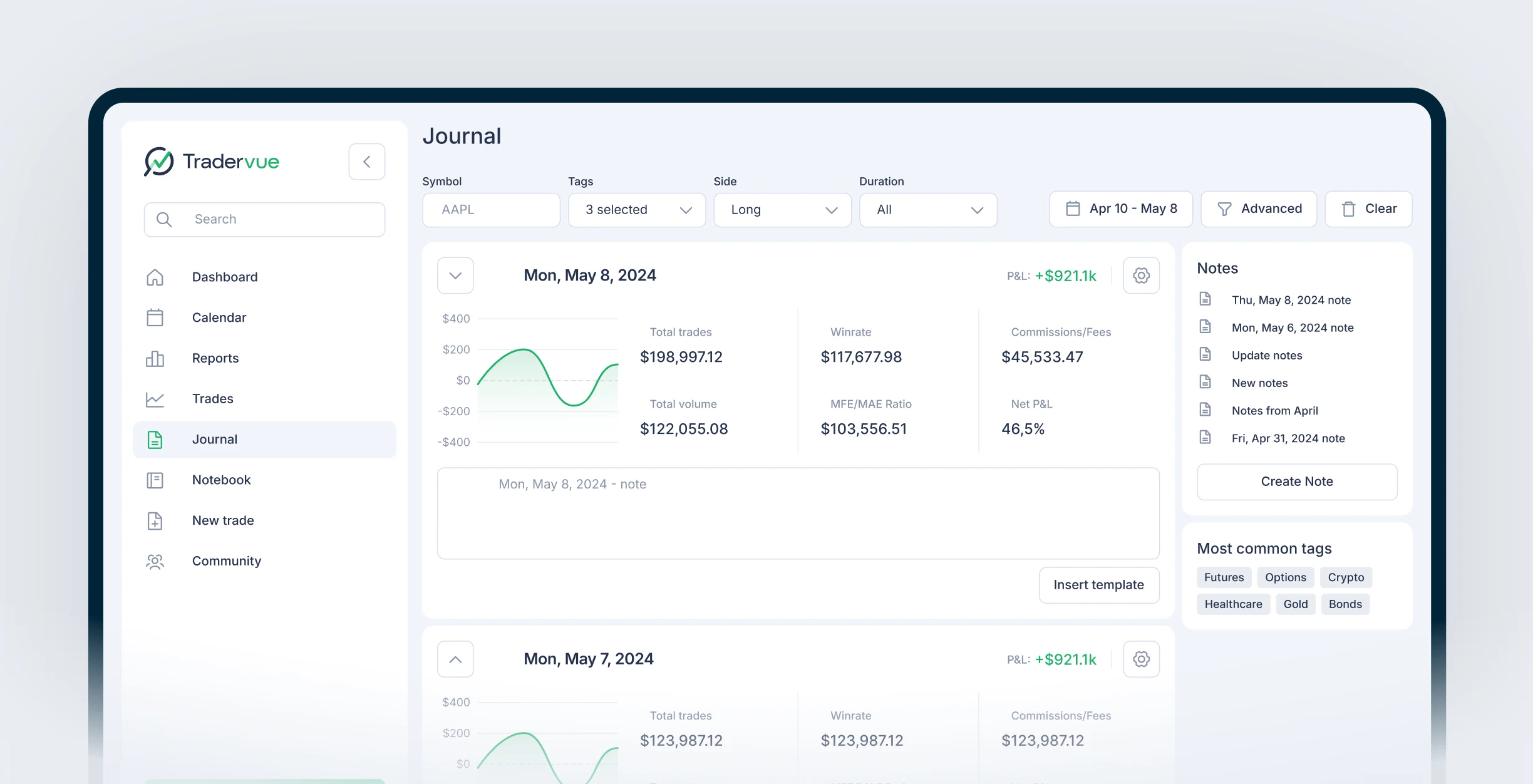
Tradervue is a web-based trading journal that offers a free tier with core journaling features and up to 30 trades per month. For day traders who are just starting to journal and want to test the habit before committing to a paid platform, Tradervue provides a functional entry point with manual and CSV import, basic tagging, and simple reports.
Day trading features
Trade import. Supports CSV import from most brokers plus direct integration with a few platforms. Import speed is slower than TradeZella's auto-sync, which matters for high-volume day traders who want trades logged immediately.
Tagging and notes. Tag trades by setup, add notes and screenshots. Basic but functional for reviewing individual trades.
Reports. Silver and Gold plans include performance reports filtered by tag, symbol, and time period. The reporting depth is adequate for basic pattern detection but lacks the per-hour breakdown and Strategy comparison that day traders need for serious optimization.
Sharing. Tradervue has a community feature where traders can share and compare journal entries. Useful for accountability but not a core day trading need.
Limitations for day traders
Free tier limited to 30 trades per month. Most day traders hit that in 2-3 sessions.
No trade replay. You can review charts and notes but can't walk through trades bar by bar.
No backtesting. You can't test strategies against historical data.
No built-in Strategies/setup tracking. You can tag trades manually but there's no dedicated setup comparison dashboard.
No Prop Firm Sync or multi-account dashboard.
Pricing
Free (30 trades/month), Silver ($29.95/month), Gold ($49.95/month). No annual discount. Silver adds unlimited trades and advanced reports. Gold adds exit analysis and 5GB storage.
3. Best for Structured Trade Coaching
TraderSync is a trading journal with an AI assistant called Cypher that analyzes your trades and provides coaching feedback. For day traders who want AI-generated insights about their patterns and mistakes, TraderSync offers a unique angle that other journals don't match on the AI coaching side.
Day trading features
Cypher AI. Analyzes your trade history and provides written feedback about patterns, mistakes, and areas for improvement. Pro plan includes 5 AI messages per day, Premium gets 15, Elite gets 60.
Trade import. Supports auto-sync and CSV import from most major brokers. Import works well for moderate volume but some day traders report delays with high-frequency sessions.
Reports and analytics. Includes performance reports, calendar view, and basic filtering. The reporting is solid but doesn't match TradeZella's 50+ reports or 7 dashboard views.
Replay simulator. TraderSync includes a replay feature, though it's not as integrated with the journaling workflow as TradeZella's Trade Replay and Day Replay modes.
Limitations for day traders
AI messages are limited per day (5 on Pro, 15 on Premium). Active day traders may burn through the daily limit quickly.
No built-in backtesting against historical data.
Pro plan limited to 5 active broker accounts.
No economic calendar.
Pricing
Pro: $29.95/month. Premium: $49.95/month. Elite: $79.95/month. Annual billing saves roughly 45%. 7-day free trial on all plans.
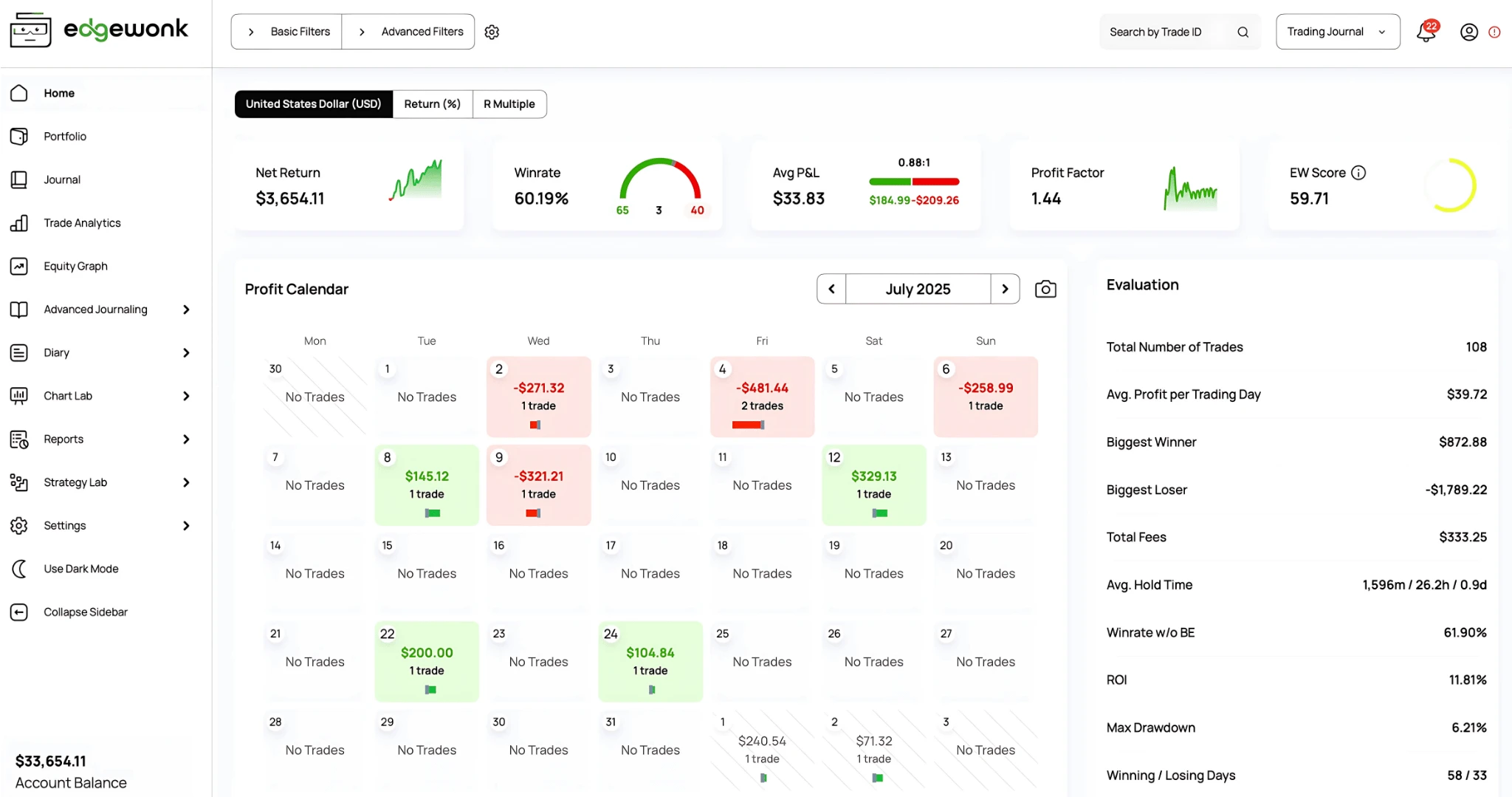
4. Edgewonk: Best for Psychology-Focused Day Traders
Edgewonk is a trading journal built around behavioral psychology and pattern recognition. For day traders who know their biggest problem is emotional decision-making rather than strategy, Edgewonk's psychology-first approach offers tools specifically designed to identify and correct behavioral patterns like tilt, revenge trading, and fear of missing out.
Day trading features
Psychology tracking. Built-in emotional state logging, tilt detection, and behavioral tags. Edgewonk was designed from the ground up around the idea that trading psychology is the primary edge. This matters for day traders because the speed of intraday trading amplifies emotional mistakes.
Edge Finder AI. Analyzes your trade data to identify your statistical edge across different conditions, setups, and time frames.
Trade import. CSV import from most brokers. No automatic real-time sync, which means day traders need to import manually after each session.
Reporting. Performance reports with filtering by setup, market conditions, and emotional state. The psychology overlay on top of standard metrics is unique to Edgewonk.
Limitations for day traders
No trade replay.
No backtesting.
No Prop Firm Sync or multi-account management.
Desktop-focused interface that feels dated compared to web-based competitors.
Pricing
$197/year (approximately $16.40/month). 24-month plan available at $297. No monthly option. Price increase announced for existing plans, so current pricing may change.
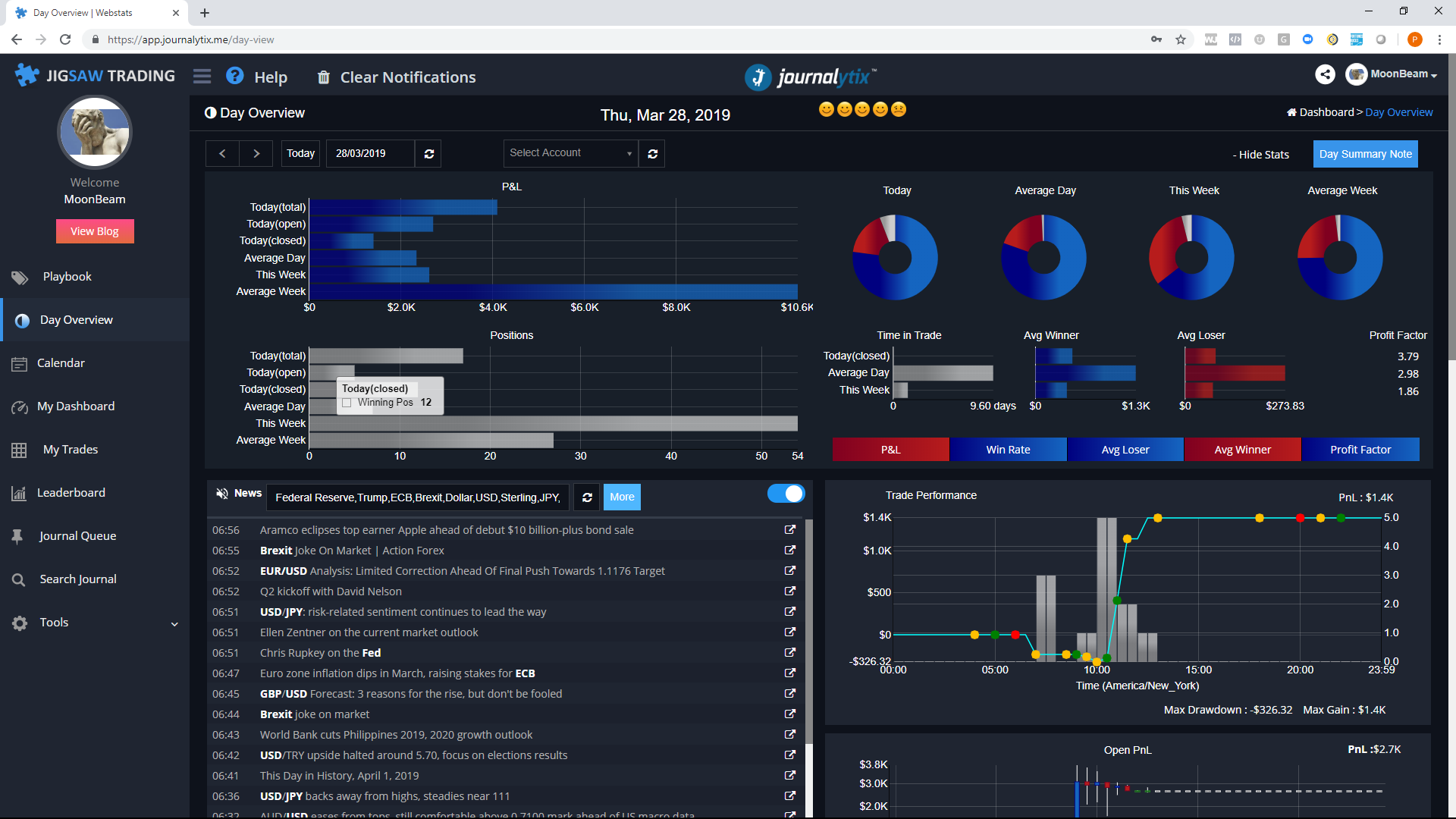
5. Journalytix: Best for NinjaTrader Futures Day Traders
Journalytix is a trading journal built specifically for futures day traders who use NinjaTrader. For traders on that specific platform and market, Journalytix offers deep integration including real-time session tracking and a live news feed that no other journal provides. It is owned by Jigsaw Trading, which specializes in order flow tools for futures traders.
Day trading features
Real-time session tracking. Journalytix runs alongside NinjaTrader and tracks your session in real time, including running P&L, trade count, and daily limit proximity. This live monitoring is Journalytix's strongest feature for active day traders.
Live news feed. Integrated news feed that shows market-moving events during your session. Useful for futures day traders who need to react to or avoid news events.
NinjaTrader integration. Deepest NinjaTrader integration of any journal. Trades import automatically with full execution details.
Prop firm and group analytics. Management dashboards for firms that track multiple traders. Includes leaderboards and group segmentation.
Limitations for day traders
NinjaTrader only. If you trade on TradingView, Tradovate, Interactive Brokers, or any other platform, Journalytix doesn't support you.
Futures only. No stock, options, forex, or crypto support.
No trade replay or backtesting.
No Strategy/setup comparison reporting.
Most expensive option at $47/month with no free tier.
Pricing
$47/month or $399/year (approximately $33.25/month). No free tier. Enterprise pricing available on request for prop firms.
Which Trading Journal Should Day Traders Choose?
The right journal depends on your specific day trading situation. Here's a direct recommendation based on the most common scenarios:
If you want the most complete platform: TradeZella. It's the only journal that combines auto-import from 500+ brokers, trade replay, backtesting, 50+ reports, Prop Firm Sync, an economic calendar, and Zella AI agents in one platform. The AI agents handle the tedious work that day traders skip: auto-tagging every trade, delivering a pre-session market briefing, and writing your session review. For day traders who want to journal, analyze, replay, and backtest without switching between tools, TradeZella covers all of it.
If you're journaling for the first time: TradeZella's auto-import removes the biggest barrier for new journalers. You don't need to learn spreadsheet formulas or build templates. Connect your broker, and your trades appear automatically. Zella AI handles tagging, so even beginners get organized data from day one without knowing what tags to create.
If AI insights matter most: Zella AI lets you ask any question about your trading data inside the app. Ask "what's costing me the most money?" and get an answer pulled from your actual trades. Other platforms offer basic AI chat, but Zella AI combines conversational Q&A with agents that work in the background automatically.
If psychology is your biggest problem: TradeZella's custom tag system lets you track emotional states (tilt, revenge, FOMO) on every trade, then filter your analytics by those tags to see exactly how much emotional trading costs you per month. The Session Review agent flags rule-breaking patterns automatically, so you don't have to remember to check. Combine that with trade replay to watch exactly how a tilt cascade unfolded in real time.
For every day trading scenario, TradeZella is the strongest choice because it combines speed (auto-import from 500+ brokers), depth (50+ reports, Strategy tracking, Day & Time analytics), review tools (Trade Replay, Day Replay, backtesting), and AI automation (Zella AI for Q&A, auto-tagging, briefings, and session reviews) in a single platform. No other journal offers this combination, which is why day traders who switch to TradeZella typically don't switch back.
How Do Day Traders Use a Journal Differently Than Swing Traders?
The journal is the same tool, but day traders use it differently because of volume and speed. Understanding these differences helps you set up your journal correctly from day one. For a step-by-step guide, see how to build a trade journal.
Volume. A swing trader might take 3-5 trades per week. A day trader takes 5-20 per day. At that volume, manual entry is not realistic. Auto-import isn't a nice-to-have, it's a requirement. Without it, day traders stop journaling within two weeks.
Review frequency. Swing traders can review weekly. Day traders need a quick daily check (2 minutes, end of session: how many trades, running P&L, any rule breaks) and a deep weekly review (30 minutes, Sunday: patterns, time-of-day analysis, replay worst trade). The P&L calendar makes the daily check instant.
Behavioral patterns. Day trading amplifies psychological mistakes because there's less time between trades. A swing trader who takes a revenge trade has hours or days to cool off. A day trader who takes a revenge trade can take three more in the next 10 minutes. This is why the day trading mistakes that cost the most money are all behavioral: moving stops, revenge entries, overtrading, and ignoring the trading plan.
Time-of-day sensitivity. Day traders have profitable hours and unprofitable hours. Most retail day traders are profitable in the first 90 minutes of the session and unprofitable in the afternoon. Without time-of-day analytics, you can't see this pattern. With it, the fix is obvious: stop trading at 11 AM. TradeZella's Day & Time report shows this per-hour breakdown across your entire trade history.
Speed of review. A swing trader can spend 15 minutes reviewing one trade. A day trader with 15 trades needs a system that surfaces the important ones fast. TradeZella's tag filtering and R-Multiple view let you immediately find the outliers: the trades where rules were broken, where risk was oversized, or where the entry was off-plan. You review those, skip the routine wins, and save the deep dive for replay on Sunday.
Platform
Auto-Import
Time-of-Day Analytics
Trade Replay
Backtesting
Prop Firm Sync
Pricing
TradeZella
500+ brokers
Day & Time report
Trade + Day Replay
11+ years data
Multi-account
$29-49/mo
Tradervue
CSV + some auto
Basic (paid only)
No
No
No
Free-$49.95/mo
TraderSync
Auto-sync + CSV
Basic reports
Simulator
No
No
$29.95-79.95/mo
Edgewonk
CSV only
Basic
No
No
No
$197/year
Journalytix
NinjaTrader only
Real-time session
No
No
Group analytics
$47/mo
Key Takeaways
The best trading journal for day traders must handle high trade volume with automatic broker import, provide time-of-day analytics for identifying profitable hours, include trade replay for reviewing fast-moving sessions, and track daily loss limits in real time.
TradeZella is the best overall trading journal for day traders in 2026 because it combines 500+ broker auto-import, 50+ reports, trade replay, backtesting, Prop Firm Sync, an economic calendar, and Zella AI agents that automatically tag trades, deliver pre-session briefings, and generate personalized session reviews.
Tradervue is the best free option for beginners with up to 30 trades per month, but the free tier runs out quickly for active day traders.
Edgewonk is best for psychology-focused traders who want behavioral pattern tracking, but lacks replay, and backtesting.
Journalytix is best for NinjaTrader futures day traders specifically, but doesn't support other platforms or markets.
Day traders use journals differently than swing traders: more volume, faster review cycles, stronger need for behavioral tracking, and greater sensitivity to time-of-day patterns.
Frequently Asked Questions
What is the best trading journal for day traders?
TradeZella is the best trading journal for day traders in 2026. It is the only platform that combines automatic trade import from over 500 brokers, time-of-day analytics, per-strategy performance tracking, trade replay, built-in backtesting, a daily P&L calendar, Prop Firm Sync, and Zella AI agents in one integrated system. Zella AI is not a chatbox. It runs three agents that work automatically: a Trade Auto-Tagger that tags every trade based on your criteria, a Market Sentiment Briefing customized to your symbols and strategy, and a Session Review that generates a personalized post-session analysis. Day traders need this combination of speed, depth, and AI automation because they generate 5 to 20 trades per session, and manual journaling breaks down at that volume.
Do I need a trading journal if I only day trade?
Day traders need a journal more than any other trading style. The speed and volume of day trading amplifies behavioral mistakes like revenge trading, overtrading, and tilt. Without a journal, these patterns are invisible because they happen too fast to notice in real time. A journal with automatic trade import captures every trade including the ones you would rather forget, and the data reveals patterns that cost day traders two thousand to five thousand dollars per month on a fifty thousand dollar account. Day traders who journal consistently identify their profitable hours, their best setups, and their most expensive mistakes within the first month of tracking.
Can I use a spreadsheet as a day trading journal?
A spreadsheet works for swing traders who take 3 to 5 trades per week. It breaks down for day traders who take 10 to 20 trades per session because manual entry takes 30 to 60 minutes per day, which most traders abandon within two weeks. Spreadsheets also cannot provide trade replay, time-of-day analytics, or automatic daily loss limit tracking, all of which are critical for day trading improvement. For a full comparison of what you gain by switching from a spreadsheet to a dedicated journal, see our trading journal versus spreadsheet analysis.
How much does a trading journal cost for day traders?
Trading journal pricing for day traders ranges from free to seventy-nine dollars and ninety-five cents per month. Tradervue offers a free tier with 30 trades per month. TradeZella Essential starts at twenty-nine dollars per month (twenty-four dollars per month billed annually). TraderSync Pro starts at twenty-nine dollars and ninety-five cents per month. Edgewonk costs one hundred and ninety-seven dollars per year. Journalytix costs forty-seven dollars per month. For day traders who need automatic import, replay, and deep analytics, expect to spend twenty-four to fifty dollars per month depending on the platform and plan.
What features matter most for day trading journals?
The five most important features for a day trading journal are automatic broker import (to handle 10 to 20 trades per session without manual entry), time-of-day analytics (to identify which hours are profitable and which are costing money), per-setup performance tracking (to compare win rate and profit factor across different strategies), trade replay (to review fast-moving trades bar by bar and catch execution mistakes), and daily loss limit tracking (to prevent a single bad session from causing catastrophic drawdown). Of these five, automatic broker import is the most critical because without it, day traders stop journaling consistently within two weeks.
Is TradeZella worth it for day traders?
TradeZella is worth it for day traders who take five or more trades per session and want to improve through data-driven review. At twenty-nine dollars per month for the Essential plan, the cost is recovered if the journal helps you avoid even one revenge trade per month (typically a two hundred to five hundred dollar savings on a fifty thousand dollar account). The Pro plan at forty-nine dollars per month adds trade replay, which is the most valuable review tool for day traders. Day traders who use TradeZella's Day and Time report to cut unprofitable hours typically save five hundred to fifteen hundred dollars per month in afternoon losses alone. The platform pays for itself within the first week of consistent use for most active day traders.
Can I use TradeZella for prop firm day trading?
Yes. TradeZella includes Prop Firm Sync, which connects funded accounts from prop firms and imports trades automatically. The platform tracks daily profit and loss against the firm's hard daily loss limit, shows trailing drawdown proximity, and consolidates multiple funded accounts into one dashboard. For day traders running two or three funded accounts simultaneously, TradeZella is the only journal that provides multi-account risk aggregation alongside intraday analytics. For the complete funded trader toolkit, see our guide to tools every funded trader is using.



.png)