TradingView Bar Replay vs. TradeZella: Which is Most Accurate for Backtesting?
TradingView Bar Replay vs. TradeZella: Which is Most Accurate for Backtesting?
Is TradingView Bar Replay enough for serious backtesting? We compare it with TradeZella, examining features like tick-by-tick data, order execution, and analytics. Choose the platform that best validates your trading strategies.
class SampleComponent extends React.Component {
  // using the experimental public class field syntax below. We can also attach
  // the contextType to the current class
  static contextType = ColorContext;
  render() {
    return <Button color={this.color} />
  }
}
Last Updated: June 18, 2026
A TradingView bar replay alternative is a tool that lets you rewind charts and practice trades the way bar replay does, but adds what bar replay is missing: real order execution, a connected journal, performance stats across every session, and a link to your live trading. TradeZella is the most complete alternative because your replay, backtesting, and real trades all live in one platform.
TL;DR
TradingView bar replay lets you rewind a chart and practice your entries, which is fine for casual review. TradeZella takes that same bar-by-bar replay and makes it far more powerful: it replays down to the second with tick data so you watch candles build, every trade is journaled automatically, and you get performance analytics and a P&L calendar with stats that build across all your sessions. It also connects to your live trades from 500+ brokers and adds Zella AI review, so your practice actually improves your real trading.
TradingView's bar replay is one of the most-used practice tools in trading, and rewinding a chart to rehearse entries bar by bar is genuinely useful. But if you have used it for a while, you have hit its ceiling: your trades are not journaled or tracked across sessions, there are no long-term stats, and your practice never touches your live trading. Here is why TradeZella is a more powerful bar replay, and where TradingView still fits.
How TradeZella Beats TradingView Bar Replay
TradingView bar replay lets you rewind a chart and practice trades on historical data. TradeZella turns that same replay into a full training system. Here is what makes the difference.
TradeZella Turns Bar Replay Into a Full Backtesting System
The charting and execution side is similar on both platforms: multi-chart replay, jump-to-candle, go-to session, custom indicators, an economic calendar, RTH and ETH, drag SL and TP, partials, scale in and out, and saved templates, and TradeZella's backtesting even runs on TradingView charts so it feels familiar. The real difference is that TradeZella wraps that replay in a complete backtesting system: every trade you take is recorded, analyzed, and turned into data you can learn from. That is where bar replay stops and real backtesting begins, and it is what the rest of this section covers.
Watch the Candle Build, Down to the Second
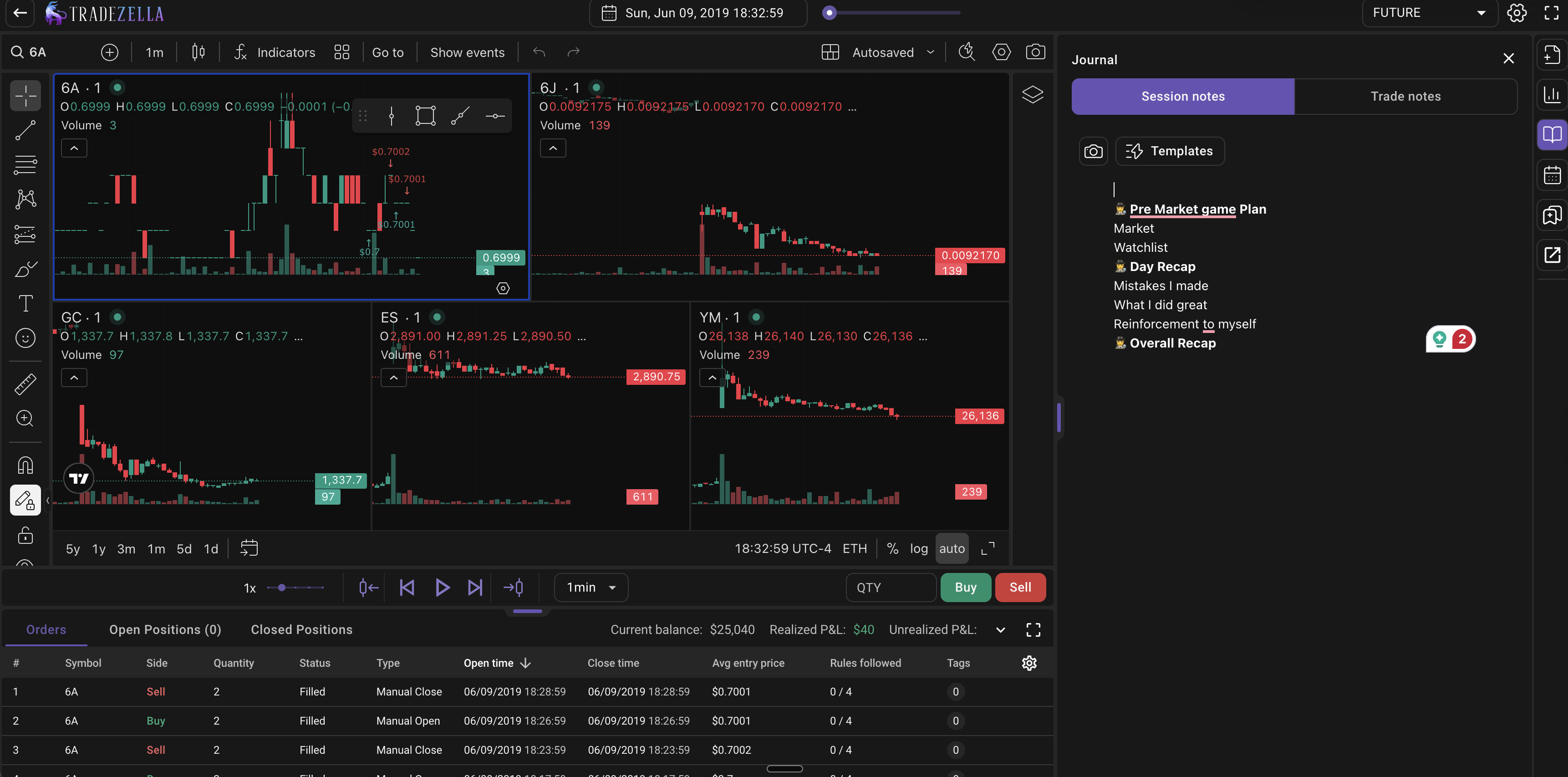
TradingView bar replay advances one completed candle at a time and, by its own documentation, cannot replay inside a bar. TradeZella replays down to the second, so on the lower timeframes you watch each candle build in real time and see how price moved inside the bar. For reading momentum and timing entries the way you would live, that granularity is a real edge over a bar-by-bar playback.
TradingView Bar by Bar Replay
TradeZella Tick by Tick Backtesting
Creating a Session
On TradingView, "starting" a replay is ad hoc: you click Replay, pick a starting bar (by date, a specific candle, or a random bar), and press play. There's nothing to set up and nothing that persists, it's a quick rewind on whatever chart you're already on.
On TradeZella, you create a structured backtesting session: you name it, connect it to a Strategy, choose your market and symbols, set a starting balance, and pick a date range, then it's saved and tracked. Every session keeps its own balance, win rate, and trade history, so your backtesting builds into a record you can return to and measure, instead of disappearing when you close the chart.
TradingView:
Tradingview Bar Replay
TradeZella:
TradeZella Backtesting - Creating a Backtesting Session
Why does the amount of market data matter? Well, for backtesting, having a good chunk of data is really helpful. It lets traders see how their strategies would've handled different market situations. This way, they can get a better idea of how their strategies might perform over time, and make more confident trading decisions.
Integration with TradingView Charts
TradingView: As expected, TradingView's Bar Replay is deeply integrated within its own charting platform. This provides users with a seamless experience, especially for those already familiar with TradingView's interface. A significant advantage here is access to TradingView's vast library of community-created and built-in custom indicators, giving users virtually infinite options for technical tools.
TradeZella: Also leverages TradingView charts, ensuring users work within a familiar and robust charting environment, complete with essential indicators and a growing list of TradeZella-created custom indicators. This means traders don't have to learn a new charting system.
TradeZella Indicators
However, TradeZella takes it a step further and enhances this familiar environment with its own set of integrated backtesting tools.
Every Trade Journaled in Detail, Not Just a Session Summary
This is the key differentiator. TradingView's replay trading gives you a basic per-session summary and a downloadable list of your trades, but it is not a journal, it does not carry your notes and tags, and it does not build across sessions. In TradeZella, every replay trade is logged in full and it stays: the exact entry and exit price, the time you entered and exited, how long you held, your position size, your R-multiple, and your dollar P&L. You can open any single trade and see precisely how it played out on the chart.
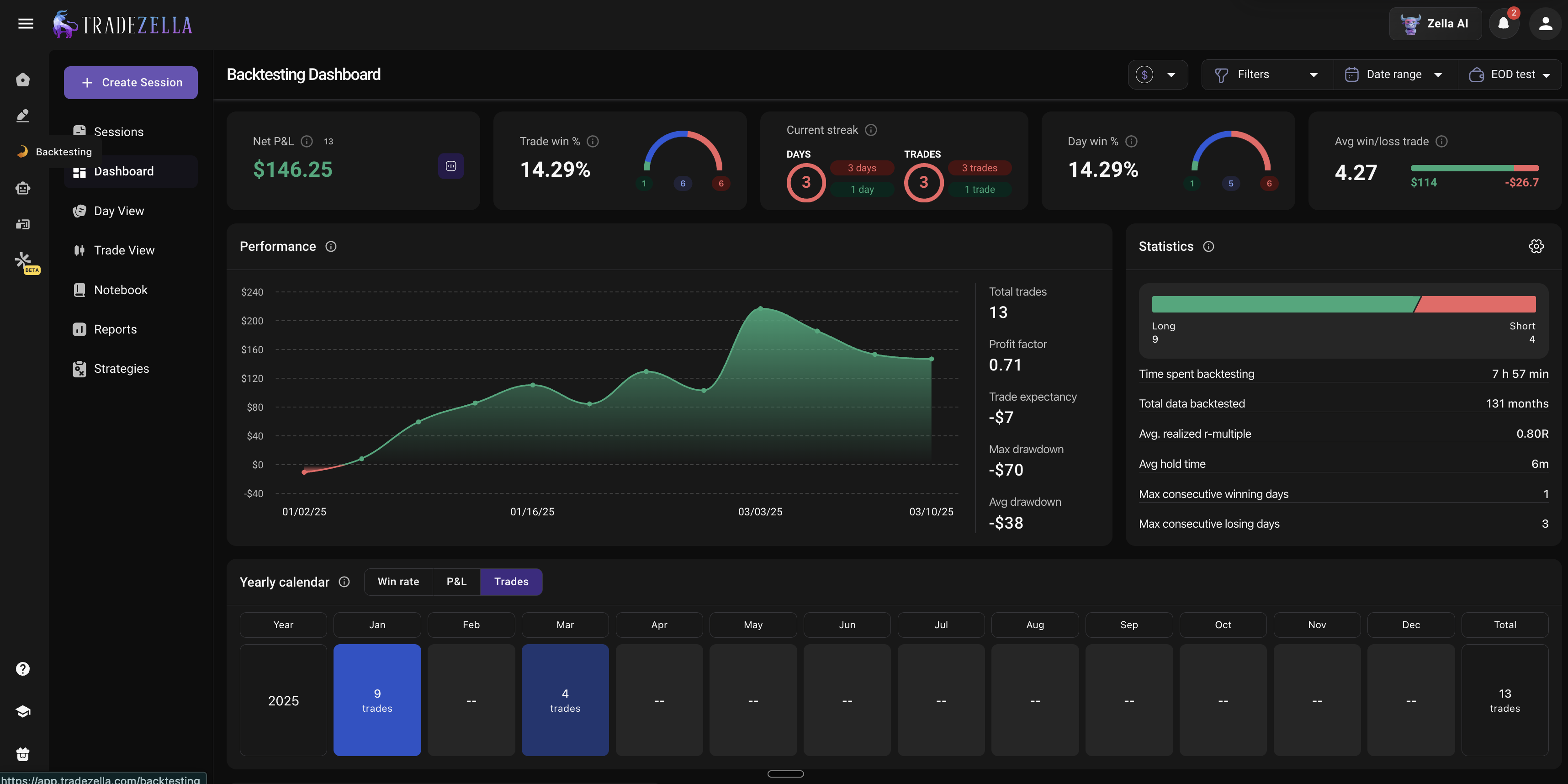
TradeZella Backtesting Dashboard
And the journaling happens during the session, not after: you take notes, tag the setup, and check off your trading rules the moment you place the trade, while the context is still fresh, instead of trying to reconstruct it later. Your history compounds instead of resetting each session.
Individual Trade Stats, Then the Full Picture
Because every trade is logged in that detail, you get two levels of insight that TradingView's replay panel does not:
First, individual trade stats, open any trade and review the exact execution, what you risked, what you made, your R-multiple, and where you entered and exited.
Second, the aggregate: a full analytics dashboard that shows your best and worst strategies side by side with win rate, net P&L, profit factor, average win versus loss, and trade count, a performance calendar that breaks results down month by month, and the ability to filter your data by strategy, symbol, tag, day and time, or risk. You can even track deeper stats like average R-multiple, average hold time, and your longest win and loss streaks. That is how you uncover a real trading edge. TradingView's replay panel shows a basic per-session summary at best, not this depth or history across sessions.
TradeZella Backtesting Trades View
Tradingview Bar Replay: List of Trades
Your Practice Connects to Your Live Trading
TradingView keeps practice and live trading completely separate. TradeZella imports your live trades from 500+ brokers, so your replay sessions, backtests, and real trades sit in the same analytics with the same filters and tags. You can finally compare how you practice to how you actually trade, which is where most improvement comes from.
Zella AI Reviews Every Session
Zella AI tags your trades, reviews each session against your plan, and surfaces patterns you would never catch by eye, across both your practice and your live data. You can ask it questions about your own results and get answers backed by your real history. TradingView bar replay has no equivalent.
Automated Backtesting at Scale
Beyond manual replay, TradeZella is rolling out automated backtesting, where you describe your strategy rules in plain English and the engine runs them across years of data. That lets you test expectancy across hundreds of trades instead of clicking through candles one at a time. For the hands-on approach available today, see how to backtest with TradeZella and backtesting for beginners.
What TradingView Bar Replay Does Well (And Where It Stops)
To be fair, TradingView bar replay is a strong, mostly free way to rewind a chart and rehearse your read bar by bar. It supports multiple synced charts, lets you drag your stop and target and jump to a specific candle, works with its enormous library of community and built-in indicators, and has deep historical data. Its replay trading also lets you place market, limit, stop, and bracket orders. Where it stops is everything after the session: there is no trade journal, no stats across sessions, no automated backtesting, and your practice never connects to your live trading. Its intraday replay depth is also gated by your TradingView plan, so practicing on the deepest 1-minute and second-by-second history can require a paid subscription.
TradingView Bar Replay vs TradeZella
Here is how the two compare on the things that matter for serious practice and development.
Features
TradingView
TradeZella
Multi-chart
✓ (4)
✓ (8)
Multi-pairs
✓
✓
Replay / jump to candle
✓
✓
Go-to session
✓
✓
Custom indicators
✓
✓
Economic calendar
✓
✓
Seconds timeframe
✓
✓
Custom timeframes
✓
✓
RTH / ETH
✓
✓
Drag SL / TP
✓
✓
Take partials
✓
✓
Scale in / out
✓
✓
Smooth candles
✓
✓
Save drawing templates
✓
✓
Save session templates
✓
✓
Seconds replay / tick data
×
✓
Performance analytics
×
✓
P&L calendar
×
✓
Journal session
×
✓
Journal trades
×
✓
Live broker sync (500+ brokers)
×
✓
AI trade analysis (Zella AI)
×
✓
TradingView bar replay and TradeZella share most charting and execution features. The difference is everything around the trade: seconds-level replay with tick data, automatic journaling of every trade and session, performance analytics, a P&L calendar, live broker sync, and AI review.
Yes, as a starting point. If you are new to practice trading and already pay for a TradingView plan, bar replay is a reasonable introduction. But if you are serious about tracking your practice results, testing strategies at scale, and connecting your development to your live performance, you will outgrow it quickly. For a wider look at dedicated tools, see our guide to the best backtesting software, the TradeZella vs TradingView comparison, and our trade replay guide for reviewing your own executed trades. If you are new to the concept entirely, start with what is backtesting and how to backtest a trading strategy.
Key Takeaways
TradingView bar replay is great for visual practice, but trades are not journaled or tracked across sessions.
TradeZella replays down to the second with tick data, which TradingView bar replay does not offer.
Every TradeZella replay trade is journaled automatically, and stats build across all your practice.
Intraday replay depth on TradingView is gated by your plan.
TradeZella connects replay, backtesting, journaling, broker sync, and Zella AI in one platform, so practice improves your live trading.
Frequently Asked Questions
What is the best TradingView bar replay alternative?
The best alternative is a platform that keeps manual bar-by-bar replay but adds real order execution, a connected journal, performance stats across sessions, and live broker sync. TradeZella is the most complete option because your practice, backtests, and live trades all live in one platform with the same analytics.
Is TradingView bar replay free?
Bar replay is available on TradingView's free plan, but intraday replay depth is limited and depends on your subscription. Practicing on the deepest 1-minute and second-by-second history can require a paid TradingView plan, so it is not fully free for active intraday traders.
Can you place trades in TradingView bar replay?
Yes. TradingView's replay trading lets you place market, limit, stop, and bracket orders and close with a Flatten button. The difference with TradeZella's backtesting is the layer around execution: every trade is journaled and analyzed automatically, with performance analytics, a P&L calendar, and stats that build across sessions. TradingView shows you a basic session panel, not a full journal and analytics.
Can you backtest with TradingView bar replay?
You can practice and place trades with bar replay, but it is not built for backtesting at scale. Testing whether a strategy has a positive expectancy across hundreds of trades requires real backtesting with metrics like win rate and profit factor tracked across sessions, which bar replay does not provide.
Does TradeZella have a bar replay feature?
Yes. TradeZella's backtesting lets you replay any chart bar by bar and down to the second, place and journal every trade automatically, and review it with full performance analytics. It also imports your live trades from 500+ brokers so your practice and real performance sit in the same analytics.
Why use a bar replay alternative instead of TradingView?
Because TradingView bar replay sessions do not connect to a journal, do not track stats across sessions, cannot test strategies at scale, and are separated from your live trading. An alternative like TradeZella closes those gaps so your practice produces measurable improvement in your real trading.