FX Replay Alternatives to Try in 2026: Comparison With 5 Competitors
FX Replay Alternatives to Try in 2026: Comparison With 5 Competitors
Five backtesting platforms compared as FX Replay alternatives for 2026, ranked by features, pricing, and what type of trader each one fits. TradeZella is the top alternative for traders who want backtesting connected to live trade journaling, analytics, AI agents, and prop firm tracking in one platform.
class SampleComponent extends React.Component {
  // using the experimental public class field syntax below. We can also attach
  // the contextType to the current class
  static contextType = ColorContext;
  render() {
    return <Button color={this.color} />
  }
}
Last Updated: July 06, 2026
If you have been using FX Replay for backtesting and feel like you have outgrown it, or you are looking for a backtesting platform that does more than replay, this guide compares the five best alternatives in 2026. We ranked TradeZella, Forex Tester Online, NinjaTrader, TradingView, and TradingSim based on backtesting features, data quality, journaling, analytics, AI, prop firm support, and pricing.
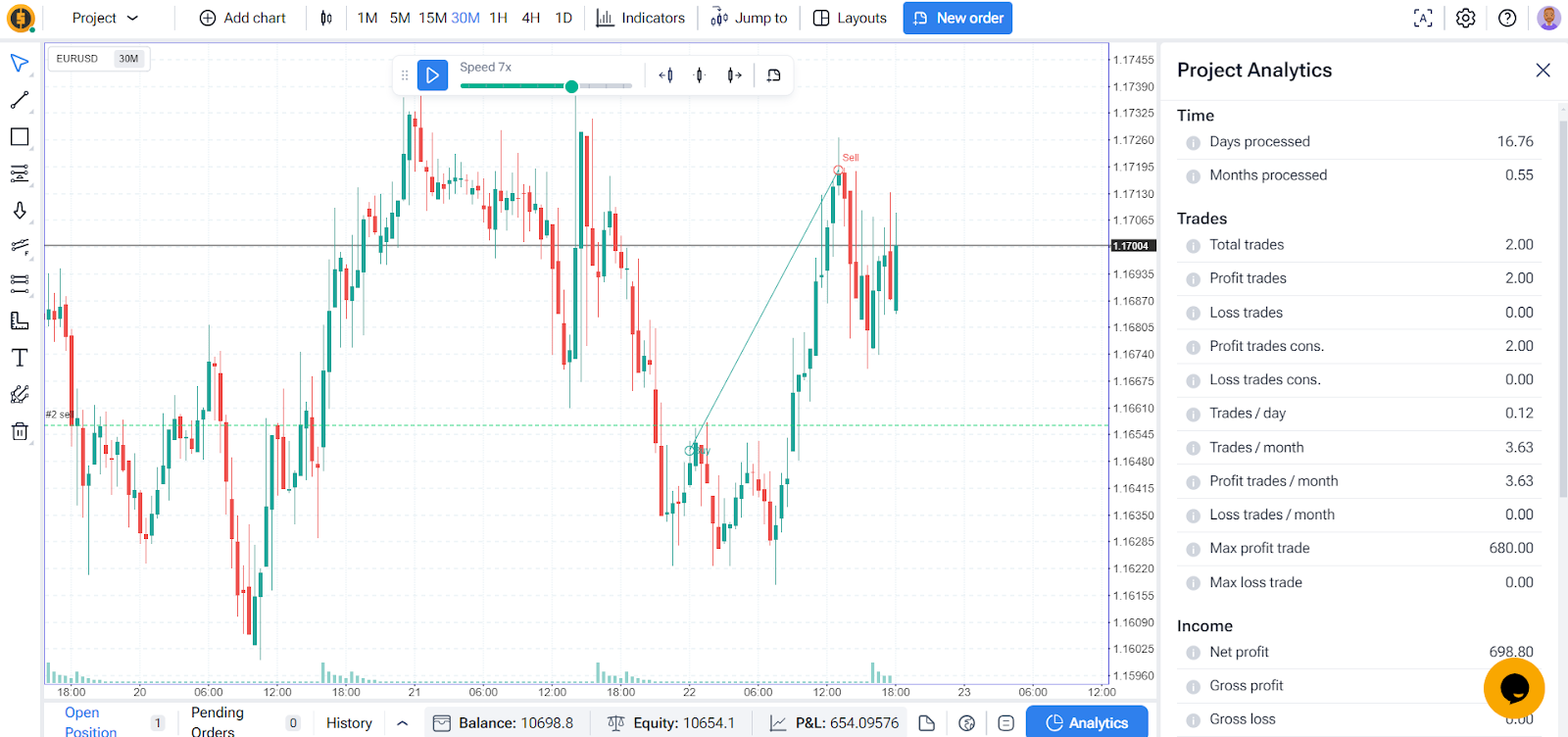
FX Replay is a solid replay simulator. TradingView-powered charts, a free tier for beginners, Mentor AI for behavioral coaching, FXR Battles for competitive trading, a Prop Firm Simulator for practicing evaluations, and FXR Script for building custom indicators. For traders who only need to practice strategies on historical data, it works.
But many traders reach a point where replay practice is not enough. You want your backtested trades and your live trades in the same analytics dashboard. You want AI that tags every trade automatically instead of doing it manually. You want prop firm tracking for real funded accounts, not just a simulator. You want to compare backtest performance against live performance on the same Strategy and see the gap. That is where these alternatives come in.
This article breaks down what each platform does well, where it falls short, and which type of trader it fits.
Our Commitment to Transparency
We built TradeZella to be the tool we wanted to use, and 100,000+ traders use it today. But we recognize different traders have different needs. Here is our honest assessment of the landscape.
TL;DR
TradeZella is the best FX Replay alternative for traders who want backtesting connected to live trade tracking, AI agents, deep analytics, and prop firm management in one platform. Backtest-to-live comparison on the same Strategy is something no other platform on this list offers. Essential plan starts at $35/month. Forex Tester Online is the best value for pure backtesting with tick-by-tick data and a $399 lifetime option. NinjaTrader is the strongest for coded automated strategies (C# required). TradingView works for simple bar replay if you are already on the platform. TradingSim has the widest US stock coverage (10,000+ symbols) but no forex and limited data history.
Why Look for an FX Replay Alternative?
FX Replay is good at what it does. The reasons traders look for alternatives usually come down to what FX Replay does not do:
No AI that takes action. FX Replay's Mentor AI (beta) gives behavioral feedback on backtested trades. But it does not tag trades automatically, does not review sessions against your plan, and does not generate pre-market briefings. Users still tag manually.
Stocks and futures require the Pro plan. FX Replay's free and Intermediate plans only include forex. Stocks (50+) and futures require the $35/month Pro plan.
No prop firm tracking for real accounts. The Prop Firm Simulator lets you practice evaluations on historical data, which is useful. But it does not connect to real prop firm accounts or track live daily/total trailing drawdown.
No automated or no-code backtesting. FX Replay is manual replay only. If you want to describe strategy rules in plain English and have an engine run them across years of data, FX Replay does not offer that.
Performance and reliability issues. Multiple users on Trustpilot report that FX Replay has become slower over time, with lag during sessions that does not depend on internet speed or hardware. Some users also report that chart templates, layouts, and drawing tools reset when switching between projects or reloading, which can disrupt backtesting workflow.
None of these are flaws in isolation. FX Replay is built as a dedicated replay practice tool, and it does that well. But if you need more than practice, or if you have hit the ceiling on what FX Replay offers, an alternative fills the gap.
Zella AI (agents: Auto-Tagger, Session Review, Market Briefing, memory)
No
AI Generate (experimental, genetic algorithm)
No
No
Live Trade Import
6 brokers + CSV
500+ brokers
No (backtesting only)
Via brokerage connections
Via broker integration (charting only)
No
Backtest-to-Live Comparison
No
Yes (same dashboard, same Strategy)
No
No
No
No
Prop Firm Support
Simulator (practice)
Prop Firm Sync (real accounts)
Simulator (practice)
No
No
No
Coding Required
No
No
No (automations on Pro)
Yes (C# for backtesting)
Pine Script for Strategy Tester
No
Automated No-Code (Plain English)
No (manual replay only)
Yes (describe rules in plain English)
Limited (rule-based automations, Pro)
No (requires C#)
No (requires Pine Script)
No (manual replay only)
Free Plan
Yes (limited)
No
Demo only
Yes (with fees)
Yes (limited)
7-day trial
Starting Price
$17.99/mo
$29/mo
$13.25/mo (annual)
Free ($99/mo for full)
~$14.95/mo
$33/mo (annual)
Best FX Replay Alternatives
1. TradeZella
TradeZella Backtesting Dashboard
TradeZella is a backtesting platform that also functions as an AI trading journal, analytics dashboard, trade replay tool, and prop firm tracker in one platform. It does both manual bar replay and automated, no-code backtesting: you describe your strategy rules in plain English, the engine runs them across 11+ years of historical data, and every individual trade is shown with Zella AI analysis. Every trade logs automatically, and the same analytics reports you use for live trades apply to your backtested trades. Import your live trades from 500+ brokers, and your backtest results and live results sit in the same tool.
This is the fundamental difference between TradeZella and every other platform on this list. Backtesting is not a standalone feature. It connects to everything: your journal, your analytics, your AI trading agents, your prop firm accounts, and your live trade data.
TradeZella's Automated Backtesting and Scenario Testing
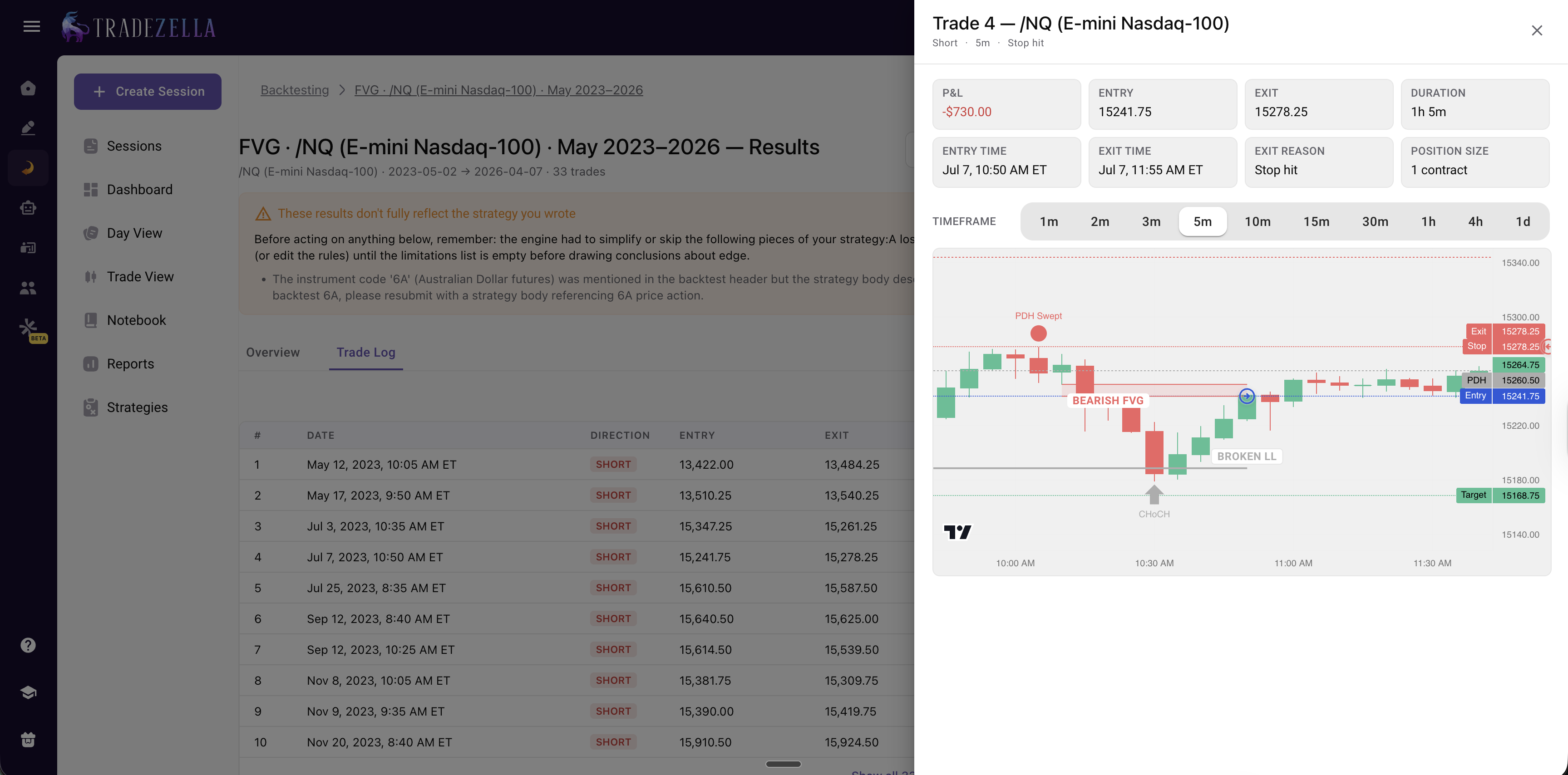
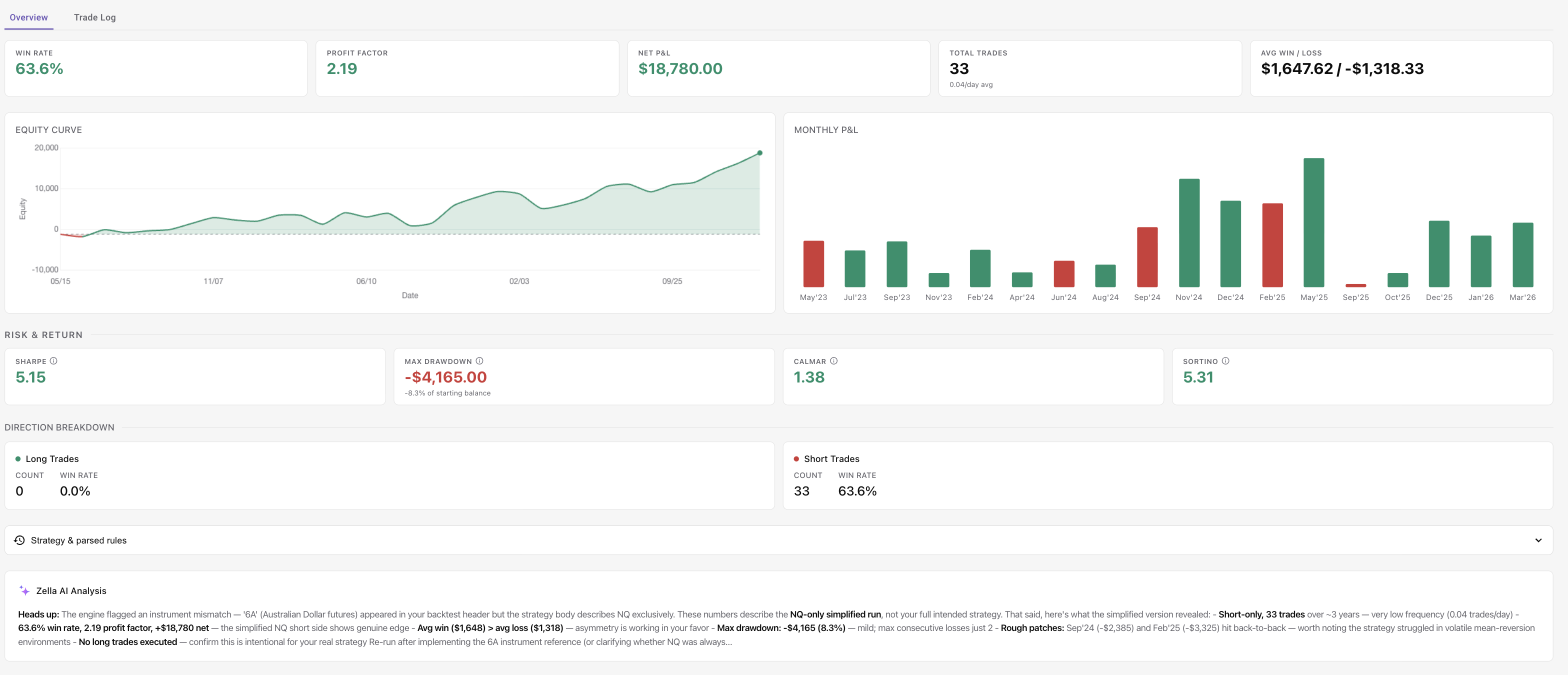
TradeZella offers automated no-code backtesting. Describe your strategy rules in plain English, and the engine parses your rules and runs them across years of historical data. Every individual trade is visible with entry, exit, trade time, and exit time. Results include win rate, profit factor, P&L, trade count, average win/loss, monthly breakdown, and long/short breakdown with Zella AI analysis. Pre-built templates cover common setups like ICT concepts, FVG, sweeps, liquidity, and opening range breakouts. No Python, no PineScript, no coding. For more, see our no-code backtesting guide.
TradeZella's Automated Backtesting: How It Works
TradeZella's automated, no-code backtesting lets you test a strategy without replaying a single candle by hand and without writing code. Here is the full flow.
1. Describe your strategy in plain English. You type the setup the way you would explain it to another trader, for example: "Buy ES when price sweeps the previous day's low and forms a bullish Fair Value Gap on the 5-minute chart, stop below the sweep, target two times risk, only in the New York morning session." No indicators to configure, no rule builder, no script.
TradeZella Automated Backtesting
2. The engine confirms and parses your rules. TradeZella reads your description, and if anything is missing (starting balance, session, timeframe, risk per trade) it asks before running, so the test is set up correctly instead of silently assuming.
3. It runs across years of historical data. The engine scans years of data across forex, futures, stocks, and crypto, down to seconds-level timeframes, and executes every trade your rules would have taken. Results come back in minutes, not the weeks a manual backtest of the same size would take.
4. Every individual trade is drawn on the chart. This is the part no manual process and no chatbot gives you. Each backtested trade opens with the exact setup drawn on the chart, the Fair Value Gap, the liquidity sweep, or the breaker block and its retest, along with the entry, exit, trade time, and P&L. You can click through trade by trade and see why each one was taken, instead of trusting a summary number.
TradeZella Automated Backtesting Per Trade Analysis
5. You get the full results and metrics. Win rate, profit factor, P&L, trade count, average win/loss, monthly breakdown, and long/short breakdown, all calculated automatically.
6. Zella AI analyzes the session. Zella AI reads the full set of results and flags what to fix, a weak session, a losing day of the week, or setups that only work under certain conditions, so you know exactly what to adjust before you run it again.
TradeZella Automated Backtesting Stats with Zella AI Analysis
Pre-built templates cover common setups like ICT concepts, FVG, sweeps, liquidity, and opening range breakouts, so you can start from a proven structure and tweak it. No Python, no PineScript, no coding at any step. For more, see our no-code backtesting guide.
Scenario backtesting takes it further with pre-built strategy templates that jump only to specific days where a setup occurred on historical data, so you practice the exact pattern under targeted conditions instead of replaying random days.
TradeZella Manual Backtesting: Charts, Data, and Replay
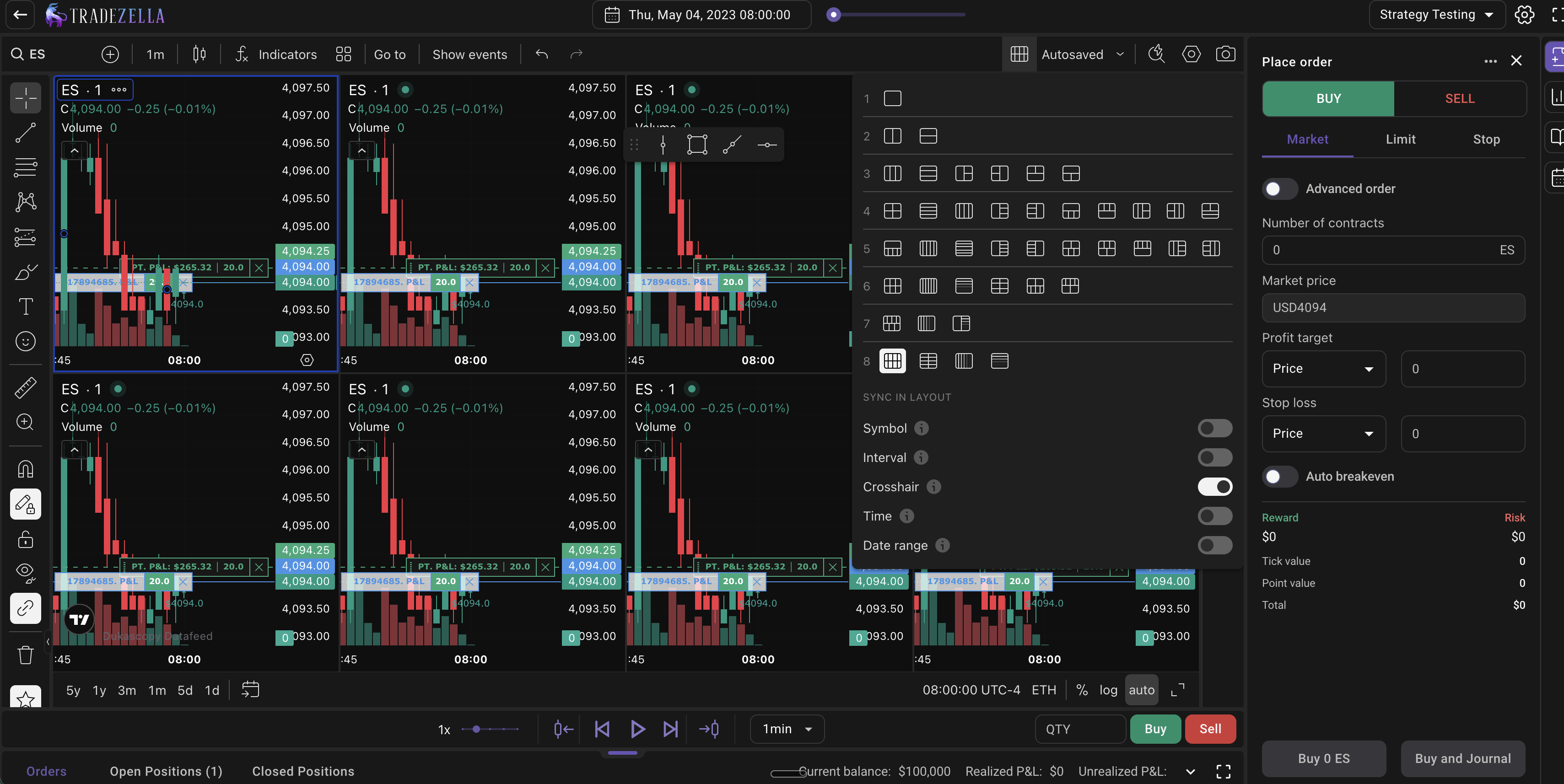
TradeZella uses TradingView-powered charts with up to 8 chart layouts and 5 symbols per backtesting session. Historical data goes back 11+ years to September 2014 across forex, futures, stocks, and crypto. All standard minute, hour, and daily timeframes are available on every plan. Seconds timeframes (1s, 2s, 5s, 10s, 15s, 30s) are available on the Pro plan. At 1x speed on the 1-second chart, the candle prints exactly as it would in a live market. You can watch it form, react, and close in real time. This is how scalpers build screen time without risking money.
TradeZella Multichart Layout
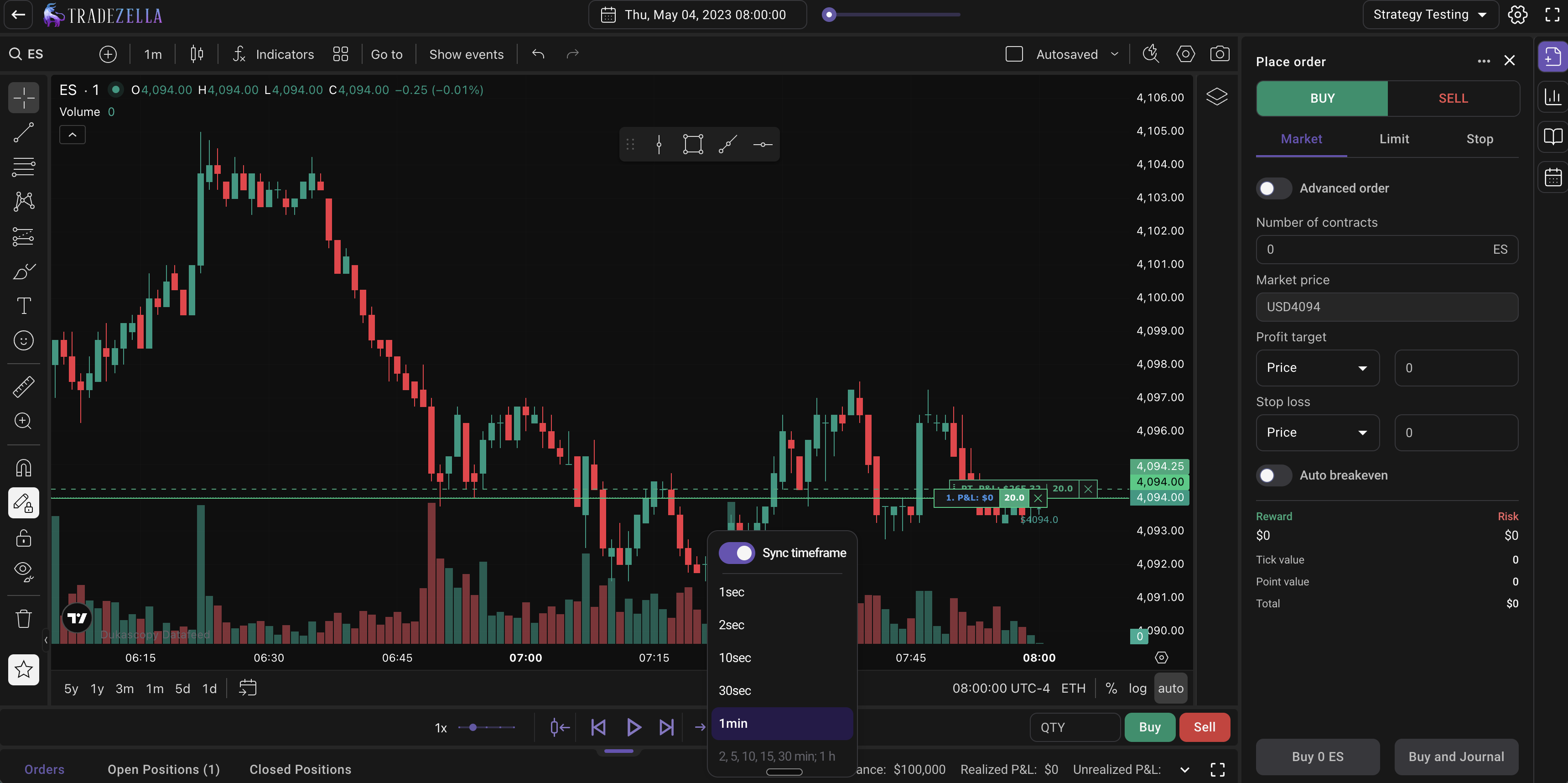
Replay speed runs from 0.5x to 10x. The Go-To feature lets you jump to specific dates, candles, or sessions instantly so you skip dead price action instead of fast-forwarding through it. Sync timeframe replay matches the replay speed to whatever chart timeframe you are viewing. Switch to the 5-minute chart and the replay advances 5-minute candles. Switch to 30-second and it advances 30-second candles. Arrow keys let you step candle by candle for precise navigation. A jump-to feature rewinds price so you can double check something on a lower timeframe without losing your place.
Sync Timeframe and Go to Feature
Built-in ICT indicators include Fair Value Gap (FVG) with configurable settings to hide invalidated gaps and show the consequent incursion middle line, Asian Session Range, HTF Bias, Key Levels, Power of 3, and session indicators. No scripts needed, no configuration. The economic calendar shows high-impact news events directly on the chart during replay. RTH/ETH toggle is included on all plans for stocks and futures. Smooth candles, full screen mode, chart color customization, and saved chart layout templates that persist across sessions are all built in.
TradeZella Backtesting Indicators
TradeZella Manual Backtesting: Order Execution and Position Sizing
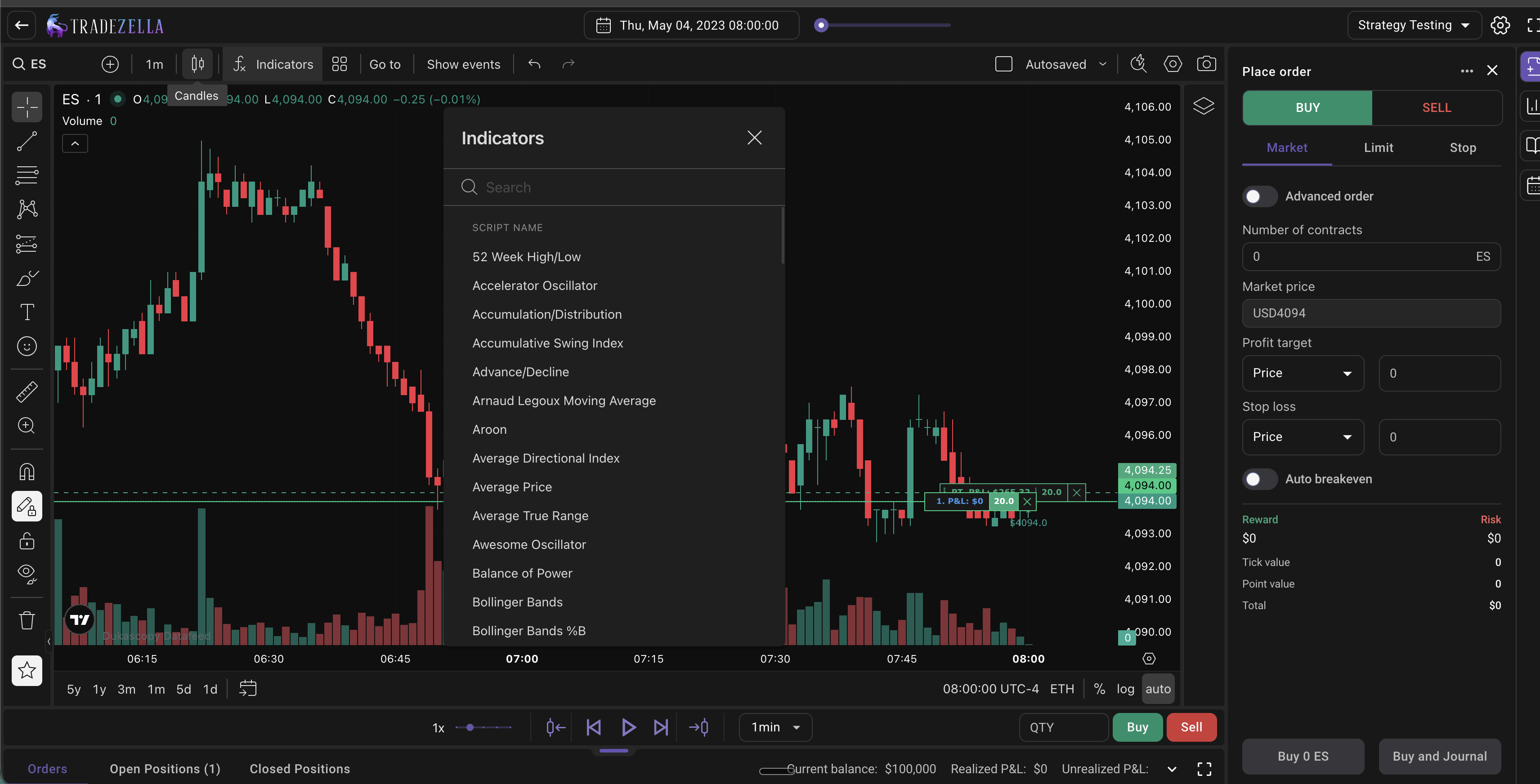
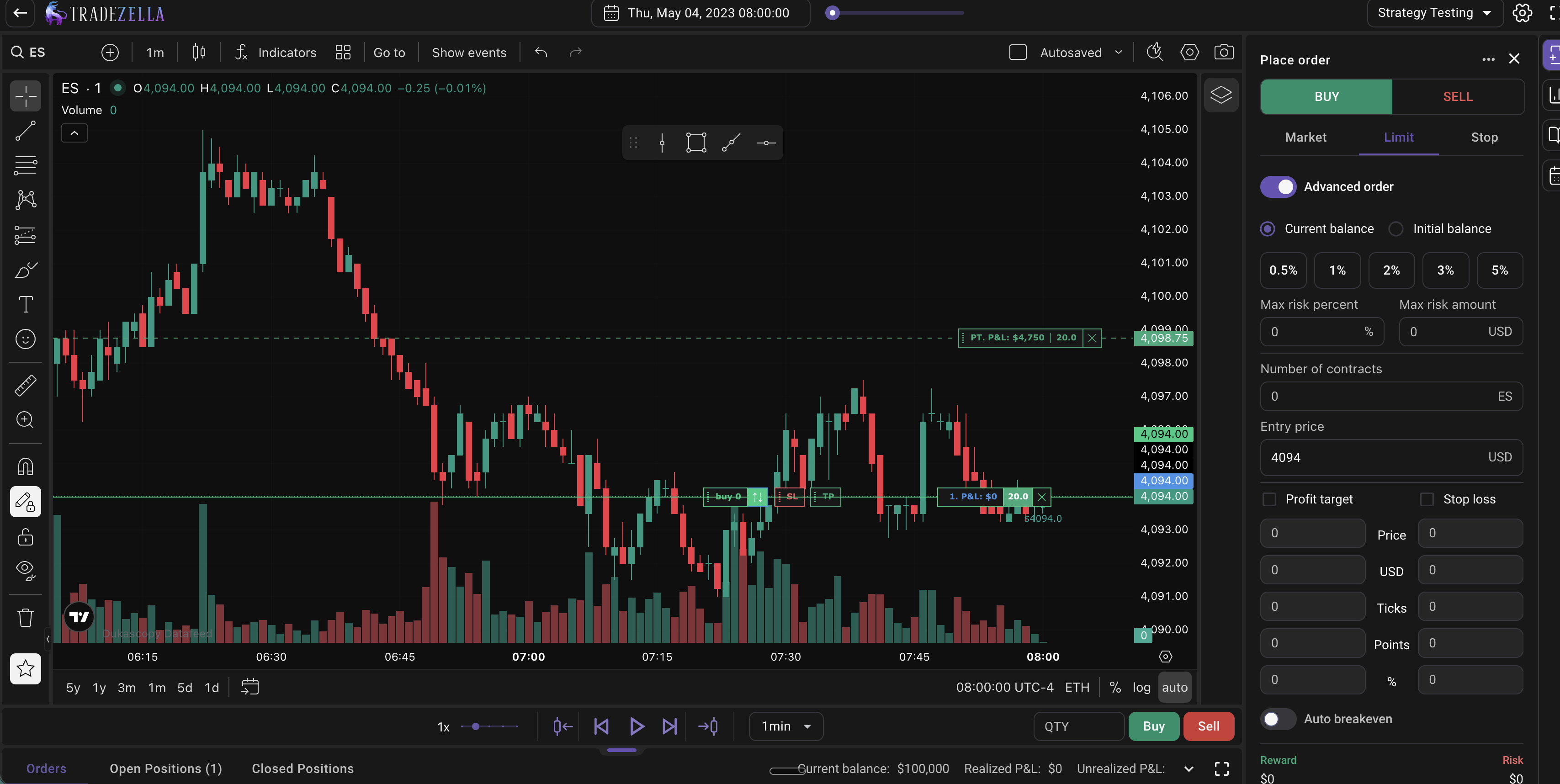
TradeZella supports market, limit, and stop orders with realistic execution. The Long/Short tool lets you draw your entry directly on the chart, and the order panel automatically fills your SL and TP. Press Advanced Order, set your risk percentage (or dollar amount), and TradeZella calculates the exact position size based on your stop distance. Your dollar risk stays the same on every trade regardless of how far your stop is. You can use Current Balance or Initial Balance as the calculation base.
Drag-and-drop SL/TP lets you adjust stops and targets directly on the chart as the trade unfolds. As you drag, the estimated profit or loss updates in real time. Auto-breakeven automatically moves your stop loss to breakeven when price hits a target you define, configurable by price level, R-multiple, or USD amount. Manual partials let you close 25%, 50%, 75%, or any custom amount of your position at any time. Scale in/out for futures and stocks works the same way it does with a real broker: add to a winning position and TradeZella averages in. This can be toggled off if you prefer separate positions. Quick buy/sell buttons handle one-click execution. Pending orders let you set limit orders and wait for price to tag you in. Multiple profit targets let you set and manage multiple TP levels per trade. Hide orders keeps the chart clean by removing order lines and labels when you want unbiased visual analysis.
TradeZella Place Order Tab
TradeZella Manual Backtesting: Auto-Journaling and Tagging
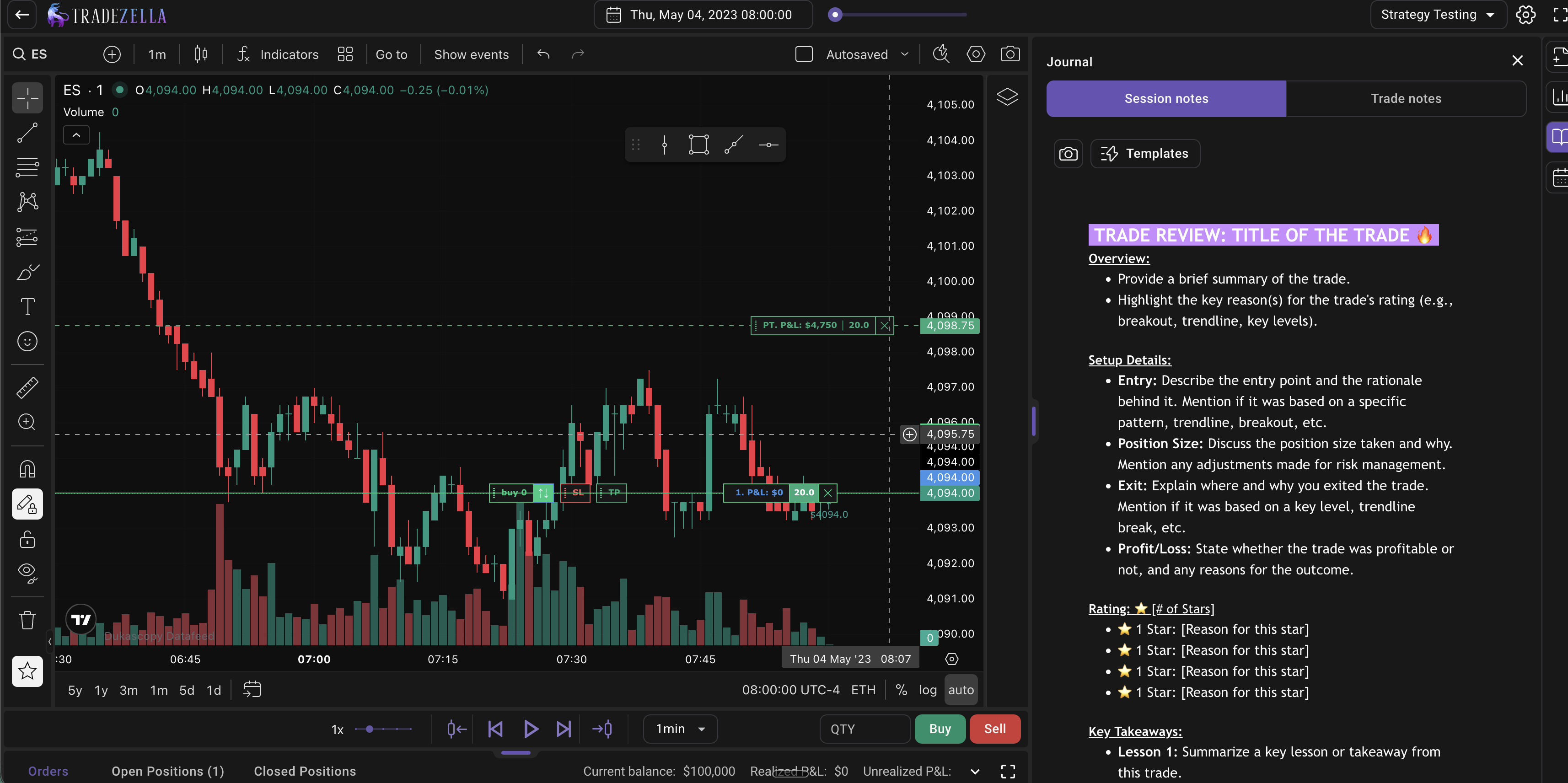
Every backtested trade logs automatically the moment you execute, with entry, exit, position size, P&L, and timestamps. The journal panel sits beside the chart so you can add context during the session without leaving the backtesting interface.
For each trade, you can check off your Strategy rules one by one, rate your confidence level (Low, Medium, High), tag your execution speed (Early, On Time, Late), tag the entry timeframe, tag the area of interest type, tag market conditions, tag trade management decisions, tag mistakes (Early Entry, Moved Stop, Oversized, FOMO Entry, Late Entry), and add screenshots. You can create unlimited custom tag categories: entry model, timeframe, emotion, sleep quality, premarket routine, news events, distractions, or anything else that might affect your trading. Session notes apply to the whole backtesting session. Trade notes apply to individual trades. All tags, notes, and attachments sync to the analytics dashboard after the session.
Strategies (formerly Playbooks) let you attach a strategy to your backtesting session. Every trade tags to that Strategy automatically. You can switch Strategies mid-session to test different setups with independent tracking. The Strategy comparison report shows win rate, profit factor, net P&L, average win/loss, expectancy, and trade count per Strategy side by side. Tool templates let you save drawing tools (supply zones, demand zones, liquidity levels, highs, lows) and reuse them across all sessions.
Live Journaling with Backtesting
TradeZella Manual Backtesting: Analytics and Reports
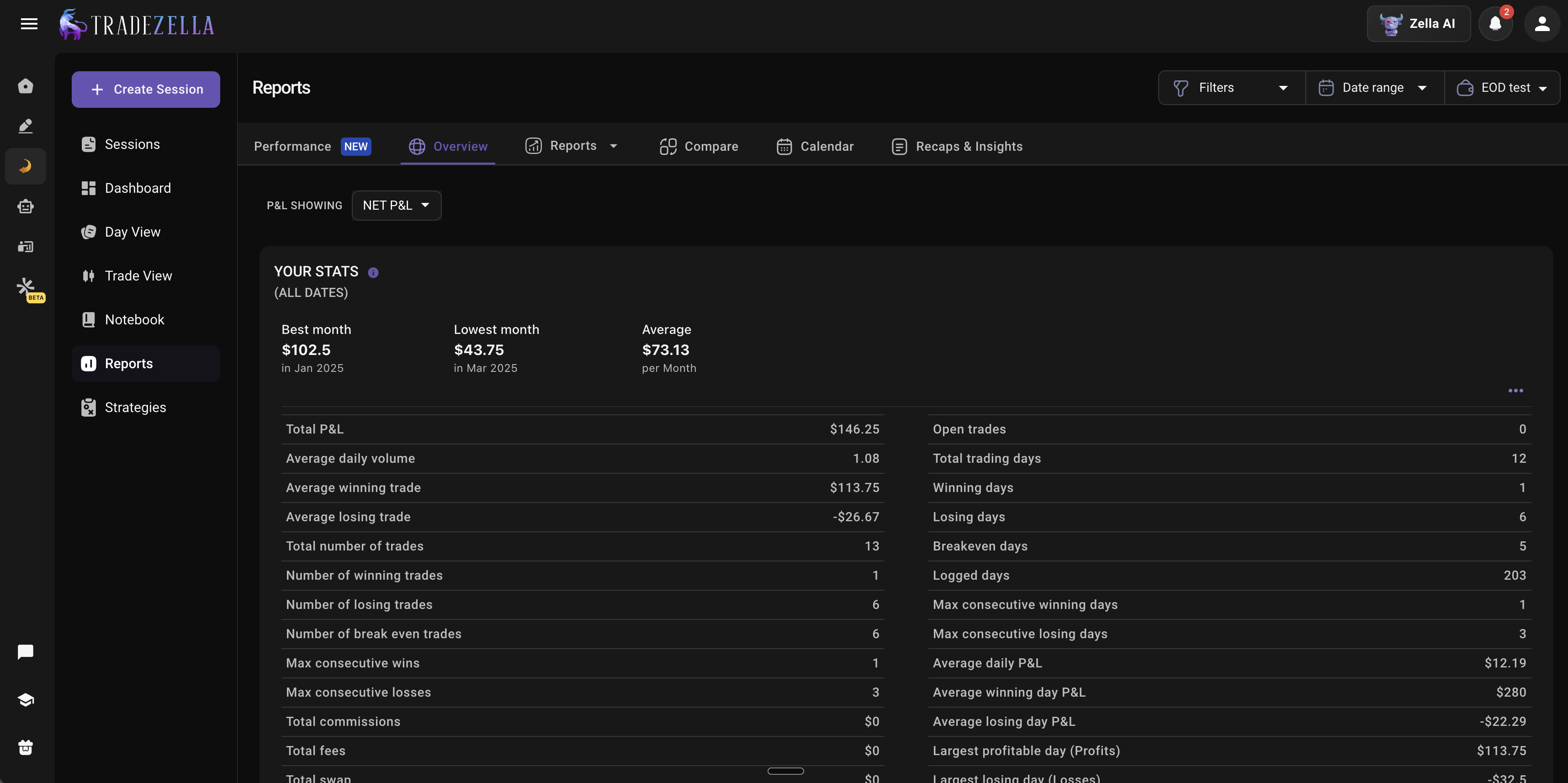
TradeZella provides reports across 7 dashboard views: Dollars, Percentage, R-Multiple, Ticks, Pips, Points, and Privacy. Performance by day of week, hour, trade duration, instrument, position size, and any custom tag combination. Strategy comparison, date and time reports, price and quantity reports, risk reports, custom reports for every tag category, MFA/MFE statistics (Maximum Adverse and Favorable Excursion), Zella Scale for actual vs potential P&L, best exit analysis, running P&L visualization, and an advanced calendar with P&L, win rate, and trade count by day, week, and month.
Backtesting Analytics and Report
AI Features: Zella AI
Zella AI is included with every TradeZella plan at no extra cost. The Auto Trade Tagger tags every trade based on rules you define in plain English: "tag by sector," "tag trades above 2R," "tag whether I followed my plan." The Session Review agent compares your morning plan against actual results and journals your entire day. The Market Sentiment Briefing generates a personalized pre-market plan based on how you trade, your instruments, and what you look at. Conversational AI answers questions about your data from your actual numbers. Memory persists across sessions, so it remembers your name, risk limits, Strategies, and preferences. For more on how AI trading agents work, see our guide.
Prop Firm Sync and Trade Replay
Prop Firm Sync connects to real prop firm evaluations and funded accounts. It tracks daily/total drawdown, trailing drawdown headroom, consistency rules, and manages multiple funded accounts in one dashboard. Auto-track spending via Plaid integration. Free for all TradeZella users. For more, see our funded trader tools guide.
Trade Replay is separate from backtesting. It reviews trades you already took live, second by second, with 3 modes: Trade Replay (individual trade), Day Replay (full session), and Scenario Replay (introducing). Replay speeds go up to 30x. Green and red markers show executions on the chart. This is execution review, not strategy testing.
Advantages over FX Replay
Backtesting + journaling + analytics + AI + prop firm tracking + trade replay in one platform
Backtest-to-live comparison in the same tool
Zella AI agents that tag, review, and plan automatically
500+ broker import for live trades alongside backtested trades
Unlimited custom tag categories with deep filtering and include/exclude logic
Built-in ICT indicators (FVG, Asian Range, HTF Bias, Key Levels, Power of 3)
Auto-breakeven and scale in/out
Prop Firm Sync for real funded accounts (not just simulation)
RTH/ETH included on all plans
Stocks included on all plans (FX Replay requires Pro for stocks)
Disadvantages
No free plan. Essential starts at $29/month.
Smaller general indicator library than FX Replay. No custom scripting language like FXR Script.
No competitive head-to-head trading (FX Replay has FXR Battles).
Pro: $49/month ($33/month billed annually). Everything in Essential plus seconds timeframe, additional multi-chart layouts, unlimited Strategies, unlimited accounts.
Best for: Traders who want backtesting connected to live performance tracking, AI agents, and analytics in one platform. If your goal is not just to practice strategies but to measure whether your live trading matches your backtest, TradeZella is the only platform that does this. For a step-by-step walkthrough, see how to backtest with TradeZella. For the fundamentals, see our guide on how to backtest a trading strategy.
2. Forex Tester Online
FX Tester Online
Forex Tester Online (FTO) is a browser-based backtesting platform from the team behind the original Forex Tester desktop software, which has been used by traders since 2006. FTO launched in 2024 and runs entirely in the browser on any device: Windows, Mac, Linux, Android, or iOS.
Advantages
Tick-by-tick data included in all paid plans. Up to 23 years of historical data with no separate data fees.
272 assets on the Pro plan: 112 forex pairs, 49 indices, 47 ETFs, 23 commodities, 21 stocks, 18 futures, and crypto.
90+ built-in indicators including ICT/SMC indicators (Fair Value Gap, BPR, MSS, ORB).
Up to 10 synchronized multi-timeframe charts.
Exit Optimizer that analyzes your trades and finds the optimal SL, TP, and hold time based on your actual data.
Prop Challenge Simulator with configurable profit targets, drawdown limits, and trading day requirements (Pro plan).
Blind Testing Mode (Pro plan) that hides dates, prices, and symbols so you can trade purely on price action without bias.
Custom automations (Pro plan) for setting rules and letting the software execute when conditions align.
Trading journal with tags, screenshots, confidence levels, and notes (added December 2025).
Lifetime pricing option: $399 one-time payment for Pro with all future updates included.
Disadvantages
No live trade import from brokers. Backtesting only. Your backtested data does not connect to live trading data.
No AI agents that tag trades, review sessions, or generate pre-market plans.
Limited stock coverage (21 stocks on Pro).
Many features locked behind Pro plan (blind testing, automations, prop challenge, custom indicators, trade import from MT4/MT5).
Browser performance issues reported by some users (freezing, lag during longer sessions).
No backtest-to-live comparison since there is no live trade import into the same dashboard.
Pricing
Free demo: Limited instruments and history.
Starter: $159/year ($13.25/month). Core backtesting with limited features.
Pro Annual: $239/year ($19.92/month). Full feature set.
Pro Lifetime: $399 one-time. All current and future features.
Best for: Traders who want a dedicated backtesting environment with tick-by-tick data precision, blind testing for unbiased practice, and a one-time lifetime purchase instead of a monthly subscription. Particularly good for forex traders who need deep historical data (23 years) and do not need live trade integration.
3. NinjaTrader
NinjaTrader
NinjaTrader is a desktop-first trading platform and futures brokerage with advanced backtesting through its Strategy Analyzer. It supports 100+ futures contracts via CME, Eurex, ICE, and Coinbase Derivatives. Stocks, forex, and options are available through third-party broker connections like Interactive Brokers.
Advantages
Automated strategy backtesting through NinjaScript (C#). The Strategy Analyzer runs coded strategies across historical data with standard backtesting, optimization, walk-forward optimization, and basket testing across multiple instruments.
Market Replay: Replays tick data with Level I and Level II data synced together. Up to 1000x speed. Multi-market simultaneous replay with simulated trading during replay.
Order Flow+ ($59/month or included with Lifetime): Volumetric bars, volume profile, VWAP, cumulative delta, trade detector, and market depth map. The deepest order flow suite of any platform on this list.
AI Generate (experimental): Genetic algorithm that combines up to 73 indicators and 25 candlestick patterns to find strategy parameter combinations. Validates with Monte Carlo simulation.
Free platform tier (higher commissions on trades). Charting, backtesting, and simulation are accessible without funding an account.
Desktop + web + mobile apps available.
Disadvantages
Backtesting requires C# coding. The Strategy Analyzer only works with NinjaScript strategies. There is no visual, no-code, or discretionary backtesting option. If you cannot code, you cannot backtest on NinjaTrader. For no-code backtesting alternatives, see our guide.
Only approximately 360 days of tick data included natively. Extended historical data requires paid third-party providers.
Basic journaling only. Text entries in the Trade Performance window. No custom tags, no AI review, no analytics integration.
Backtesting analytics only apply to automated NinjaScript strategies, not discretionary trades taken during Market Replay.
$35/month inactivity fee on the free plan if you do not trade.
Order Flow+ is an additional $59/month unless you buy the $1,499 Lifetime plan.
Futures-focused brokerage. Stocks and forex require third-party connections.
Windows desktop is the primary platform. Web and mobile are more limited.
Monthly: $99/month. Lower commissions, Order Flow+ not included.
Lifetime: $1,499 one-time. Lowest commissions, Order Flow+ included.
Order Flow+ add-on: $59/month (unless Lifetime).
Best for: Algorithmic traders who code their own strategies in C# and want to run automated backtests with deep statistical analysis. Also strong for futures traders who need Order Flow+ tools (volumetric bars, volume profile, market depth). Not suitable for discretionary traders who want to replay charts and practice setups manually.
4. TradingView
TradingView Backtesting
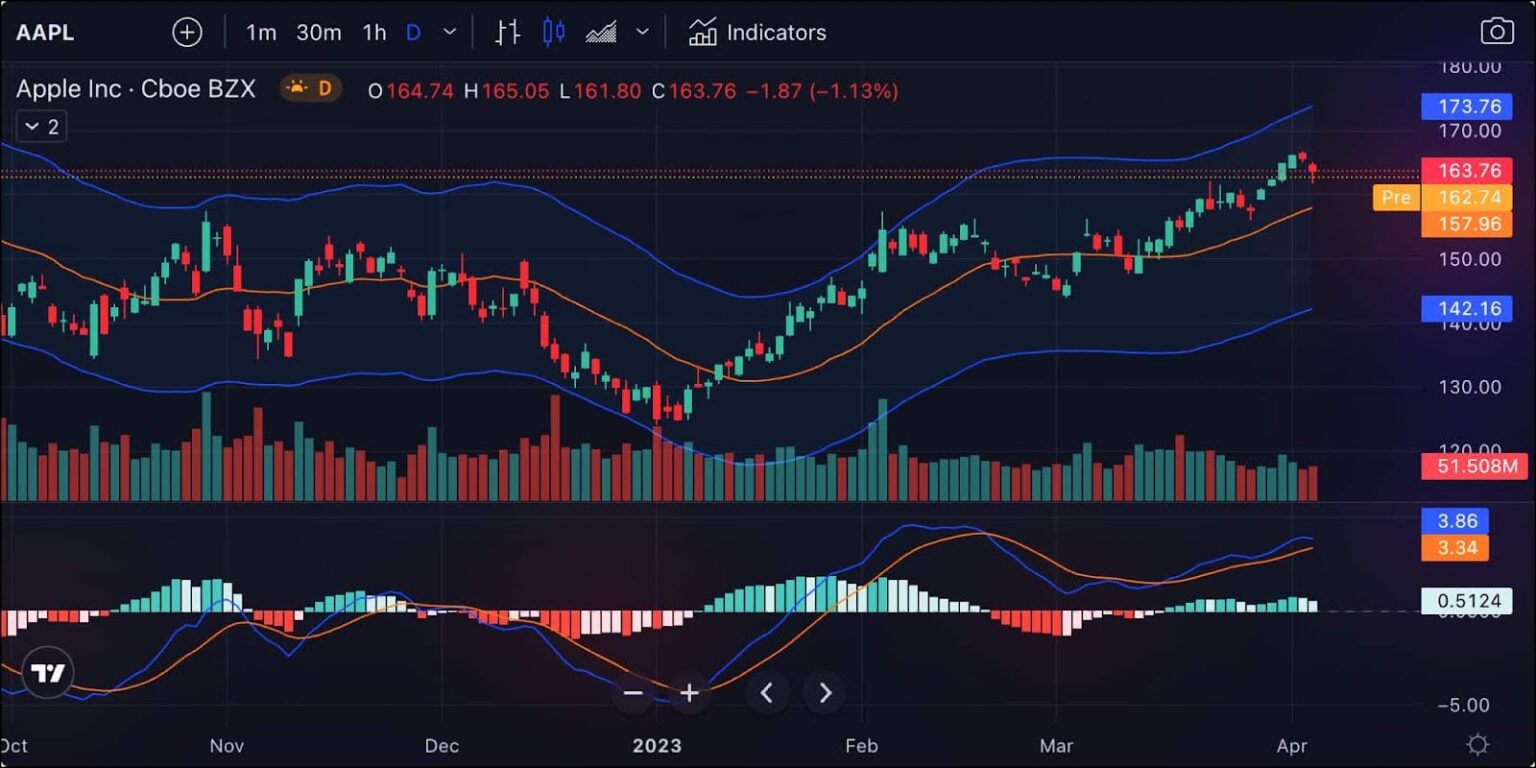
TradingView is the most popular charting platform in the world with over 100 million users. It is not a dedicated backtesting tool, but its Bar Replay feature lets you rewind any chart to a historical date and step forward candle by candle, placing simulated trades as you go. For more on how MT4 and MT5 compare as charting alternatives, see our guide.
Advantages
Largest indicator library in the world. Thousands of community-built indicators through Pine Script, plus all standard indicators. If a trading concept exists, someone has coded an indicator for it on TradingView.
Pine Script for building custom indicators and automated strategy backtesting. The Strategy Tester runs Pine Script strategies with detailed performance reports.
Paper Trading integrated directly into charts for practice without risk.
Massive community with published ideas, scripts, and educational content.
Covers every asset class: Stocks, forex, futures, crypto, ETFs, bonds, indices, with real-time data from exchanges worldwide.
Browser-based and mobile apps with one of the smoothest charting experiences available.
Free tier available with limited features.
Disadvantages
Bar Replay is basic. You step through candles one at a time. There is no dedicated order panel, no automatic position sizing based on risk percentage, no auto-breakeven, no partial profit-taking interface, and no session management like FX Replay or TradeZella provide.
No auto-journaling. Trades taken during Bar Replay do not log anywhere with tags, notes, or screenshots.
No analytics dashboard for reviewing replay performance. No win rate, profit factor, or Strategy comparison reports on your Bar Replay trades.
No AI features for trading analysis (though Pine Script can create signal-based indicators).
No prop firm simulator or tracking.
Bar Replay on intraday timeframes requires a paid plan.
The Strategy Tester (automated) only works with Pine Script strategies. Discretionary traders cannot use it.
Pricing
Basic: Free. Limited Bar Replay (daily charts only), limited indicators.
Essential: ~$14.95/month. Bar Replay on intraday, more indicators.
Plus: ~$29.95/month. More charts, alerts, indicators.
Premium: ~$59.95/month. Full features including seconds-based replay.
Best for: Traders who already use TradingView for charting and want to practice simple candle-by-candle replay without switching to another platform. Also excellent for Pine Script coders who want automated strategy backtesting with the Strategy Tester. Not a replacement for a dedicated backtesting platform if you want journaling, analytics, or AI features.
5. TradingSim
TradingSim Backtesting
TradingSim is a browser-based market replay simulator designed primarily for US stock traders. Founded in 2009, it provides replay of historical market data for day trading practice with 10,000+ US equity symbols across Nasdaq, NYSE, and AMEX, plus futures and crypto.
Advantages
10,000+ US equity symbols across Nasdaq, NYSE, and AMEX. If you trade US stocks, TradingSim has the widest stock coverage on this list.
Futures and crypto included alongside stocks (mini and micro contracts).
Full session replay with pre-market and after-hours data. Speed controls from 0.5x to 10x+, jump-to-time, and bookmarks.
50+ indicators and 60+ drawing tools.
Level 2 data on the Premium plan for order book analysis.
Delayed live sessions (15-minute delay) on Premium for near-real-time practice.
7-day free trial with all data fees included in the subscription.
Browser-based. No download needed.
Disadvantages
No forex. If you trade forex, TradingSim is not an option.
Limited historical data. Pro plan has roughly 2 to 3 years. Premium has 5 years. For backtesting trading strategies across different market regimes, this is a significant limitation.
No AI features of any kind.
Basic analytics only. Gain/loss history and win/loss tracking. No custom tags, no setup categorization, no advanced reports, no Strategy comparison.
No journaling depth. No custom tags, no session notes, no screenshots attached to trades.
No prop firm simulator or tracking.
No live trade import. Simulator only.
Expensive monthly pricing. $79/month for Pro, $89/month for Premium. Even annual billing ($33 to 37/month) makes it one of the most expensive options per month.
Up to 4 chart layouts only.
Pricing
Pro: $79/month ($33/month billed annually at $396/year). 2 to 3 years of data, no Level 2.
Premium: $89/month ($37/month billed annually at $449/year). 5 years of data, Level 2, delayed live sessions, seconds/tick charts.
Best for: US stock day traders who want a dedicated simulator with 10,000+ symbols and pre-market/after-hours data. If you trade stocks and want to practice with realistic market replay, TradingSim has the deepest stock coverage. Not suitable for forex traders, and the limited data history and basic analytics make it less useful for long-term strategy validation.
Which Alternative Is Right for You?
The best FX Replay alternative depends on what you need beyond replay practice:
You want everything in one platform (backtesting + journaling + analytics + AI + prop firm):TradeZella. The only platform where backtested and live trades share the same dashboard. For a guide on how to analyze trading performance using this data, see our article.
You want tick-by-tick precision and a lifetime purchase: Forex Tester Online. Best pure backtesting value at $399 one-time.
You code automated strategies in C# and trade futures: NinjaTrader. The deepest automated backtesting with Order Flow+.
You already use TradingView for charting and want simple replay: TradingView. No new platform to learn.
You trade US stocks and want 10,000+ symbols: TradingSim. Widest stock coverage for replay practice.
You want a free backtesting option: FX Replay's free plan (limited to non-premium forex pairs), TradingView's basic Bar Replay (daily charts only), or NinjaTrader's free tier (requires C# coding).
Many traders use two platforms: one for practice and one for everything connected to real money. FX Replay or Forex Tester Online for dedicated backtesting practice, and TradeZella for live trade tracking, analytics, AI agents, and prop firm management. The data flows in one direction: from practice to performance. For more on finding your trading edge through data analysis, see our guide. For risk management tools including position sizing and drawdown calculators, see our free trading calculators.
Key Takeaways
FX Replay is a solid backtesting platform with a free tier, Mentor AI coaching, FXR Battles, and a Prop Firm Simulator. It excels as a dedicated replay practice tool.
TradeZella is a backtesting platform in 2026. It does both manual bar replay and automated, no-code backtesting: you describe your strategy rules in plain English, the engine runs them across 11+ years of historical data across forex, futures, stocks, and crypto, and every individual trade is shown with Zella AI analysis. On top of the backtesting, it also works as an AI trading journal, analytics dashboard, trade replay tool, and prop firm tracker, so every backtested trade logs automatically and the same analytics reports you use for live trades apply to your backtests. Import your live trades from 500+ brokers, and your backtest results and live results sit in the same tool.
Forex Tester Online offers the best pure backtesting value with tick-by-tick data, 23 years of history, and a $399 lifetime option. No live trade integration.
NinjaTrader is the strongest choice for automated strategy backtesting with C# coding and Order Flow+ tools. Not suitable for discretionary traders.
TradingView is not a dedicated backtesting platform, but Bar Replay and Pine Script Strategy Tester work well for traders already on the platform.
TradingSim has the widest US stock coverage (10,000+ symbols) but no forex, limited data history, and expensive monthly pricing.
FX Replay itself has the best free plan among backtesting platforms, with limited sessions, 2 charts, and non-premium forex pairs. TradingView offers free Bar Replay on daily charts. NinjaTrader's platform is free (with higher commissions and a 35 dollar per month inactivity fee) and includes charting, backtesting with NinjaScript, and Market Replay. None of these free options include AI, auto-journaling, or prop firm tracking.
Can TradeZella replace FX Replay for backtesting?
Yes. TradeZella includes TradingView-powered charts, historical data across forex, futures, stocks, and crypto, replay controls up to 10x speed, automatic position sizing, drag-and-drop SL and TP, auto-breakeven, partials, Go-To navigation, RTH/ETH toggle, and built-in ICT indicators. It also adds auto-journaling, analytics, Zella AI agents, and Prop Firm Sync that FX Replay does not have. FX Replay has faster replay speed (up to 16x), a larger indicator library, FXR Script, FXR Battles, and a Prop Firm Simulator that TradeZella does not.
Does NinjaTrader have visual backtesting without coding?
No. NinjaTrader's Strategy Analyzer requires NinjaScript (C#) coded strategies. There is no visual or no-code backtesting option for discretionary traders. Market Replay lets you replay tick data and place simulated trades manually, but it does not produce the detailed analytics reports that the Strategy Analyzer generates for automated strategies.
Is Forex Tester Online better than FX Replay?
It depends on what you need. Forex Tester Online offers tick-by-tick data precision (vs FX Replay's minute bars on most plans), blind testing mode, custom automations, and a lifetime pricing option at 399 dollars. FX Replay offers a free plan, Mentor AI coaching, FXR Battles for competitive trading, and FXR Script for custom indicators. Forex Tester Online is better for pure backtesting precision. FX Replay is better for traders who want AI coaching and competitive features.
Can I use TradingView for serious backtesting?
TradingView's Bar Replay is useful for candle-by-candle practice, but it lacks the dedicated order panel, automatic position sizing, auto-journaling, and analytics dashboard that platforms like TradeZella and FX Replay provide. For automated strategy backtesting, TradingView's Pine Script Strategy Tester is powerful. For manual discretionary backtesting, a dedicated platform will give you a more complete workflow.
What is the best tool for automated backtesting?
TradeZella is the best tool for automated, no-code backtesting. You describe your strategy rules in plain English, and the engine runs them across years of historical data, showing every individual trade with Zella AI analysis of the results. NinjaTrader and TradingView also offer automated backtesting, but both require coding (C# for NinjaTrader, Pine Script for TradingView). FX Replay, Forex Tester Online, and TradingSim are manual replay only. If you want automated backtesting without writing code, TradeZella is the strongest choice.
Which FX Replay alternative is best for prop firm traders?
TradeZella is the strongest option for prop firm traders because Prop Firm Sync connects to real evaluation and funded accounts, tracking daily and total drawdown, trailing drawdown headroom, and consistency rules across multiple accounts. FX Replay and Forex Tester Online both have prop firm challenge simulators for practice, but neither tracks real funded accounts.
What is the cheapest FX Replay alternative?
For paid plans, Forex Tester Online Starter at 159 dollars per year (13.25 dollars per month) is the cheapest option with full backtesting capabilities including tick data. TradeZella Essential at 29 dollars per month (24 dollars on annual billing) is more expensive but includes live trade import, AI agents, analytics, and prop firm tracking alongside backtesting. TradingSim at 33 to 37 dollars per month on annual billing is the most expensive per-month option among the five alternatives.



.png)