The Best Forex Tester Alternative: From Backtesting-Only to a Complete Trading Platform
The Best Forex Tester Alternative: From Backtesting-Only to a Complete Trading Platform
Forex Tester is a dedicated backtesting tool, but it cannot import your live trades, journal your sessions, or analyze your real trading performance. TradeZella does all of that plus manual replay, automated backtesting, AI-powered analysis, and Prop Firm Sync, making it the best Forex Tester alternative for traders who want to improve with real data.
class SampleComponent extends React.Component {
  // using the experimental public class field syntax below. We can also attach
  // the contextType to the current class
  static contextType = ColorContext;
  render() {
    return <Button color={this.color} />
  }
}
Last Updated: June 25, 2026
A Forex Tester alternative is a trading platform that does everything Forex Tester does for backtesting, plus the things Forex Tester cannot do: importing live trades from your broker, journaling every session, analyzing real trading performance with AI, and tracking prop firm accounts. TradeZella is the best Forex Tester alternative in 2026 used by 100k+ traders because it combines manual replay, automated backtesting with plain English rules, 500+ broker import, Zella AI agents, 50+ analytics reports, and Prop Firm Sync into a single platform. Instead of backtesting in one tool and then scrambling to track your actual results somewhere else, you do everything in one place.
Forex Tester has been a popular backtesting tool for years, and for good reason. It lets you replay historical price data, practice entries and exits, and test strategies before risking real capital. But backtesting is only one piece of the trading improvement puzzle. When you finish a backtest in Forex Tester, what happens next? Your live trades go into a spreadsheet. Your journal is a Word document. Your performance analytics are a calculator and some formulas. Your prop firm drawdown tracking is manual math. That gap between backtesting and everything else is exactly why traders are looking for a Forex Tester alternative.
Why Are Traders Looking for a Forex Tester Alternative?
Forex Tester is a good tool for one job: replaying historical charts and practicing trade execution. The problem is that modern traders need more than one job done well. They need a platform that connects their backtesting results to their live trading performance, so they can measure whether a strategy that looked good in historical data actually works when real money is on the line.
Here is what traders tell us when they switch from Forex Tester to TradeZella:
"I backtest in Forex Tester, then my live trades go into a spreadsheet, and I never actually compare the two." This is the most common complaint. Forex Tester lives in isolation. It does not know about your broker, your real trades, or your actual P&L. When you finish a 100-trade backtest showing a 1.8 profit factor, you have no way to check whether your live results match that number. With TradeZella, your backtest results and your live trade data exist in the same platform. You can filter by Strategy, compare your backtest expectations against actual results, and identify exactly where execution differs from the plan."
"I am paying for a backtesting tool and a journal and a spreadsheet, and none of them talk to each other." Forex Tester handles replay. Your journal handles notes. Your spreadsheet handles metrics. That is three tools doing work that one platform should handle. Every manual data transfer introduces errors and friction, and the friction is why most traders stop journaling within a month. TradeZella replaces all three. Your trades import automatically from 500+ brokers, your journal and tags live alongside each trade, and your analytics update in real time."
"Forex Tester does not have AI, and I do not want to copy-paste my trades into ChatGPT." AI analysis has become a real differentiator in trading tools. But Forex Tester has either no AI or only basic query capabilities on their higher-tier plans. Meanwhile, copying trade data into a general AI like ChatGPT means it has no memory of your history, no understanding of your Strategies, and no ability to take action on your data. TradeZella's Zella AI is an AI trading journal built specifically for traders, with agents that tag your trades, review your sessions, and generate pre-market plans based on how you actually trade."
Where Does Forex Tester Fall Short?
Forex Tester is not a bad product. It does backtesting well. But "does backtesting well" is a low ceiling for a platform in 2026. Here are the specific limitations that matter:
No Live Trade Import
This is the biggest gap. Forex Tester is a backtesting-only tool. It cannot connect to your broker, cannot import your real trades, and cannot show you how your live performance compares to your backtest results. If you trade 20 times per week across two brokers, every one of those trades needs to be tracked somewhere else. TradeZella imports trades from 500+ brokers automatically, including NinjaTrader, Tradovate, Interactive Brokers, Webull, Schwab, TD Ameritrade, and many more. Some connect via API, others through CSV upload. Either way, your real trades appear in the same platform where you do your backtesting.
No Journaling or Trade Notes
Forex Tester does not have a journal. When you finish a backtest session or a live trading day, there is no place inside the platform to write what you were thinking, tag the emotional state of a trade, document why you moved your stop, or attach a screenshot of your setup. TradeZella's forex trading journal lets you tag every trade with custom labels (session timing, pair type, setup name, emotional state), write notes, add screenshots, and review everything through filtered analytics. The journal is not a separate tool. It is built into the same platform as your backtesting and analytics.
No AI Analysis
Forex Tester Online offers basic AI queries on their Pro plan ($239/year), but it is limited to simple questions about your backtest results. There are no autonomous agents, no memory across sessions, no trading-specific skills, and no ability to tag trades or generate session reviews automatically. TradeZella's AI trading agents work differently. The Auto Trade Tagger applies your tagging criteria to every trade automatically. The Session Review agent compares your morning plan against your actual results and journals the entire day. The Market Sentiment Briefing generates a personalized pre-market plan based on your configuration, your assets, and how you trade. These agents take action on your data. They do not just answer questions.
No Real Trading Analytics
Forex Tester can show basic metrics from your backtesting sessions: win rate, profit factor, drawdown. But it has no analytics for your actual trading. It cannot show you which day of the week you lose the most money, which session (London, New York, Asian) produces your best results, whether your win rate degrades after a losing streak, or how your position sizing changes when you are on tilt. TradeZella has 50+ analytics reports that work on both your backtest data and your live trades. The Day and Time report, Strategy comparison, Tags report, R-Multiple View, Calendar view, and Zella Score all help you find your trading edge by filtering your real data across multiple dimensions.
No Prop Firm Support
Forex Tester cannot connect to your prop firm accounts. If you are trading a Topstep, FTMO, Apex, or FundedNext evaluation, Forex Tester cannot track your daily drawdown, monitor your trailing drawdown buffer, or show your progress toward profit targets. You need a separate spreadsheet or tool for that. TradeZella's Prop Firm Sync connects directly to your evaluation and funded accounts. The Challenge widget shows your real-time progress against profit targets and drawdown limits. You can track multiple accounts simultaneously and catch correlated risk across firms before it becomes a problem. See our complete guide to prop firm trading and trailing drawdown rules.
How Does TradeZella Compare to Forex Tester?
The simplest way to understand the difference: Forex Tester is a backtesting tool. TradeZella is a complete trading platform that includes backtesting.
Forex Tester does one thing. TradeZella does that thing plus everything else a serious trader needs to actually improve. Here is how the two platforms compare across every major category:
Feature
Forex Tester
TradeZella
Manual Bar Replay
Yes (up to 16x speed)
Yes (0.5x to 10x speed)
Automated Backtesting
No (requires custom coding via API)
Yes: Plain English rules, pre-built templates
Live Trade Import
No
500+ brokers (API and CSV)
Journaling and Trade Notes
No
Full journal with tags, notes, screenshots, Notebook
3 modes: Trade Replay, Day Replay, Scenario Replay
Platform Access
Desktop (Windows) or browser (FTO)
Browser-based (any device)
The comparison table makes the gap clear. Forex Tester wins on one dimension: dedicated replay speed controls (up to 16x on some plans). TradeZella wins on everything else because it is not trying to be just a backtesting tool. It is trying to be the platform where you do all of your trading work.
For a broader comparison of backtesting platforms, see our best backtesting software guide, which covers 10 platforms including Forex Tester, TradingView, NinjaTrader, and others. For a direct comparison with another popular replay tool, see FX Replay vs TradeZella.
Does TradeZella Have Backtesting?
Yes. This is important because Forex Tester's own website lists TradeZella as an alternative and claims "No backtesting features" as a disadvantage. That information is outdated.
TradeZella offers two backtesting methods:
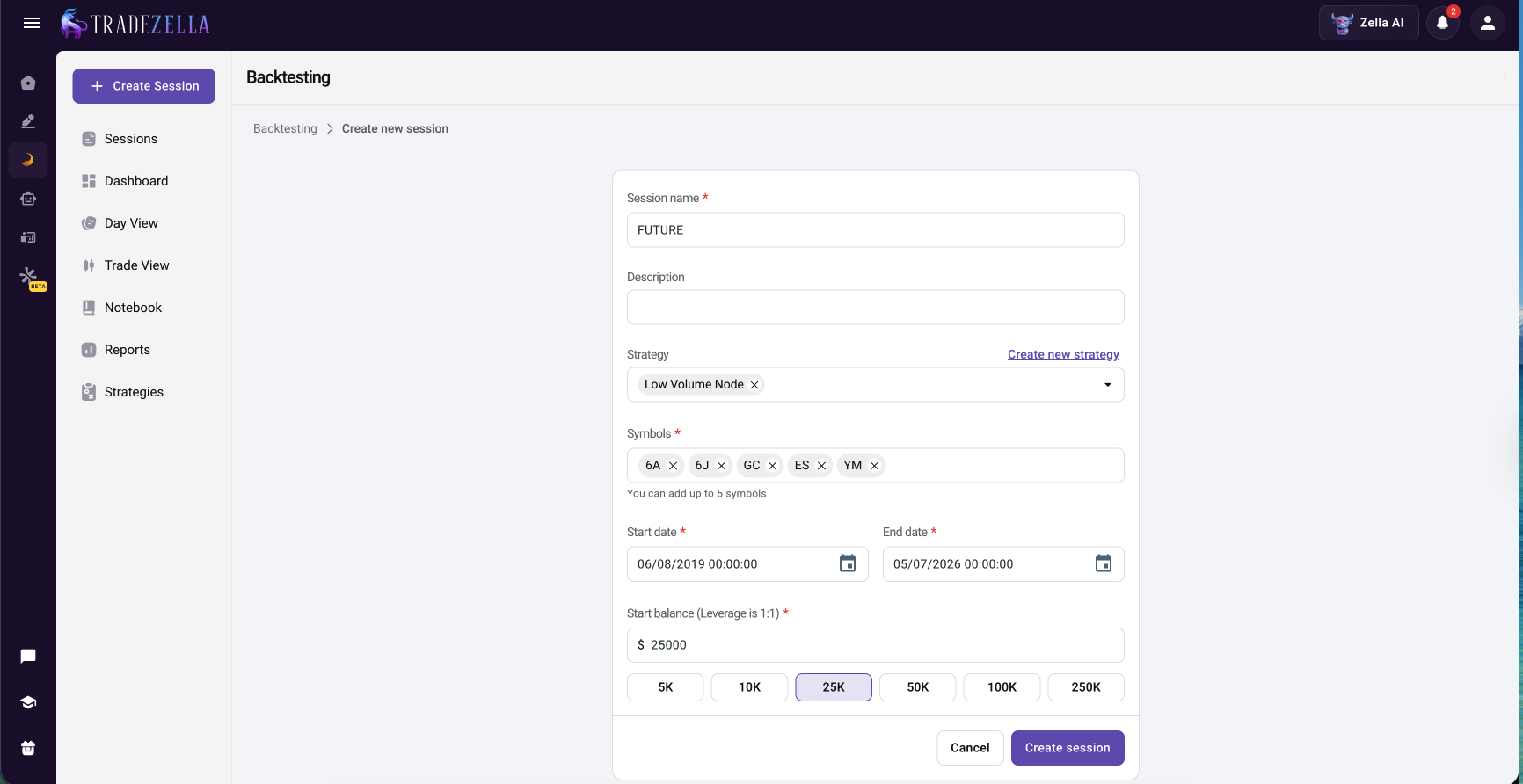
Manual Bar Replay. Set up a backtesting session with your chosen instrument, date range, and timeframe. Replay the chart at speeds from 0.5x to 10x. Place all order types (market, limit, stop), drag and drop your stop loss and take profit levels, use ICT indicators, view up to 5 symbols across 8 charts, toggle RTH/ETH sessions, and execute entries and exits exactly as you would in live trading. Every trade is automatically journaled with entry, exit, P&L, and R-multiple. After the session, your results flow directly into your analytics dashboard. For a step-by-step walkthrough, see how to backtest a trading strategy and backtest with TradeZella.
TradeZella Manual Backtesting
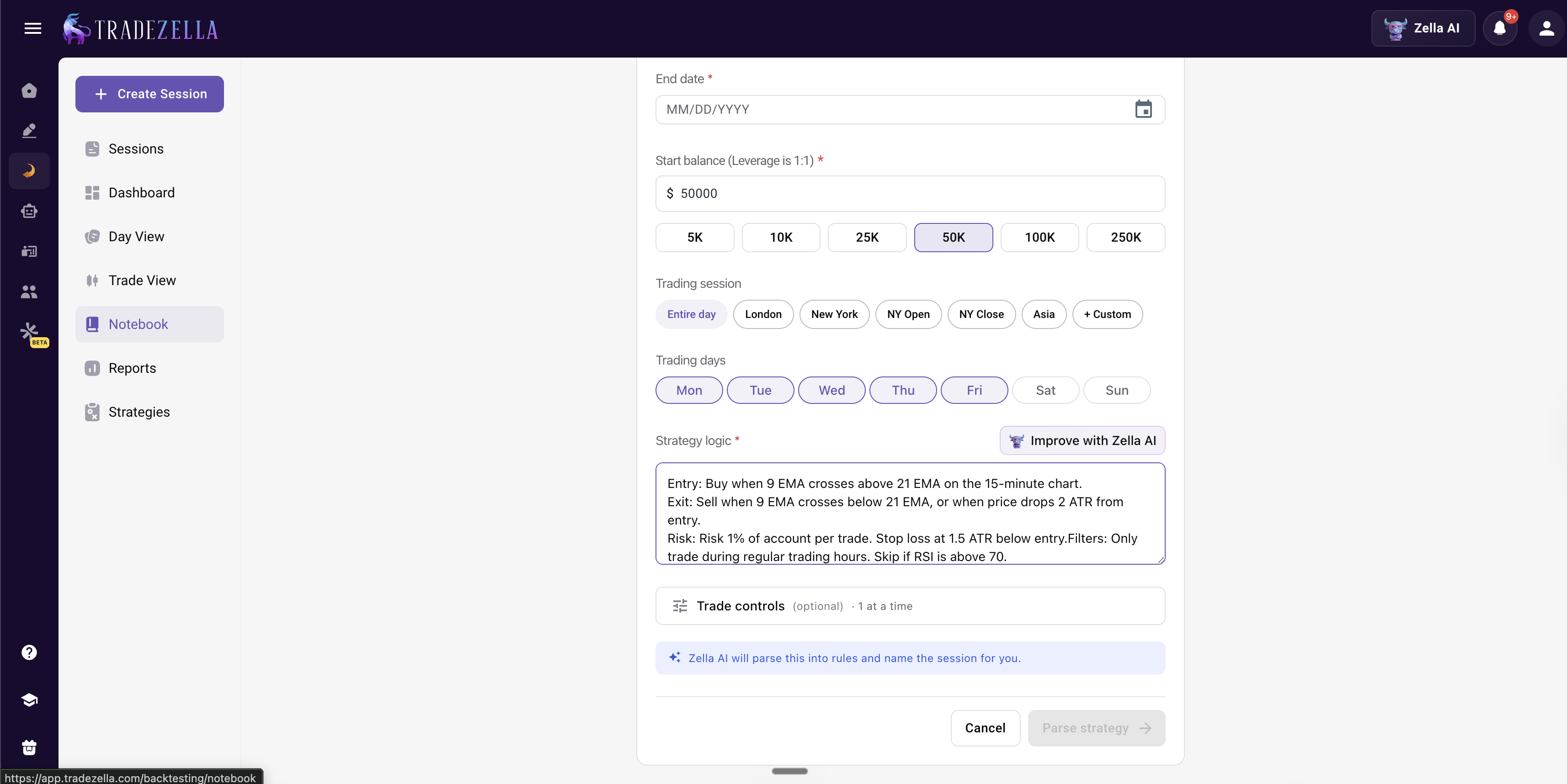
Automated Backtesting. Write your trading rules in plain English instead of code. Define your instrument, timeframe, entry conditions, exit conditions, risk parameters, and filters in a 6-step process. TradeZella runs those rules across years of market data in seconds and generates a complete trade log with every individual trade visible. Pre-built templates are available for ICT strategies (FVGs, liquidity sweeps, breaker blocks), Opening Range Breakout, trend following, and mean reversion. No Pine Script, no Python, no MQL5 required. For more details, see automated backtesting guide.
TradeZella Automated Backtesting
The key difference from Forex Tester: your backtest results exist in the same platform as your live trades. When you import real trades from your broker, you can compare your backtest expectations against your actual performance side by side. Same Strategy, same analytics, same dashboard. That comparison is what tells you whether your strategy actually works with real capital, or whether execution gaps are destroying the edge you found in backtesting. This is the core of the backtesting vs forward testing validation pipeline.
What Can You Do With Live Trades That Forex Tester Cannot Touch?
This is the section that matters most. Backtesting is practice. Live trading is the game. Forex Tester helps with practice but has zero functionality for the game itself. Here is what TradeZella gives you for live trading that Forex Tester simply does not offer:
Automatic Trade Import From 500+ Brokers
Connect your broker and your trades appear in TradeZella automatically. NinjaTrader, Tradovate, Interactive Brokers, Webull, Schwab, Coinbase, Bybit, and hundreds more. Some brokers connect via API for same-day sync. Others use CSV export and import. Either way, you never manually enter a trade. This single feature eliminates the biggest friction point in trading improvement: actually logging what you did. Most traders who rely on manual data entry quit journaling within 30 days. Auto-import means you never start.
Strategies: Track Every Setup Across Backtesting and Live Trading
TradeZella's Strategies feature lets you define your setups with specific entry rules, then tag every trade (backtest and live) to that Strategy. After 30+ trades, you can compare your Strategies side by side: which setup produces the best profit factor? Which has the smallest drawdown? Which works in trending markets but fails in ranges? This is how you find your trading edge. Filter by Strategy, filter by time of day, filter by market condition, and the data tells you exactly where your edge lives.
50+ Analytics Reports
Win rate by Strategy, profit factor by day of week, R-multiple distribution, time-of-day performance, tag-based filtering, Calendar view with daily P&L, Zella Score, and dozens more. These reports work on both your backtest data and your live trades. You can see your backtested Strategy at 1.8 PF across 100 historical trades, then filter your live trades for the same Strategy and compare. If live performance shows 1.2 PF, you know execution is the gap, not the setup. For a deeper look at what to track, see trade review process.
Trade Replay for Real Trades
Forex Tester replays historical data for practice. TradeZella also offers trade replay software that replays your actual trades from live sessions. Three modes: Trade Replay (review a single trade second by second), Day Replay (review your entire trading session), and Scenario Replay (coming soon). This means you can review the exact moment you moved your stop too early, or the specific candle where you chased an entry. During replay, you can tag mistakes, add notes, and journal the trade, all within the same platform.
Risk Management Tools Built In
TradeZella includes a Position Size Calculator, Risk/Reward Calculator, Drawdown Recovery Calculator, and Monte Carlo Simulator on the free trading calculators page. Inside the platform, R-Multiple View shows whether you are consistently hitting your planned risk-to-reward targets. The Calendar view reveals daily P&L patterns and post-loss clustering. Tags let you filter for "Rules Broken" versus "Rules Followed" trades to measure discipline. For a complete risk framework, see risk management in trading.
How Does Zella AI Improve Your Backtesting and Trading?
Zella AI is TradeZella's built-in AI trading partner. It is not a chatbot bolted onto a journal. It is an intelligence layer that works on your actual trade data, remembers your preferences across sessions, and takes action through autonomous agents.
Here is what Zella AI does that no Forex Tester feature can match:
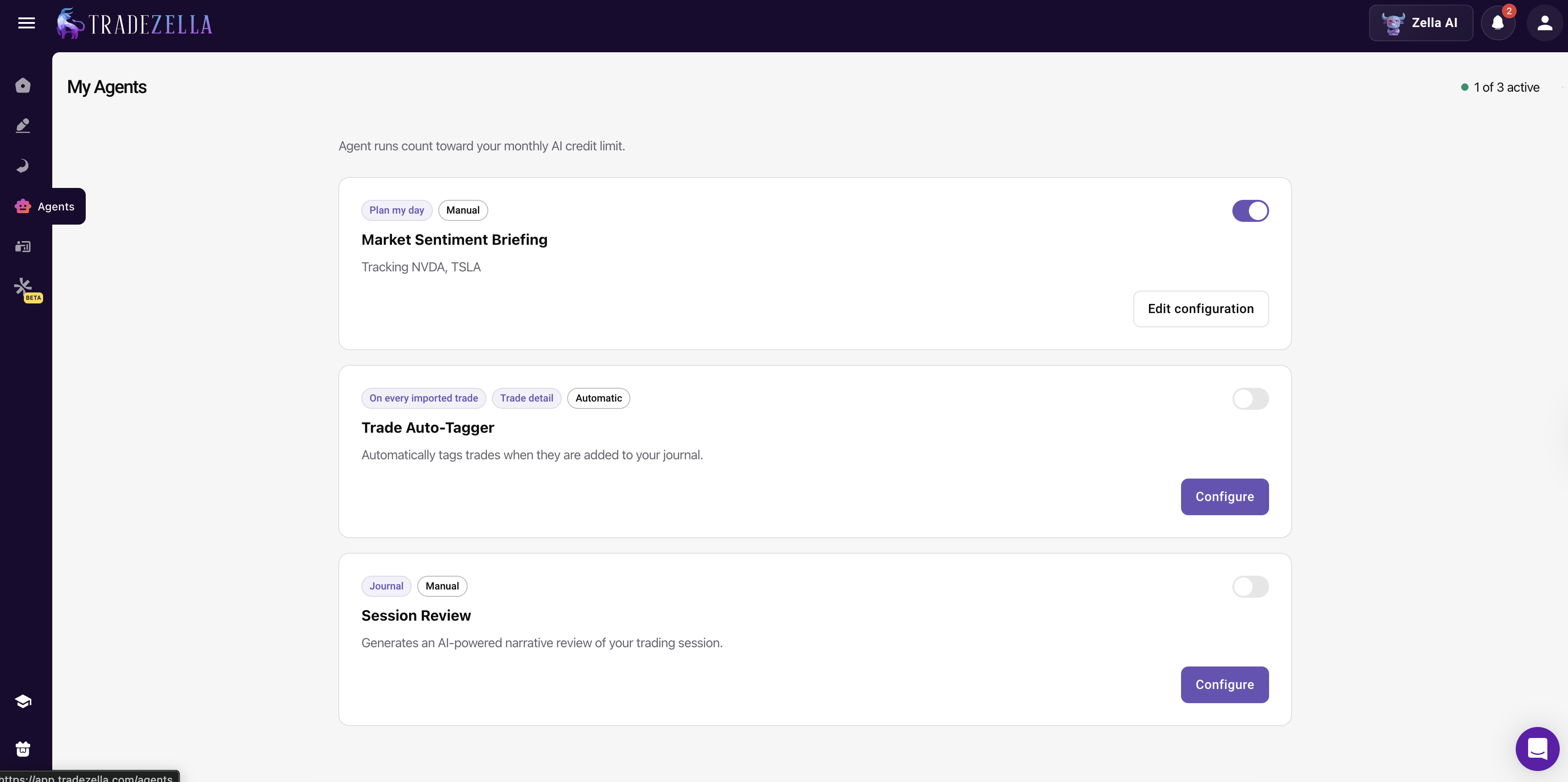
Auto Trade Tagger. You set up tagging criteria: "tag trades that went 2R or more," "tag all trades by entry timeframe," "tag whether SMT was present," "tag supply and demand concepts." The agent applies those tags automatically to every trade based on the rules you define. This gives you clean, consistent data without the tedious manual tagging that most traders skip.
Session Review. After your trading day ends, the Session Review agent automatically reviews your session. It compares your morning plan (from Market Sentiment Briefing) against your actual results. Did you follow your rules? What went well? What needs to change? The review is customized to emphasize whatever you care about most: rule adherence, deviations from plan, sizing compliance, or emotional patterns. It journals the entire day for you.
Market Sentiment Briefing. Before the market opens, you configure the agent with how you trade (for example, "I am an ICT trader"), select your assets (ES, NQ, forex pairs, stocks), and tell it what you look at (economic calendar, higher timeframes, FVGs, order blocks, supply and demand, trendlines). When you click "Start My Day," the agent creates pre-market scenarios and a trading plan based on your specific trading style and configuration.
TradeZella Zella AI Agents
Memory. Zella AI remembers your name, your risk limits, your Strategies, and your preferences across sessions. Every interaction makes the next one better. By month 6, Zella AI has enough context to flag patterns you would never catch yourself: "Your win rate drops 15% on Wednesdays after a losing Monday. Consider reducing size or sitting out."
Trading-Specific Skills. ICT, order flow, book map, prop firm rules, VWAP exhaustion, breaker blocks. These are built in, not generic AI responses. When you ask about a trading concept, Zella AI answers with your data, not textbook definitions.
Can TradeZella Replace Forex Tester for Prop Firm Traders?
Yes, and this is where the gap between the two platforms is widest. Forex Tester can help you practice strategies before attempting an evaluation, but it cannot track your live funded account performance. TradeZella does both.
Prop Firm Sync connects your evaluation and funded accounts directly to TradeZella. The Challenge widget shows your real-time progress against profit targets and drawdown limits. Daily drawdown, total drawdown, trailing drawdown buffer, profit targets, and consistency targets (like Topstep's rule that your best day cannot exceed 50% of total profit) are all visible in one dashboard.
Multi-account tracking. If you run accounts at FTMO, Topstep, and Apex simultaneously, TradeZella consolidates all of them. You can see aggregate exposure, catch correlated risk across firms (for example, 5 NQ contracts spread across 3 accounts that all move together), and review per-account compliance separately.
Evaluation-to-funded transition. Your backtest results, evaluation performance, and funded account data all live in the same platform. When you pass an evaluation, you can compare your evaluation trading against your funded trading to see if anything changed, size, win rate, rule adherence, emotional patterns.
Prop Firm Traders: Forex Tester can help you practice before an evaluation. TradeZella tracks your actual evaluation in real time. Use both if you want dedicated replay practice, but when real capital is on the line, TradeZella's Prop Firm Sync, Challenge widget, and Session Review agent are tools that Forex Tester does not have. And with TradeZella's own backtesting and replay, many traders find they no longer need a separate backtesting tool at all.
When Should You Keep Forex Tester?
To be fair, there are specific use cases where Forex Tester still makes sense:
You only backtest and never trade live. If you are purely practicing and do not need to track real trades, Forex Tester's dedicated replay environment is solid. But most traders eventually go live, and at that point, you need the other features.
You need 16x replay speed. Forex Tester offers faster replay speeds on some plans. TradeZella's manual replay goes up to 10x. If ultra-fast replay is critical to your workflow, Forex Tester's speed advantage matters.
You are happy with your current journal and analytics workflow. If your spreadsheet, journal, and manual analytics are working and you genuinely review your data every week, adding TradeZella might feel redundant for the backtesting component alone. But most traders who say their workflow is "working" discover significant gaps when they see all their data in one place for the first time.
For everyone else, the question is not whether TradeZella is a good Forex Tester alternative. The question is why you would keep paying for a backtesting-only tool when a complete platform exists. See how TradeZella compares in our manual vs automated backtesting breakdown.
Key Takeaways
Forex Tester is a solid backtesting tool that does one job well. But trading improvement requires more than backtesting alone. You need to import your real trades, journal your sessions, analyze your performance across multiple dimensions, track prop firm accounts, and get AI-powered feedback on your patterns.
TradeZella is the best Forex Tester alternative because it replaces not just Forex Tester, but also the spreadsheet, the journal app, and the manual analytics workflow that most Forex Tester users cobble together around it. Manual replay, automated backtesting, 500+ broker import, Zella AI agents, 50+ analytics reports, Strategies, trade replay, and Prop Firm Sync, all in one platform.
The traders who get the most from switching are the ones who were already doing the work: backtesting, journaling, reviewing. TradeZella does not change what you do. It removes the friction so you actually do it consistently.
TradeZella is the best Forex Tester alternative in 2026. It includes manual bar replay and automated backtesting with plain English rules, plus live trade import from 500+ brokers, Zella AI agents for auto-tagging, session review, and pre-market planning, 50+ analytics reports, Strategies for setup tracking, trade replay for live sessions, and Prop Firm Sync. Forex Tester only handles backtesting. TradeZella handles backtesting and everything that comes after it.
Does TradeZella have backtesting like Forex Tester?
Yes. TradeZella offers manual bar replay with speeds from 0.5x to 10x, all order types, drag-and-drop stop loss and take profit, ICT indicators, up to 5 symbols across 8 charts, and RTH/ETH session controls. TradeZella also has automated backtesting where you write rules in plain English and run them across years of data in seconds. Every individual trade from both manual and automated backtesting is visible and flows into the analytics dashboard.
Can I import my live trades into TradeZella?
Yes. TradeZella imports trades from 500+ brokers across stocks, futures, forex, crypto, and options. Some brokers connect via API for automatic syncing, and others use CSV export and import. This is one of the biggest differences from Forex Tester, which cannot import live trades at all.
Does Forex Tester have AI features?
Forex Tester Online offers basic AI query capabilities on their Pro plan at $239 per year. However, it does not have autonomous agents, memory across sessions, auto-tagging, session review, or pre-market planning. TradeZella's Zella AI includes all of these features: the Auto Trade Tagger, Session Review agent, Market Sentiment Briefing agent, trading-specific skills like ICT and order flow, and persistent memory that compounds over time.
Can TradeZella track prop firm accounts?
Yes. TradeZella's Prop Firm Sync connects to your evaluation and funded accounts. The Challenge widget displays your real-time progress against profit targets and drawdown limits, including daily drawdown, total drawdown, and trailing drawdown buffer. You can track multiple prop firm accounts simultaneously. Forex Tester does not offer any live prop firm tracking.
Is TradeZella only for forex traders?
No. TradeZella supports stocks, futures, forex, crypto, and options. You can import trades from any asset class and view all of your trading data in one analytics dashboard. Forex Tester's desktop version focuses primarily on forex with limited additional instruments.
How long does it take to switch from Forex Tester to TradeZella?
Most traders complete the initial setup in about 15 minutes. Connect your broker, create your Strategies, and configure your Zella AI agents. Your trade history imports automatically. If you have been tracking trades manually in spreadsheets alongside Forex Tester, you will save that setup time back immediately by eliminating the manual data transfer.