Notion Trading Journal Template: What You Get, Where It Breaks, and When to Upgrade
Notion Trading Journal Template: What You Get, Where It Breaks, and When to Upgrade
Notion trading journal templates let you log trades for free, but they cannot import from brokers, run analytics, track Strategies, or tell you what is actually working in your trading. TradeZella replaces the entire Notion setup with automated trade import from 500+ brokers, 50+ analytics reports, Zella AI agents, backtesting, trade replay, and Prop Firm Sync, all starting at $35 per month.
class SampleComponent extends React.Component {
  // using the experimental public class field syntax below. We can also attach
  // the contextType to the current class
  static contextType = ColorContext;
  render() {
    return <Button color={this.color} />
  }
}
Last Updated: July 13, 2026
A Notion trading journal is a trade logging system built inside Notion using databases, templates, and formulas. Traders use it because Notion is free, flexible, and familiar. You create a database, type every trade by hand, and hope the formulas do not break. It works for basic logging. The problem starts when you need the journal to actually tell you something. Notion cannot import trades from your broker. It cannot tell you which setups make money. It cannot compare your performance by time of day, by market condition, or by Strategy. It stores what you type, but it does not do anything with it.
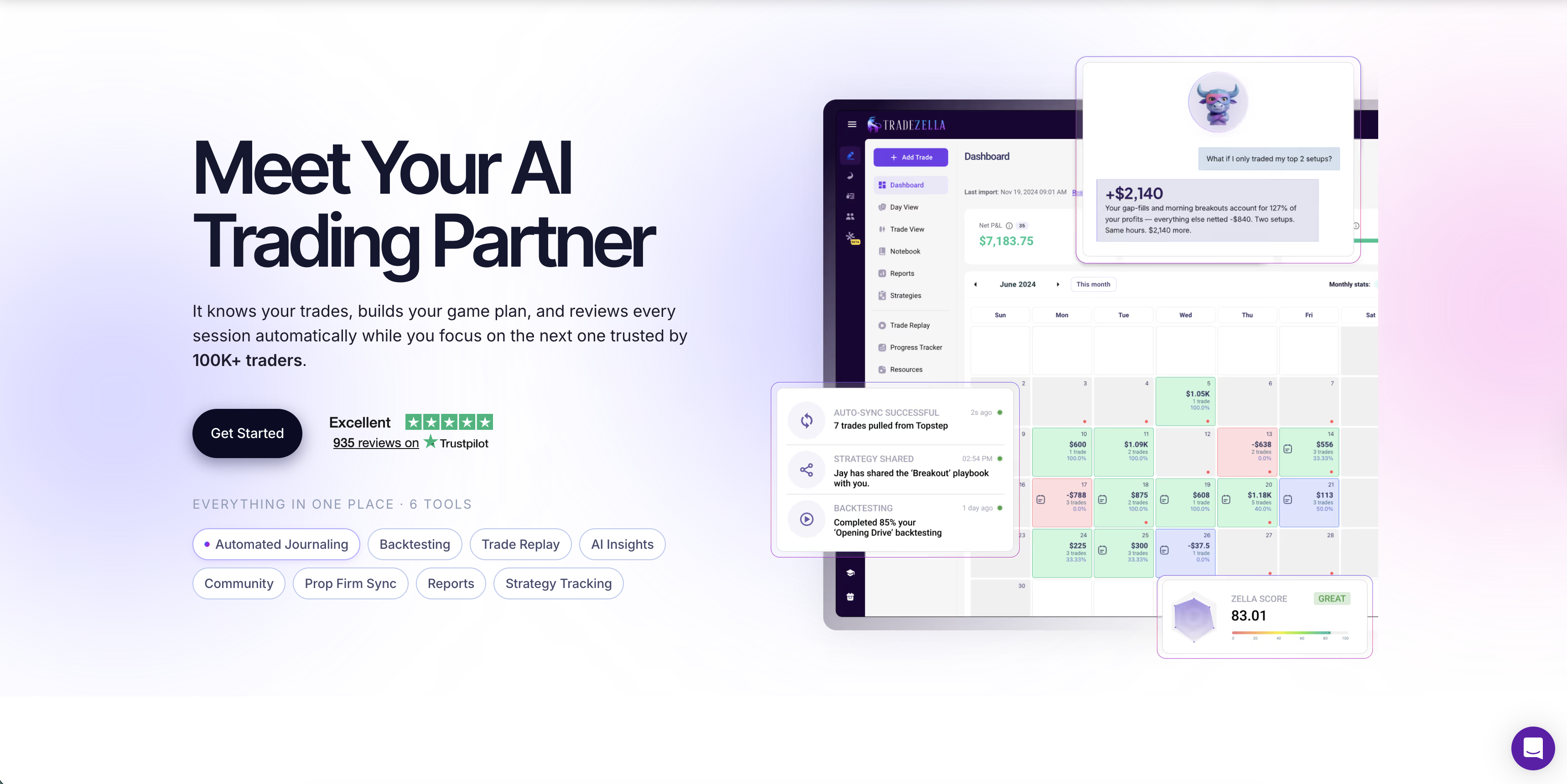
TradeZella is a dedicated AI trading journal that does the work for you. Your trades import automatically from 500+ brokers. Zella AI tags every trade based on rules you define, reviews your entire session against your morning plan, and journals your day without you lifting a finger. You can ask Zella AI any question about your trading data and get answers from your actual numbers, not generic advice. It remembers your name, your risk limits, your Strategies, and your preferences across every session. On top of AI, TradeZella runs 50+ analytics reports, includes backtesting (automated and manual backtesting), trade replay, and Prop Firm Sync in the same platform. The journal still exists, but it runs in the background. You trade. Zella AI handles the rest. This article compares what a Notion trading journal template actually gives you, where it breaks down, and what an AI trading journal does differently.
What Does a Notion Trading Journal Template Actually Include?
Notion Template
Most Notion trading journal templates, whether free or paid, follow the same structure. A database table serves as the trade log. Each row is one trade. Columns typically include:
Date and time: When you opened the trade
Ticker or instrument: What you traded (AAPL, EUR/USD, ES, etc.)
Direction: Long or short
Entry price and exit price: Typed manually
Position size: Shares, contracts, or lots
Stop loss and take profit levels: What you planned
P&L: Either typed manually or calculated via a Notion formula
Setup name: A select property like "Breakout," "Pullback," or "Gap and Go"
Emotion tag: A select property like "Confident," "Revenge," "FOMO"
Notes: Free-text field for trade reasoning and review
Screenshots: Manually uploaded chart images
Some premium templates add a calendar view, a weekly review page, and Notion formulas that calculate running P&L, win rate, and average win vs. average loss. The best templates are well-organized and genuinely useful for low-volume traders who take 1-5 trades per week.
The appeal is real. Notion is free for personal use, works on every device, and lets you customize everything. If you are just starting out and want to build the habit of reviewing your trades, a Notion template is a reasonable starting point. Our free trading journal template covers the same principles in a spreadsheet format.
Where Does a Notion Trading Journal Work Well?
Notion deserves credit in a few areas. Being honest about where Notion works well makes the comparison more useful than pretending it has zero value.
The price is right. Notion's free plan is genuinely free. For a trader who has never journaled before, zero cost removes the barrier to starting. Building the habit of writing down what you traded and why is more valuable than any specific tool.
Complete customization. Notion lets you build exactly the layout you want. If you have a very specific workflow that no pre-built journal accommodates, Notion gives you the canvas to create it.
Notes and reflections. Notion is excellent at long-form writing. If your journal practice is primarily about written reflections, morning plans, and end-of-day essays, Notion's text editor is cleaner and more flexible than most trading journals.
Non-trading context. Some traders keep their trading journal, morning routine, reading notes, and life goals all in one workspace. Notion does that better than any trading-specific tool.
If you take fewer than 5 trades per week, are brand new to journaling, and primarily want a place to write reflections, Notion can work. The problems start when you need the journal to work for you instead of the other way around.
Where Does a Notion Trading Journal Break Down?
Notion was built as a productivity tool for teams. It was not built for trading. The limitations are structural, not fixable with a better template. Here are the 7 places where Notion breaks down for serious traders.
1. No Broker Import
This is the single biggest limitation. Notion cannot connect to your broker. Every trade must be entered by hand: ticker, entry price, exit price, position size, stop loss, take profit, P&L, date, time. On a $50,000 account taking 5 trades per day, that is 25 trades per week, each requiring 2-3 minutes of manual entry. That is over an hour per week just typing numbers that your broker already has. At 20 trading days per month, you are spending 4-5 hours on data entry alone.
TradeZella Broker Import
TradeZella imports trades from 500+ brokers including NinjaTrader, Tradovate, MetaTrader 4 and 5, Interactive Brokers, Schwab (ThinkorSwim), Robinhood, Webull, Bybit, cTrader, DXtrade, TradeLocker, and hundreds more. Most connect via auto-sync or API. Others use CSV import. Your trades appear with full price data, execution points, and timestamps the moment they close.
2. No Analytics Engine
Notion stores data. It does not analyze it. You can write Notion formulas for basic calculations like win rate or total P&L. But you cannot filter your performance by setup type and compare which Strategy is profitable and which is losing money. You cannot see your win rate by time of day, by day of week, or by market condition. You cannot calculate profit factor, expectancy, or R-multiple distribution across different subsets of your trades.
TradeZella has 50+ reports across profitability, risk, time analysis, trading activity, and streaks. You get 7 dashboard views (Dollars, Percentage, R-multiple, Ticks, Pips, Points, Privacy mode), Strategy comparison reports, Day and Time analysis, Symbol reports, Tags reports, Cross Analysis, and Zella Score. Every metric can be filtered by any combination of dates, instruments, tags, Strategies, and time periods. These reports exist to help you find your trading edge, not just store your data.
TradeZella Reports
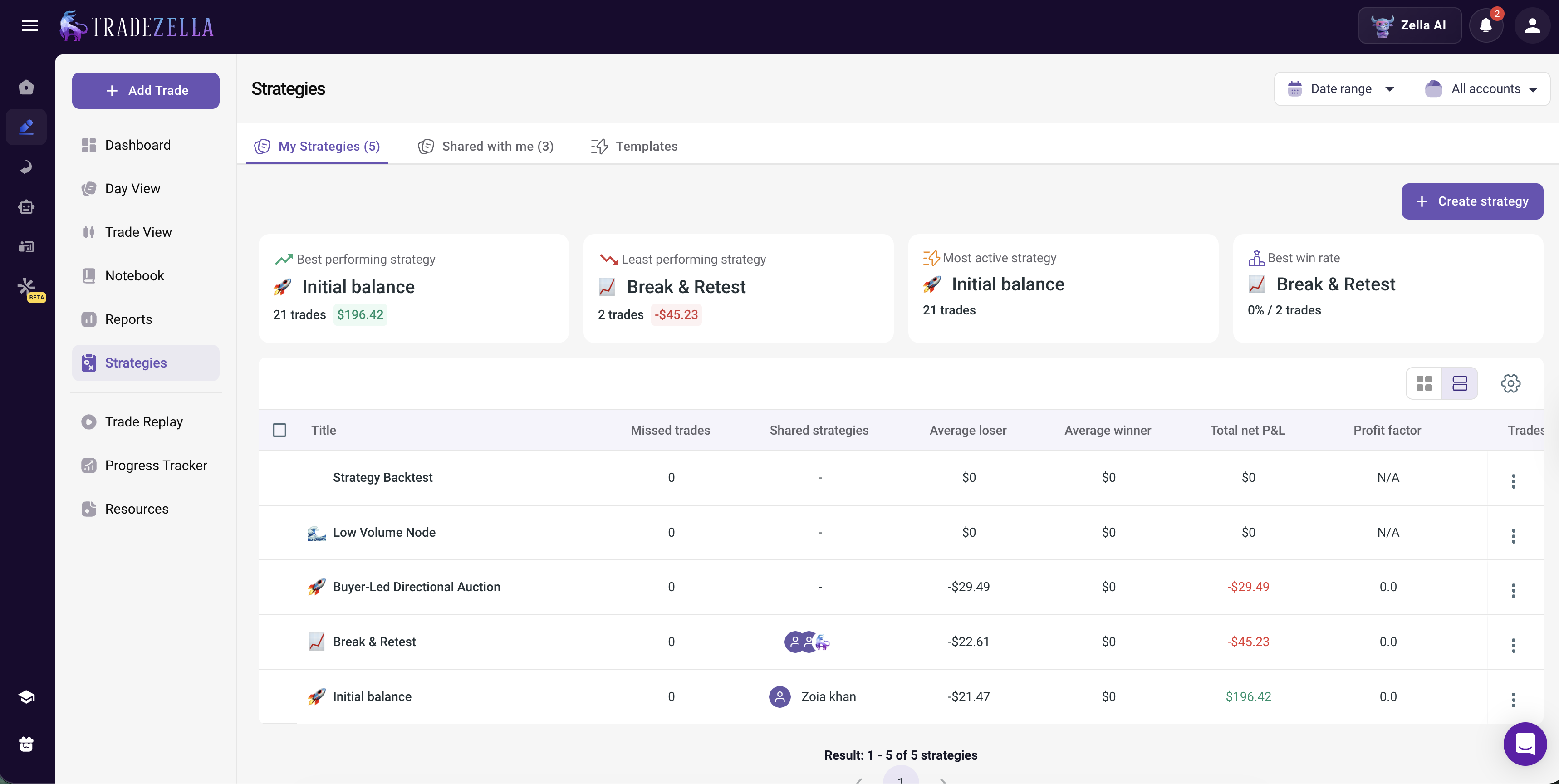
3. No Strategies (Setup Tracking)
In Notion, you can add a "Setup" column with select options like "Breakout" or "Pullback." But that is just a label. You cannot compare the performance of one setup against another with calculated metrics. You cannot see that your Breakout Strategy has a 2.1 profit factor while your Reversal Strategy sits at 0.7. You cannot filter to see only your best Strategy during the best hours on the best days.
In TradeZella, you define Strategies with entry rules and criteria. But you do not have to manually tag each trade to a Strategy. Zella AI's Auto Trade Tagger does it for you based on rules you define. Tell it "tag all breakout entries above the opening range" and every qualifying trade gets tagged automatically. Then the Strategy comparison report shows you each Strategy side by side: win rate, net P&L, average win vs. average loss, expectancy, and trade count. On a $50,000 account running 3 Strategies, knowing which one actually makes money is the difference between growing the account and slowly bleeding it. For more on building effective setups, see our guide on how to build a trade journal.
TradeZella Strategies
4. No Charts or Trade Visualization
Notion has no charting capability. The only way to see your trades on a chart is to manually screenshot your broker platform, crop the image, upload it to Notion, and attach it to the trade entry. For 5 trades per day, that is 25 screenshots per week. Most traders stop doing this within the first month.
TradeZella Trade Section
TradeZella automatically plots your entries and exits on real candlestick charts with accurate execution mapping. Every position, every fill, fully visualized without manual work. You can also use trade replay to walk through any trade bar by bar, reviewing your timing in real market context.
5. Templates Break at Scale
Notion formulas were not designed for financial calculations across hundreds of rows. As your trade count grows, formulas slow down, break, or produce errors. One mistyped entry can throw off your entire P&L calculation. Rollup formulas across related databases become fragile. The more you customize, the more time you spend maintaining the tool instead of using it.
A trader logging 100 trades per month in Notion will spend more time managing the template than reviewing the data. TradeZella handles the infrastructure so you spend your time on the analysis, not the plumbing. Our trading journal vs spreadsheet comparison covers this scaling problem in detail.
6. No Feedback Loop
A journal is supposed to make you better. Notion stores what you tell it. It does not tell you anything back. It does not flag that your Wednesday afternoon trades lose money. It does not surface that revenge trades are costing you $2,000 per month on a $50,000 account. It does not notice that your win rate drops from 55% to 35% when you trade more than 6 times in a day.
Zella AI creates the feedback loop that Notion cannot. The Session Review agent flags every deviation from your plan at the end of each day. The Auto Trade Tagger marks emotional trades automatically so you can see the exact dollar cost without manual tagging. And you can ask Zella AI directly: "Am I overtrading on Wednesdays?" or "What is my profit factor during the first 30 minutes vs the last hour?" It answers with your numbers. The trading dashboard with 50+ reports shows you what is working, when it works, and how to lean into your edge.
7. No AI, No Backtesting, No Replay, No Prop Firm Support
Notion has none of the specialized trading features that separate a productivity tool from a trading tool:
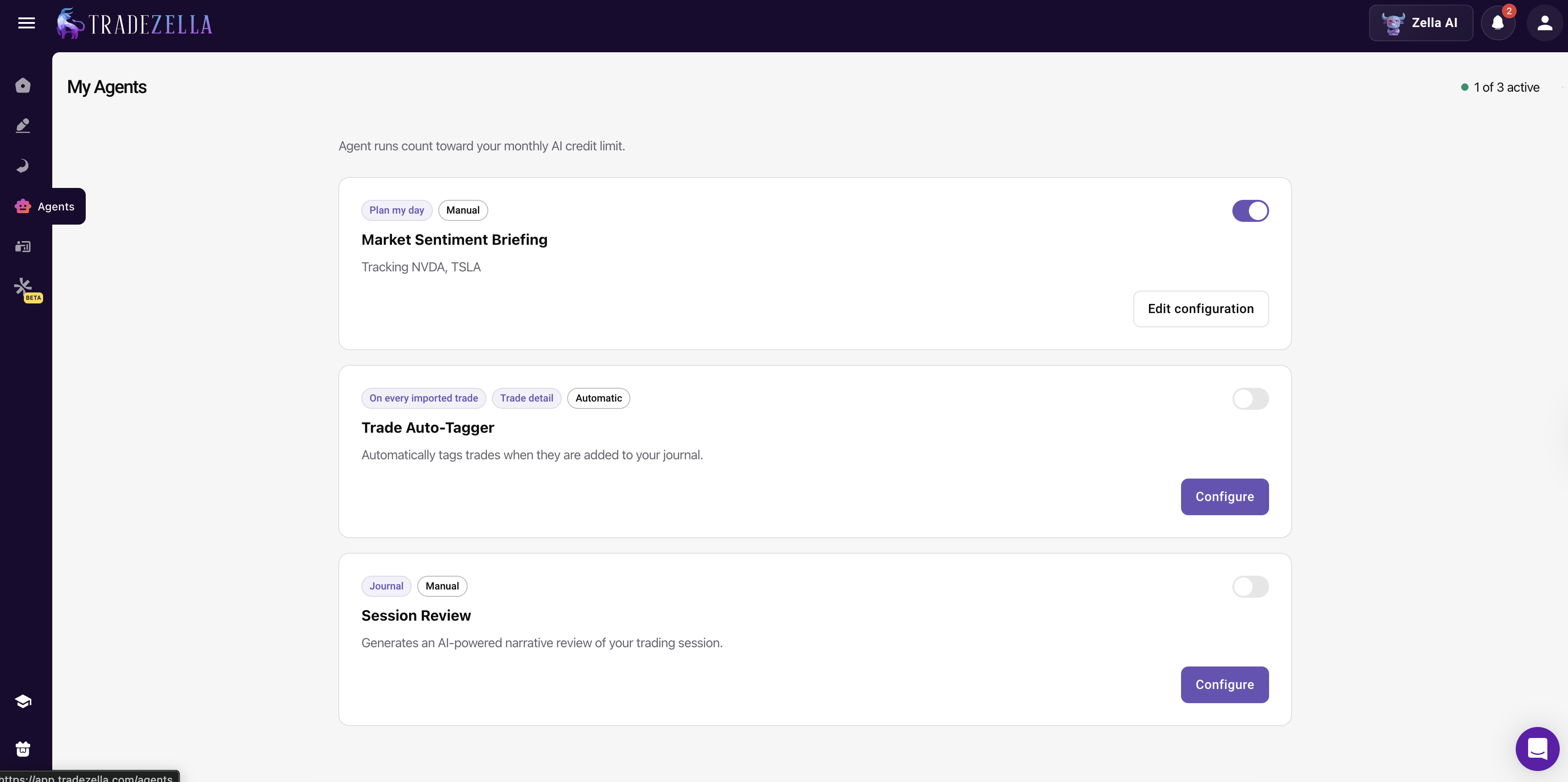
No AI. TradeZella includes Zella AI, an AI trading journal partner with autonomous agents. The Auto Trade Tagger applies your custom tagging rules to every trade automatically. The Session Review agent compares your morning plan against actual results and journals your entire day. The Market Sentiment Briefing generates a personalized pre-market plan based on how you trade. Zella AI also includes memory across sessions and conversational AI you can query about your own data.
No backtesting. TradeZella includes a full backtesting engine with TradingView-powered charts, 11+ years of historical data, all order types, ICT indicators, and auto-journaling for every backtested trade. See our guide on backtesting trading strategies.
No trade replay. TradeZella offers three replay modes: Trade Replay (review individual trades bar by bar), Day Replay (walk through an entire session), and Scenario Replay (coming soon).
No prop firm support. TradeZella's Prop Firm Sync imports trades from real prop firm evaluations and funded accounts, tracks challenge progress, monitors drawdown limits, and manages multiple accounts in one dashboard. See our prop firm trading journal guide.
What Does TradeZella Do That Notion Cannot?
The simplest way to understand the difference: with Notion, you do all the work. With TradeZella, Zella AI does the work for you.
Zella AI Is Your Trading Partner, Not a Chat Box
Zella AI is the reason TradeZella is fundamentally different from Notion or any template. It is not a chatbot bolted onto a journal. It is an AI trading partner that takes action on your data:
Auto Trade Tagger. You tell Zella AI what to tag: "tag trades that went 2R," "tag by entry timeframe," "tag whether SMT was present," "tag supply and demand concepts." The agent applies those tags to every trade automatically after import. You do not create tags manually. You do not go through each trade checking boxes. On a $50,000 account with 100 trades per month, Notion requires 10-15 hours of manual tagging. Zella AI does it in seconds.
Session Review. After your trading day, this agent compares your morning plan against what you actually did. It flags every deviation, identifies what went well, documents what went wrong, and journals your entire session automatically. You do not write your own end-of-day review. The AI writes it for you, using your actual data.
Market Sentiment Briefing. You configure it with how you trade: your instruments, your style, what you look at (higher timeframes, FVGs, order blocks, economic calendar). When you click Start My Day, Zella AI generates a personalized pre-market plan based on YOUR trading configuration. Not a generic news feed. Not a ChatGPT summary. A plan built for how you trade.
Conversational AI with memory. Ask Zella AI anything about your trading data. "What is my win rate on breakout trades before 10:30 AM this month?" "Which Strategy lost money last week?" "Am I overtrading on Wednesdays?" It answers with your actual numbers, pushes back when your data says you are wrong, and remembers your preferences across every session. Month 1, it knows your basics. Month 6, it knows your behavioral patterns. Month 12, it has a full year of your history to reference.
This is the core difference between a Notion template and an AI trading journal. Notion is a blank page. You fill it. TradeZella is a partner. It fills itself, then tells you what it found.
Zella AI Agents
Everything Else That Comes With It
On top of Zella AI, TradeZella includes the full trading infrastructure that no Notion template can replicate:
Automated trade import from 500+ brokers. NinjaTrader, Tradovate, MetaTrader 4/5, Interactive Brokers, Schwab, Robinhood, Webull, Bybit, cTrader, DXtrade, TradeLocker, and hundreds more. Trades appear the moment they close.
50+ analytics reports. Strategy comparison, Day and Time analysis, R-multiple distribution, Tags analysis, Symbol reports, Zella Score, performance calendar, and 7 dashboard views.
Automatic chart plotting. Entries and exits mapped on real candlestick charts. No manual screenshots.
Backtesting. TradingView-powered charts, 11+ years of data, ICT indicators, auto-journal for every backtested trade.
Trade replay. Review any trade bar by bar in 3 modes: Trade Replay, Day Replay, and Scenario Replay (coming soon).
Prop Firm Sync.Real evaluation and funded account tracking with Challenge widget, drawdown monitoring, and multi-account management.
11+ years data, TradingView charts, ICT indicators
No
Trade Replay
3 modes (Trade, Day, Scenario coming soon)
No
Prop Firm Support
Prop Firm Sync + Challenge widget + multi-account
No
Custom Tags with Analytics
Unlimited tags, each with performance reports
Select properties (no analytics)
Time of Day Analysis
Day & Time report with heatmap
No
Scales to 100+ Trades/Month
Yes (automated, no performance degradation)
Formulas slow/break at high volume
Pricing
$29/mo ($24/mo annual)
Free
How Much Does TradeZella Cost Compared to Notion?
Notion is free for personal use. Paid plans start at $10/month for teams, but individual traders do not need a paid Notion plan for trade journaling.
TradeZella pricing (June 2026):
ESSENTIAL — $35/month ($26/month billed annually at $315/year). Best for new traders finding their edge. Includes 1 connected account, 500 AI credits per month, automated journaling, 10 Strategies, and manual backtesting. Does not include Zella Agents, automated AI backtesting (though you get 1 free run), or Trade Replay.
PRO (Most Popular) — $59/month ($44/month billed annually at $531/year). Best for active and serious traders. Everything steps up here: connect up to 50 accounts, 1,500 AI credits per month, Zella Agents included, 10 automated backtesting runs per month, unlimited Trade Replays with 1-sec chart and AI insights, automated journaling, unlimited Strategies, and manual backtesting.
ULTRA — $99/month ($74/month billed annually at $891/year). Best for full-time and professional traders. Unlimited connected accounts, 3,000 AI credits per month, Zella Agents included, 100 automated backtesting runs per month, unlimited Trade Replays with 1-sec chart and AI insights, automated journaling, unlimited Strategies, and manual backtesting.
TradeZella also provides free trading calculators including a Position Size Calculator, Drawdown Recovery Calculator, Risk/Reward Calculator, and Monte Carlo Simulator at no cost.
When Should You Use Notion vs. When Should You Upgrade?
Notion makes sense if:
You are brand new to trading and want to build the journaling habit before spending anything
You take fewer than 5 trades per week and primarily want a place for written reflections
You are still paper trading and do not have broker data to import
You already use Notion for everything and want to keep your trading notes in the same workspace
TradeZella makes sense if:
You want an AI that tags your trades, reviews your sessions, journals your day, and generates pre-market plans without you doing anything
You want to ask questions about your trading data and get answers from your actual numbers, not generic advice
You take 5 or more trades per week and manual entry is eating into your review time
You want to know which of your Strategies actually makes money and which is losing
You need analytics beyond basic win rate and total P&L
You want to backtest ideas on 11+ years of data before risking real capital
You trade prop firm accounts and need compliance tracking with Prop Firm Sync
You have outgrown your template and spend more time maintaining it than using it
Most traders who start with Notion end up migrating within 2-3 months. The pattern is always the same: you start journaling manually, you realize you want answers from your data, you discover Notion cannot provide them, and you look for something that can. That transition is natural and healthy. The journaling habit you built in Notion transfers directly to TradeZella. The difference is that now the tool does the heavy lifting.
How to Migrate from Notion to TradeZella
If you have been journaling in Notion and want to switch, the process is straightforward:
Connect your broker. Go to TradeZella's integrations page and connect your broker. Most connections take under 2 minutes. Your historical trades begin importing automatically.
Tell Zella AI how to tag. Instead of manually creating tags like you did in Notion, you tell the Auto Trade Tagger what to look for: "tag trades that went 2R," "tag by entry timeframe," "tag revenge trades," "tag my ICT setups." Zella AI applies those tags to every trade automatically from that point forward. No manual tagging, ever.
Set up your morning briefing. Configure the Market Sentiment Briefing with your instruments, your trading style, and what you look at. Every morning, Zella AI generates a personalized pre-market plan based on how you trade.
Trade normally. This is the whole point. You trade. When you are done, the Session Review agent compares your plan against your actual results, journals your entire day, and flags every deviation. Your trades are already imported, already tagged, already reviewed. The journal is done before you close your charts.
Ask questions. Open Zella AI and ask anything. "Which Strategy made money this week?" "Am I sizing up after losses?" "What is my win rate on morning trades vs afternoon?" It answers with your data, remembers the conversation, and gets smarter over time.
You do not need to import your old Notion data into TradeZella. Your broker connection will pull in your historical trades, which is more accurate than anything you typed manually. Within 2-4 weeks of regular trading, you will have enough data in TradeZella to start seeing meaningful patterns.
What About Other Notion Alternatives?
If you have decided Notion is not enough but are comparing options, here is where TradeZella fits relative to other alternatives:
Google Sheets / Excel: Same manual entry problem as Notion, but with better formula support. Still no broker import, no analytics dashboard, no AI, no backtesting. We cover this fully in our trading journal vs spreadsheet comparison.
Dedicated journals (TradeZella, Tradervue, Edgewonk, TraderSync): All solve the broker import and analytics problems that Notion cannot. TradeZella differentiates with Zella AI agents, backtesting, trade replay, and Prop Firm Sync. For a full comparison, see our best trading journal software guide.
Spreadsheet-to-Notion hybrids: Some traders use Notion for notes and a spreadsheet for numbers. This splits your data across two tools with no connection between them. You still cannot filter your notes by Strategy performance or link your reflections to actual outcomes.
TradeZella also includes risk management tools that Notion cannot replicate: position size calculations, drawdown tracking, daily loss limit monitoring, and R-multiple views across your entire history.
Key Takeaways
Notion trading journal templates work for basic trade logging, but you do all the work: manual entry, manual tagging, manual review. Notion stores data but does not analyze it or act on it.
The biggest limitation is that Notion is a blank page. It does not tell you which Strategies make money, when you trade best, or what your emotional trades are costing you.
TradeZella is an AI trading journal where Zella AI does the work for you. The Auto Trade Tagger tags every trade based on your rules. The Session Review agent journals your entire day. The Market Sentiment Briefing generates your pre-market plan. You can ask Zella AI any question about your data and it answers with your actual numbers.
Zella AI has memory across sessions. It remembers your name, risk limits, Strategies, and preferences. Every interaction makes the next one more useful.
On top of AI, TradeZella includes automated import from 500+ brokers, 50+ analytics reports, Strategies with side-by-side comparison, backtesting, trade replay, and Prop Firm Sync.
Notion is a reasonable starting point for beginners who want to build the journaling habit at zero cost. TradeZella is what you upgrade to when you want an AI trading partner that journals, tags, and reviews for you.
Migration takes under 30 minutes. Connect your broker, tell Zella AI how to tag, set up your morning briefing, and trade. The AI handles everything else.
Yes, but with significant limitations. Notion works for basic trade logging where you manually enter ticker, entry price, exit price, position size, and P&L for each trade. You can add notes, screenshots, and simple formulas for win rate. However, Notion cannot connect to your broker, cannot import trades automatically, cannot run analytics across different setups or time periods, and cannot tell you which of your Strategies is actually making money. For traders taking more than a few trades per week, the manual effort and lack of analytics make Notion impractical as a long-term journal.
What is the best Notion trading journal template?
Most Notion trading journal templates follow the same structure: a database table with columns for date, ticker, direction, entry, exit, position size, P&L, setup name, emotion tag, and notes. The best templates add a calendar view, weekly review page, and running P&L formulas. Free templates work fine for getting started. The limitation is not the template quality. The limitation is Notion itself. No template can add broker import, analytics dashboards, or AI to Notion. If you want a free starting point, TradeZella offers a free trading journal template on its calculators page that covers the same fields.
Why do traders switch from Notion to TradeZella?
The most common reasons are manual entry fatigue, lack of analytics, and broken formulas at scale. A trader taking 5 trades per day spends 4 to 5 hours per month on manual data entry in Notion. TradeZella imports those same trades automatically from 500 plus brokers. Beyond time savings, traders want answers from their data: which Strategy is profitable, what time of day produces the best results, how much revenge trading is costing them. Notion stores data but does not analyze it. TradeZella has 50 plus reports that surface these patterns automatically.
How much does TradeZella cost compared to Notion?
Notion is free for personal use. TradeZella Essential costs 35 dollars per month or 26 dollars per month billed annually. TradeZella Pro costs 59 dollars per month or 44 dollars per month billed annually. TradeZella Ultra costs 99 dollars per month or 74 dollars per month billed annually. The Essential plan includes automated broker import from 500 plus platforms, 300 plus analytics reports, Strategies, manual backtesting, and Prop Firm Sync. The Pro plan adds all Zella AI agents, unlimited trade replay with 3 modes, 10 automated backtests per month, and unlimited Strategies. The cost difference reflects the difference in capability.
Can I import my Notion journal data into TradeZella?
You do not need to. When you connect your broker to TradeZella, it imports your actual trade history with accurate execution data, timestamps, and price information. This is more reliable than manually entered Notion data. Your historical trades will appear in TradeZella's analytics immediately. Within 2 to 4 weeks of regular trading, you will have enough fresh data to start seeing meaningful patterns in your Strategy comparison and time of day reports.
Does TradeZella have an AI trading journal?
Yes. TradeZella includes Zella AI, an AI trading partner with autonomous agents. The Auto Trade Tagger applies your custom tagging rules to every trade automatically after import. The Session Review agent compares your morning plan against actual results and journals your entire trading day. The Market Sentiment Briefing generates a personalized pre-market plan based on your instruments and trading style. Zella AI also includes memory across sessions and conversational AI you can query about your own trading data. Notion has no AI trading capabilities.
Is a Notion trading journal good enough for prop firm traders?
No. Prop firm traders need daily drawdown tracking, evaluation progress monitoring, rule compliance checking, and multi-account management. Notion provides none of these. A single miscalculation in a manual Notion formula could cause you to miss a drawdown limit and blow an evaluation. TradeZella's Prop Firm Sync imports trades from real prop firm accounts, tracks challenge progress with a Challenge widget, monitors daily and total drawdown limits, and manages multiple funded accounts in one dashboard.