Futures Backtesting: A Complete Guide for Futures Traders
Futures Backtesting: A Complete Guide for Futures Traders
Futures backtesting is the process of testing a trading strategy on historical futures data for contracts like ES, NQ, CL, GC, and micro futures before risking real capital. This guide covers why futures need their own backtesting approach, how to set up a futures backtest step by step, contract specs, session timing, dollar examples, and how to connect backtest results to live performance.
class SampleComponent extends React.Component {
  // using the experimental public class field syntax below. We can also attach
  // the contextType to the current class
  static contextType = ColorContext;
  render() {
    return <Button color={this.color} />
  }
}
Last Updated: June 8, 2026
Futures backtesting is the process of testing a trading strategy on historical futures market data to measure how it would have performed before you risk real capital. Unlike stocks or forex, futures contracts have unique characteristics that affect how you backtest: tick values vary by contract (one tick on ES is $12.50, one tick on NQ is $5.00, one tick on CL is $10.00), session timing matters (Regular Trading Hours vs Electronic Trading Hours produce different price action), and margin requirements amplify both gains and losses. A futures backtest needs to account for all of these factors to produce results you can trust.
TradeZella supports futures backtesting across most major contracts including ES, NQ, MES, MNQ, YM, RTY, CL, GC, SI, NG, and more with 11+ years of historical data going back to September 2014. If you are new to backtesting in general, start with our guide on what is backtesting.
TL;DR
Futures backtesting requires accounting for tick values, session timing (RTH vs ETH), and contract-specific position sizing that generic backtesting does not cover. Set up your backtest with the exact contract you trade, toggle RTH/ETH to match your live sessions, use automatic position sizing based on risk percentage so your dollar risk stays the same regardless of stop distance, and track results in R-multiples so they normalize across different contracts. TradeZella logs every backtested futures trade automatically with full details and lets you compare backtest vs live performance in the same tool.
Why Do Futures Need Their Own Backtesting Approach?
You cannot backtest futures the same way you backtest stocks or forex. Three things make futures different:
Tick values are contract-specific. On ES (E-mini S&P 500), one tick is 0.25 points and worth $12.50. On NQ (E-mini Nasdaq 100), one tick is 0.25 points and worth $5.00. On CL (Crude Oil), one tick is $0.01 and worth $10.00. On GC (Gold), one tick is $0.10 and worth $10.00. A 10-point move on ES is $500 per contract. A 10-point move on NQ is $200 per contract. Your backtesting platform needs to calculate P&L correctly for each contract, or your results are meaningless. TradeZella calculates P&L correctly for each contract automatically, so your results match what you would see on a live account.
Micro contracts reduce the tick value proportionally. MES (Micro E-mini S&P 500) is $1.25 per tick, one-tenth of ES. MNQ (Micro E-mini Nasdaq 100) is $0.50 per tick, one-tenth of NQ. This matters for backtesting because position sizing on micros looks very different from full contracts on the same account. For more on sizing, see our guide on risk per trade.
Session timing changes price behavior. Futures trade nearly 24 hours, but not all hours are equal. The Regular Trading Hours (RTH) session for index futures (ES, NQ, YM, RTY) runs from 9:30 AM to 4:00 PM EST. The Electronic Trading Hours (ETH) session covers the overnight and pre-market activity. Price action during RTH is higher volume, tighter spreads, and cleaner setups. ETH is thinner, choppier, and more prone to false moves. If you trade RTH but backtest on ETH data, your results will not match live trading. Your backtesting platform needs to let you toggle between RTH and ETH so your backtest mirrors the session you actually trade. TradeZella includes RTH/ETH on all plans and a Go-To feature that jumps directly to the start of any session: Asian Session, London Session, New York Session, NY AM Session, NY PM Session, Silver Bullet London Session, or Next Day Open. You can also customize session times through Customize Settings. Instead of fast-forwarding through overnight data, you skip straight to the session you trade and start backtesting immediately
Leverage amplifies everything. A $50,000 futures account with 2 ES contracts controls over $500,000 in notional value. A 1% move in the S&P 500 is a $5,000 gain or loss on those 2 contracts, which is 10% of your account. This leverage means drawdowns happen faster and hit harder than stocks. Your backtest needs to measure max drawdown in dollar terms relative to your account size, not just in points. For drawdown management frameworks, see our dedicated guide.
Step 1: Pick your contract and write your rules. Choose the exact contract you trade live. If you trade MNQ, backtest MNQ, not NQ. The tick values, margin requirements, and price behavior differ. Write your entry rules, exit rules, stop placement, and target placement before you start. "Enter long on NQ when price sweeps the previous session low and reclaims above a 15-minute demand zone" is a testable rule. "Buy NQ when it looks oversold" is not. For a complete framework, see our guide on how to create a trading plan.
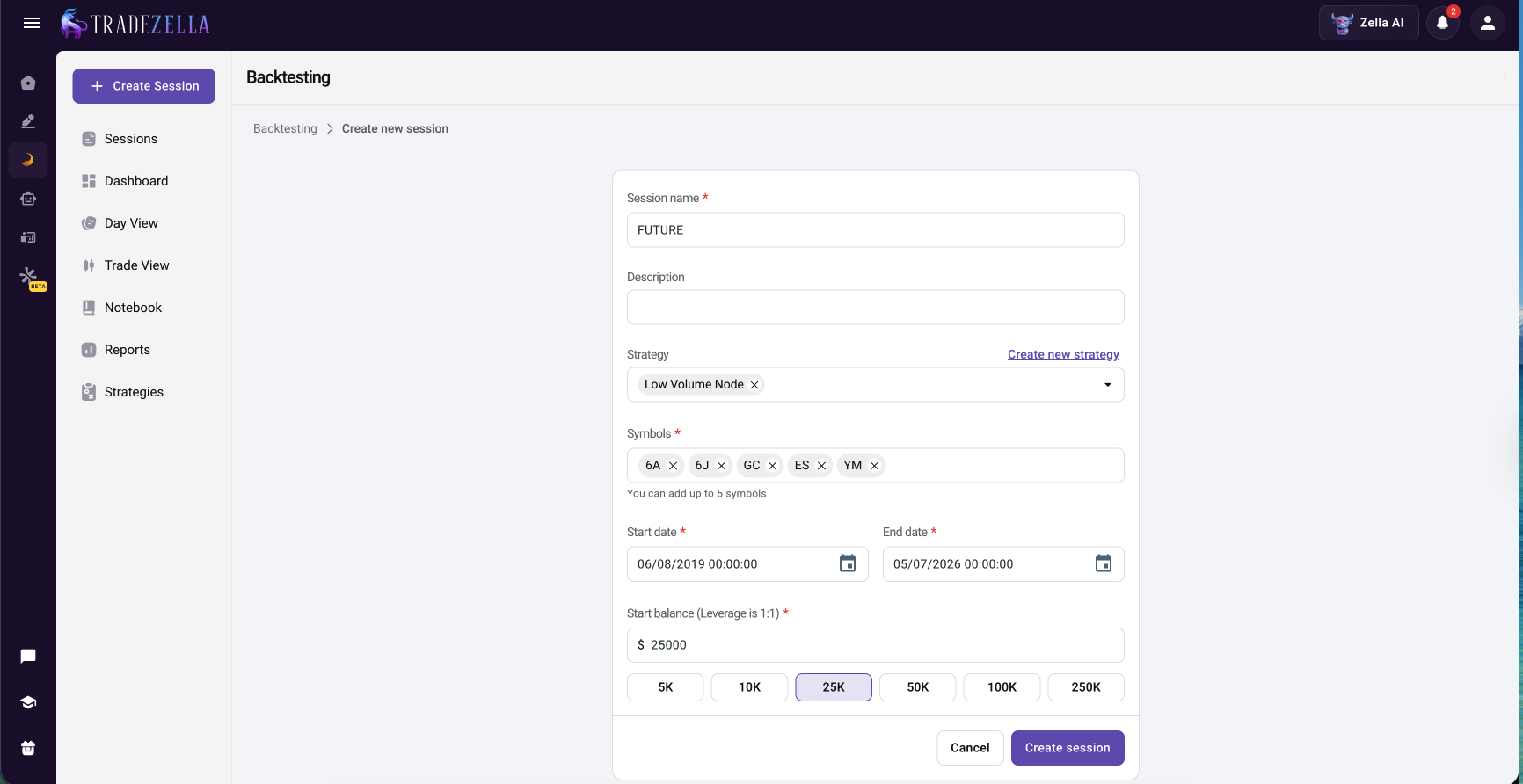
Step 2: Set up your session correctly. In TradeZella, create a new backtesting session, select your futures contract, and set your starting balance to match your live account. Toggle RTH or ETH based on when you actually trade. If you only trade the 9:30 AM to 12:00 PM EST window, use the Go-To feature to jump directly to those hours instead of replaying overnight price action. Set up your chart timeframes the way you trade: higher timeframe for structure (15-minute, 1-hour) and lower timeframe for entries (1-minute, 3-minute, or seconds on Pro).
Step 3: Set your position sizing. Use TradeZella's automatic position sizing. Set your risk percentage (for example, 1% of a $50,000 account is $500 per trade). When you draw your entry with the Long/Short tool, TradeZella calculates how many contracts to trade based on your stop distance. If your stop is 10 points on ES ($500 per contract), you trade 1 contract. If your stop is 5 points ($250 per contract), you trade 2 contracts. Your dollar risk stays at $500 regardless.
Step 4: Replay and execute trades. Press play and let the chart unfold bar by bar. When your setup appears, take the trade. Follow your rules exactly. Use drag-and-drop SL/TP to adjust stops and targets on the chart as the trade develops. Auto-breakeven can move your stop to entry automatically when price hits a target you define. Take partials at 25%, 50%, or 75% if that is part of your strategy. Scale into positions if you add to winners.
Step 5: Tag and journal every trade during the session. TradeZella auto-journals every futures trade with entry, exit, P&L, and timestamps. During the session, add your tags: setup type, entry timeframe, session (London open, NY open, afternoon), market condition (trending, ranging, volatile), and any mistakes. Check off your Strategy rules for each trade. Rate your confidence. Add screenshots of the chart at the moment of entry. Zella AI Auto Trade Tagger can apply tags automatically based on rules you define in plain English.
Step 6: Collect at least 50 trades before analyzing. A 10-trade backtest on NQ tells you nothing. Futures are volatile, and small samples are dominated by outlier trades. Aim for 50 to 100 trades. If you trade 3 to 5 setups per session and backtest 1 to 2 hours per day, you can reach 50 trades in 2 to 3 weeks.
Step 7: Analyze your results. Open the TradeZella dashboard filtered by your backtesting session. Check profit factor (above 1.3 is solid), win rate, expectancy per trade, max drawdown, and average R-multiple. Filter by time of day to see whether morning trades outperform afternoon trades. Filter by setup type to see which strategies carry the edge. For a full framework, see our guide on finding your trading edge.
How Does Futures Backtesting Connect to Live Trading?
This is where most futures traders stop. They backtest, see good results, then jump to live trading and hope it translates. It usually does not, because the gap between backtesting and live execution is where emotional trading, slippage, and discipline problems live.
TradeZella is the only platform that closes this gap because everything lives in one tool. Your backtested futures trades and your live futures trades imported from your broker are in the same place. Same analytics, same reports, same Strategy labels, same tags. Filter by "Backtest" vs "Live" on the same Strategy and see the exact difference. If your ES opening range breakout backtest shows a 1.36 profit factor but your live performance on the same strategy shows 0.85, you know the problem is execution, not the strategy. Maybe you are entering too early. Maybe you are moving your stop. Maybe afternoon trades are creeping back in. The data tells you exactly where the gap is.
TradeZella imports futures trades from brokers including NinjaTrader, Tradovate, Interactive Brokers, and more. The import happens automatically. Backtested and live data, one platform, one set of reports. For more on tracking live futures trades, see our futures trading journal guide.
Most prop firm evaluations are on futures contracts, primarily ES, NQ, and micro contracts. Backtesting before paying the evaluation fee is not optional. It is how you avoid wasting money on strategies that do not work.
Here is how to use backtesting for prop firm preparation:
Test against the firm's specific rules. If the evaluation has a $3,000 max drawdown on a $50,000 account and a 6% profit target, your backtest needs to show that your strategy can hit the target without breaching the drawdown limit. Run 50+ trades and check max drawdown. If it exceeds $3,000 at any point, the strategy is too aggressive for that evaluation.
Backtest with tighter personal limits. Set your personal daily loss limit at 60% of the firm's limit. If the firm allows $1,500 daily loss, set yours at $900 during the backtest. If the strategy works under tighter limits, it has margin for error during the real evaluation.
Track trailing drawdown behavior. Some firms use trailing drawdown that follows your equity high. Your backtest should show how the strategy's equity curve behaves relative to trailing drawdown rules. A strategy that makes money but does it with large swings may trip the trailing drawdown even while profitable.
Use Prop Firm Sync after you pass. Once you have a funded account, TradeZella's Prop Firm Sync connects to your real prop firm account and tracks daily/total drawdown, trailing drawdown headroom, and consistency rules automatically. Your backtested Strategies and your funded account trades show up in the same dashboard. For more, see our funded trader tools guide.
Automated Futures Backtesting
Manual futures backtesting (replaying charts bar by bar) is the standard approach and builds screen time and pattern recognition. But it is slow. Testing a strategy across 6 months of NQ data with 3 to 5 trades per day takes weeks of daily backtesting sessions.
TradeZella has automated no-code backtesting for futures. Describe your strategy rules in plain English: "Enter long when price sweeps the previous session low and reclaims above a 15-minute demand zone on NQ. Stop below the sweep. Target 2R." The engine parses your rules and runs them across years of historical futures data automatically. Every individual trade is visible with entry, exit, trade time, and P&L, and you can open any trade to see the setup the AI drew on the chart. Results include win rate, profit factor, trade count, average win/loss, monthly breakdown, and Zella AI analysis. Pre-built templates cover common futures setups like ICT concepts, FVG, liquidity sweeps, and opening range breakouts. No Python, no NinjaScript, no coding.
Scenario backtesting takes it further with pre-built strategy templates that jump to specific days where a setup occurred on futures data, so you practice the exact setup under targeted historical conditions instead of replaying random days.
Common Futures Backtesting Mistakes
Backtesting on the wrong session. If you trade RTH (9:30 AM to 4:00 PM), backtest on RTH. Overnight ETH data produces different levels, different volume, and different win rates. Mixing sessions corrupts your results.
Using the wrong contract. ES and MES have different tick values ($12.50 vs $1.25). Backtesting on ES but trading MES (or vice versa) means your P&L math is off by 10x. Use the exact contract you trade live.
Ignoring rollover dates. Futures contracts expire quarterly (March, June, September, December for index futures). Historical data around rollover dates can show price gaps that do not represent real trading conditions. Be aware of these periods in your backtest.
Not accounting for commissions. Futures commissions ($2 to $5 per contract round trip) add up fast for active traders. A strategy that makes $100/day before commissions on 20 round trips might only make $40/day after. Factor commissions into your backtest P&L.
Too few trades. Futures are volatile. A 15-trade backtest on CL can look like a 3.0 profit factor or a 0.5 profit factor depending on which 15 days you picked. You need 50+ trades minimum for results that mean anything.
Not filtering by time of day. Futures performance varies dramatically by hour. The first 90 minutes of RTH typically produces the most volume and cleanest setups. Afternoon sessions are often choppy. If you do not filter by time of day in your analysis, you are averaging your best setups with your worst conditions.
Key Takeaways
Futures backtesting requires accounting for contract-specific tick values, RTH vs ETH session timing, and leverage that generic backtesting tools do not handle.
TradeZella supports futures contracts (ES, NQ, CL, GC, MES, MNQ, RTY, and more) with 11+ years of historical data, RTH/ETH toggle on all plans, automatic position sizing, and seconds timeframes on Pro.
Set up your backtest with the exact contract and session you trade live. If you trade NQ during RTH from 9:30 to 11:30 AM, backtest NQ during RTH from 9:30 to 11:30 AM.
Collect at least 50 trades. Filter by time of day, setup type, and market condition to find where your edge actually lives.
The backtest-to-live comparison in TradeZella is how you measure the gap between what your strategy should produce and what your live execution actually delivers. No other platform connects these two data sets for futures.
For prop firm traders, backtest against the firm's specific rules (drawdown limits, profit targets) before paying the evaluation fee. Use Prop Firm Sync to track real funded accounts after you pass.
TradeZella offers automated no-code futures backtesting where you describe rules in plain English and the engine runs them across years of data with Zella AI analysis.
Frequently Asked Questions
What is futures backtesting?
Futures backtesting is the process of testing a trading strategy on historical futures market data before risking real capital. You replay past price action on contracts like ES, NQ, CL, or GC, take trades following your rules, and measure the results over a large sample. It tells you whether your strategy has a statistical edge on futures markets before your account balance tells you it does not.
What is the best futures backtesting software?
TradeZella is the best futures backtesting software for traders who want backtesting connected to live trade tracking, AI agents, and analytics in one platform. It supports multiple futures contracts with 11 plus years of historical data, RTH and ETH toggle, automatic position sizing, seconds timeframes, and backtest-to-live comparison on the same Strategy. FX Replay and NinjaTrader are also options. FX Replay is a dedicated replay simulator. NinjaTrader requires C sharp coding for automated backtesting.
Can you backtest micro futures?
Yes. TradeZella supports micro futures including MES (Micro E-mini S&P 500), MNQ (Micro E-mini Nasdaq 100), MYM (Micro E-mini Dow), M2K (Micro E-mini Russell 2000), MCL (Micro WTI Crude Oil), MGC (Micro Gold), and more. Tick values are one-tenth of the full contract. Backtest on the exact micro contract you trade live so the P&L math matches.
Should I backtest on RTH or ETH?
Backtest on the session you actually trade. If you trade index futures during Regular Trading Hours (9:30 AM to 4:00 PM EST), backtest on RTH. If you trade the overnight session, backtest on ETH. Mixing sessions corrupts your results because price action, volume, and spread behavior differ significantly between RTH and ETH.
How many trades do I need in a futures backtest?
At minimum 50 trades. Futures are volatile and small samples are unreliable. A 15 trade backtest on NQ can look like a 3.0 profit factor or a 0.5 profit factor depending on which 15 days you picked. With 50 plus trades, the results smooth out and you can see whether the edge is real or noise. If you trade 3 to 5 setups per session, you can reach 50 trades in 2 to 3 weeks of daily backtesting.
Can I backtest futures for prop firm evaluations?
Yes. Most prop firm evaluations are on futures contracts (ES, NQ, and micro contracts). Backtest against the firm's specific rules: max drawdown, daily loss limit, profit target, minimum trading days. If your strategy breaches the drawdown limit during backtesting, it is too aggressive for that evaluation. After you pass, TradeZella Prop Firm Sync connects to your real funded account and tracks drawdown and consistency rules automatically.
Does TradeZella have automated futures backtesting?
TradeZella offers automated no-code backtesting where you describe your futures strategy rules in plain English and the engine runs them across years of historical data automatically. Every individual trade is visible with entry, exit, and P&L. Results include win rate, profit factor, trade count, and Zella AI analysis. Pre-built templates cover common futures setups. No coding required.